

Thread lifecycle and states
The six Thread.State values exactly as Java 21 defines them, every transition and the call behind it, and how to read them in a real thread dump.
On this page
- Picture it first: one status per ticket
- The six states, as the Javadoc defines them
- Under the hood: watching all six states
- The wait() round trip, and sleep vs wait
- BLOCKED vs WAITING: monitors vs parking
- RUNNABLE is bigger than "running"
- Reading states in a thread dump
- Real world
- Advanced: snapshots, virtual threads and the OS view
- How to say it in the interview
🚦 What are thread states?
Every Java thread is in exactly one of six states at any moment, defined by the enum java.lang.Thread.State: NEW, RUNNABLE, BLOCKED, WAITING, TIMED_WAITING and TERMINATED. You read it with thread.getState(), and you see the same names in every thread dump. A thread created with new Thread(task) is NEW; after start() it is RUNNABLE; when run() ends it is TERMINATED for good.
For this lesson, we'll learn the six states the way the Javadoc defines them, every transition and the exact call that causes it, and how to read them in a production thread dump. Interviewers ask this because it looks like vocabulary and then turns into "does a thread waiting on a socket show as BLOCKED?" and "what state is a thread in right after notify()?". Those follow-ups need a real model of monitors and parking, not a memorised list.
Below the line (out of scope)
- How to create and start threads: Creating threads: Thread, Runnable and Callable
- The guarded-wait pattern in full: wait(), notify() and notifyAll()
- Interrupt etiquette: Interrupts and cancellation
- Deadlock hunting and full thread-dump analysis get their own lessons ("Deadlock detection and prevention", "Reading thread dumps")
The 30-second answer
Thread.State has six values. NEW before start(). RUNNABLE while executing in the JVM, which includes waiting for a core and sitting in native I/O. BLOCKED only while waiting to enter or re-enter a synchronized monitor. WAITING after Object.wait(), Thread.join() or LockSupport.park() with no timeout. TIMED_WAITING for sleep(ms), wait(ms), join(ms), parkNanos and parkUntil. TERMINATED once run() returns or throws, and a thread can never be restarted. A thread woken from wait() passes through BLOCKED to re-acquire the monitor. ReentrantLock waiters show WAITING, not BLOCKED, because locks park. sleep() keeps locks; wait() releases the monitor.
What you’ll learn
- Name the six
Thread.Statevalues (NEW, RUNNABLE, BLOCKED, WAITING, TIMED_WAITING, TERMINATED) and the exact calls that enter and leave each - Explain why a thread woken by
notify()goes WAITING to BLOCKED to RUNNABLE beforewait()returns - Separate BLOCKED (monitor entry only) from WAITING (parking), and predict that a
ReentrantLockwaiter showsWAITING - Map the textbook five-state model onto Java's six, including why a thread in a socket read reports RUNNABLE
- Contrast
sleep()andwait()on locks held, state produced and the way out - Observe every state with
getState()andisAlive(), and know whygetState()is for monitoring, never synchronization - Read
jcmd Thread.printlines likeBLOCKED (on object monitor),WAITING (parking)andwaiting to lock <0x...>to diagnose contention, missing timeouts and idle pools - Describe how virtual threads report the same states in Java 21, and what pinning changes
Interview radar
Asked very often: What are the thread states in Java? What's the difference between BLOCKED and WAITING?
Core follow-up: sleep() vs wait(): which one releases the lock, and which state does each produce?
Production angle: A thread dump shows 180 threads RUNNABLE in a socket read. Is the service busy or stuck?
01Picture it first: one status per ticket
Picture the ticket rail in a busy kitchen, where every order has one status chip. A ticket that's written but not handed in is new. Once handed in, it's in play, whether a cook is on it or it's next in line; the board doesn't tell you which. A ticket stuck because another cook has the only blowtorch is blocked. One clipped to the rail until the waiter says "table's ready" is waiting; one with a 10-minute timer is timed waiting. A served ticket is done and never goes back on the rail.
Java threads work the same way: one state at a time, changed only by specific calls and events. Here's the whole machine. Purple arrows are the calls that move a thread into a state; green arrows are what moves it back to RUNNABLE.
The Java thread state machine: NEW to RUNNABLE on start, RUNNABLE to TERMINATED when run ends, and the calls that move a thread into and out of WAITING, BLOCKED and TIMED_WAITING
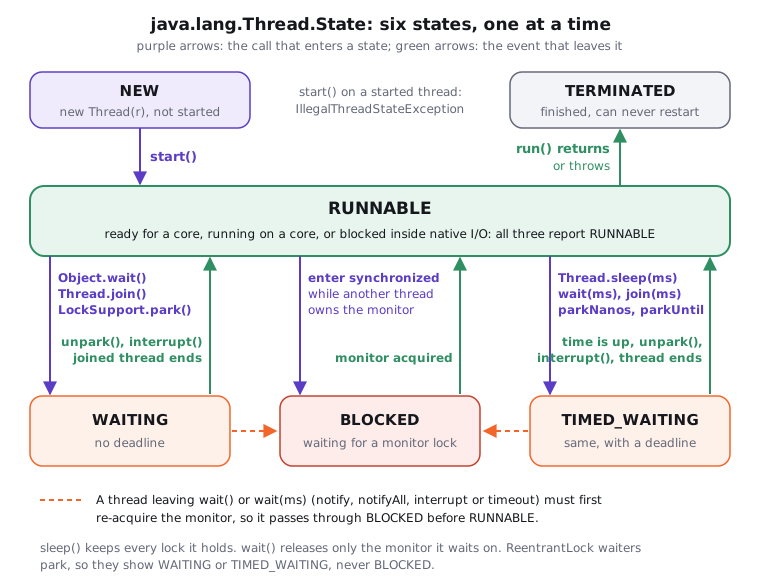
Notice that RUNNABLE is the hub. Every state except NEW and TERMINATED is a round trip out of it and back, and nothing ever leaves TERMINATED.
02The six states, as the Javadoc defines them
Thread.State has existed since Java 5. The Javadoc is precise, and interviewers who know it will hold you to it:
| State | What it means (Java 21 Javadoc, paraphrased) | Gets in by | Gets out by |
|---|---|---|---|
NEW |
Created, not yet started | new Thread(...), Thread.ofPlatform().unstarted(...) |
start() |
RUNNABLE |
Executing in the JVM, though possibly waiting for an OS resource such as a processor | start(), or returning from any state below |
the calls below, or run() ending |
BLOCKED |
Waiting for a monitor lock to enter a synchronized block or method, or to re-enter one after Object.wait |
contended synchronized entry; waking from wait |
acquiring the monitor |
WAITING |
Waiting with no time limit for another thread to act | Object.wait(), Thread.join(), LockSupport.park() |
notify/notifyAll (via BLOCKED), unpark, the joined thread ending, interrupt() |
TIMED_WAITING |
The same, but only up to a given time | Thread.sleep(ms), wait(ms), join(ms), LockSupport.parkNanos, LockSupport.parkUntil |
timeout, or any exit WAITING has |
TERMINATED |
Has exited | run() returns normally or throws |
never: it's final |
Two sentences from that Javadoc are worth quoting nearly word for word in an interview. A thread is in only one state at a time. And these are JVM states that do not reflect operating system thread states. Keep that second one in mind; it explains most of the surprises below.
TERMINATED really is terminal. Calling start() a second time throws IllegalThreadStateException, even after the thread has finished. If you want to run the task again, create a new Thread or, better, submit it to a pool.
03Under the hood: watching all six states
Try it yourself first
Before reading on, predict the state at each step. A thread is in monitor.wait(), and another thread calls notify() but hasn't left its synchronized block yet: what does getState() return? And what does a thread waiting on a held ReentrantLock report?
Here's the program I use to show every state on demand. The only trick is awaitState: start() returns before the new thread reaches its sleep or wait, so the demo polls briefly instead of guessing with a fixed sleep.
import java.util.concurrent.locks.ReentrantLock;

public class ThreadStates {
    static final Object monitor = new Object();

    public static void main(String[] args) throws Exception {
        Thread worker = new Thread(() -> {
            while (!Thread.currentThread().isInterrupted()) { } // burn CPU until told to stop
        }, "worker");
        show("created, not started", worker);                       // NEW
        worker.start();
        show("busy loop after start()", worker);                    // RUNNABLE

        Thread sleeper = new Thread(() -> {
            try { Thread.sleep(5_000); } catch (InterruptedException e) { }
        }, "sleeper");
        sleeper.start();
        awaitState(sleeper, Thread.State.TIMED_WAITING);
        show("inside Thread.sleep(5_000)", sleeper);                // TIMED_WAITING

        Thread waiter = new Thread(() -> {
            synchronized (monitor) {
                try { monitor.wait(); } catch (InterruptedException e) { }
            }
        }, "waiter");
        waiter.start();
        awaitState(waiter, Thread.State.WAITING);
        show("inside monitor.wait()", waiter);                      // WAITING

        synchronized (monitor) {
            monitor.notify();
            awaitState(waiter, Thread.State.BLOCKED);
            show("notified, main still holds monitor", waiter);     // BLOCKED
        }
        waiter.join();
        show("re-acquired monitor, run() returned", waiter);        // TERMINATED

        ReentrantLock lock = new ReentrantLock();
        lock.lock();
        Thread locker = new Thread(lock::lock, "locker");
        locker.start();
        awaitState(locker, Thread.State.WAITING);
        show("queued on a held ReentrantLock", locker);             // WAITING, not BLOCKED
        lock.unlock();

        worker.interrupt(); sleeper.interrupt();
        worker.join();
        show("interrupted, loop exited", worker);                   // TERMINATED
        try { worker.start(); }
        catch (IllegalThreadStateException e) { System.out.println("start() again -> " + e.getClass().getSimpleName()); }
    }

    // start() returns before the new thread reaches its blocking call, so poll briefly.
    static void awaitState(Thread t, Thread.State expected) throws InterruptedException {
        long deadline = System.nanoTime() + 2_000_000_000L;
        while (t.getState() != expected) {
            if (System.nanoTime() > deadline) throw new AssertionError(t.getName() + " stuck in " + t.getState());
            Thread.sleep(1);
        }
    }

    static void show(String when, Thread t) {
        System.out.printf("%-36s %-8s %-14s alive=%s%n", when, t.getName(), t.getState(), t.isAlive());
    }
}
Running java ThreadStates.java printed this, identically across five runs:
created, not started                 worker   NEW            alive=false
busy loop after start()              worker   RUNNABLE       alive=true
inside Thread.sleep(5_000)           sleeper  TIMED_WAITING  alive=true
inside monitor.wait()                waiter   WAITING        alive=true
notified, main still holds monitor   waiter   BLOCKED        alive=true
re-acquired monitor, run() returned  waiter   TERMINATED     alive=false
queued on a held ReentrantLock       locker   WAITING        alive=true
interrupted, loop exited             worker   TERMINATED     alive=false
start() again -> IllegalThreadStateException
Notice four things:
isAlive()is true exactly betweenstart()and termination. It's false inNEWand inTERMINATED, and true in the four states in between.notify()doesn't make the waiter runnable. It moved fromWAITINGtoBLOCKED, becausemainstill owned the monitor. Only aftermainleft itssynchronizedblock could the waiter re-acquire it and finish.- A
ReentrantLockwaiter reportsWAITING. Same situation as a contendedsynchronizedblock, different state, becausejava.util.concurrentlocks are built onLockSupport.park(). - A finished thread can't be restarted. The second
start()throws immediately.
04The wait() round trip, and sleep vs wait
The second point surprises most people, so let's put it in everyday terms first. You're on hold with a bank, and an agent finally says "we're ready for you". You still can't talk until the one phone line is free. notify() is the agent's message; the monitor is the phone line. Being told isn't the same as getting the line.
Here it is as a timeline: the waiter, the notifier, and who owns the monitor at each moment.
A wait and notify round trip: the waiter goes RUNNABLE to WAITING when it calls wait, to BLOCKED when notified while the notifier still owns the monitor, and back to RUNNABLE when it re-acquires the monitor
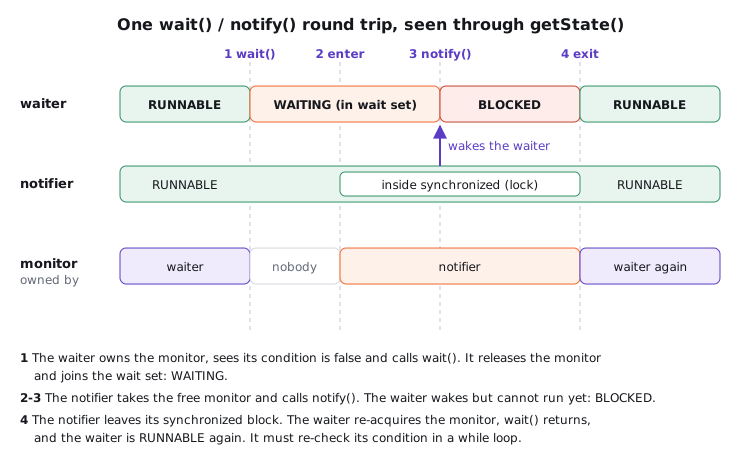
The same detour through BLOCKED happens when the wait ends any other way. If wait(ms) times out, or another thread interrupts the waiter, it still has to re-acquire the monitor before wait can return or throw InterruptedException. That's why a thread dump can show a thread BLOCKED at an Object.wait frame.
This is also the cleanest way to answer "sleep vs wait":
Thread.sleep(ms) |
Object.wait() / wait(ms) |
|
|---|---|---|
| Must hold the monitor? | No | Yes, or IllegalMonitorStateException |
| Locks while paused | Keeps every lock it holds | Releases only that object's monitor (keeps any others) |
| State | TIMED_WAITING |
WAITING or TIMED_WAITING |
| Ends when | Time is up, or interrupted | notify/notifyAll, timeout, interrupt, or a spurious wake-up |
| On the way out | Straight to RUNNABLE |
Through BLOCKED to re-acquire the monitor |
| Defined on | Thread (static, acts on the current thread) |
Object (any monitor) |
A thread that sleeps inside synchronized makes every other thread that needs that monitor BLOCKED for the whole sleep. That's a classic way to turn a 50 ms pause into a service-wide stall.
05BLOCKED vs WAITING: monitors vs parking
In plain words: BLOCKED is standing outside a locked bathroom. Nobody needs to call you; the moment the person inside walks out, you go in. WAITING is sitting in a doctor's waiting room. You won't move until a nurse calls your name, however long that takes.
The difference is what the thread is waiting for, not how long. BLOCKED means "I want a monitor that someone else owns". It is reserved for synchronized entry and re-entry after wait, and nothing else. WAITING means "I'm parked until another thread does something for me": notifies me, unparks me or finishes.
ReentrantLock, ReadWriteLock, Semaphore, CountDownLatch, BlockingQueue.take() and CompletableFuture.get() are all built on AbstractQueuedSynchronizer or similar code that calls LockSupport.park(). So a thread stuck on any of them shows WAITING (or TIMED_WAITING for the timed variants), even when, logically, it's waiting for a lock. If you grep a dump for BLOCKED to find lock contention, you'll miss every ReentrantLock hot spot.
06RUNNABLE is bigger than "running"
Think of an attendance sheet that marks an employee as "at work". They might be at their desk typing, standing in the coffee queue, or on hold with a supplier for twenty minutes. The sheet says "at work" for all three. RUNNABLE is that sheet.
Operating-systems courses teach five states: new, ready, running, blocked and dead. Java's six don't line up one to one, and the mapping is where good answers separate from memorised ones.
The textbook five-state model mapped onto Java's six states: ready and running both become RUNNABLE, native I/O also reports RUNNABLE, and only monitor entry becomes BLOCKED
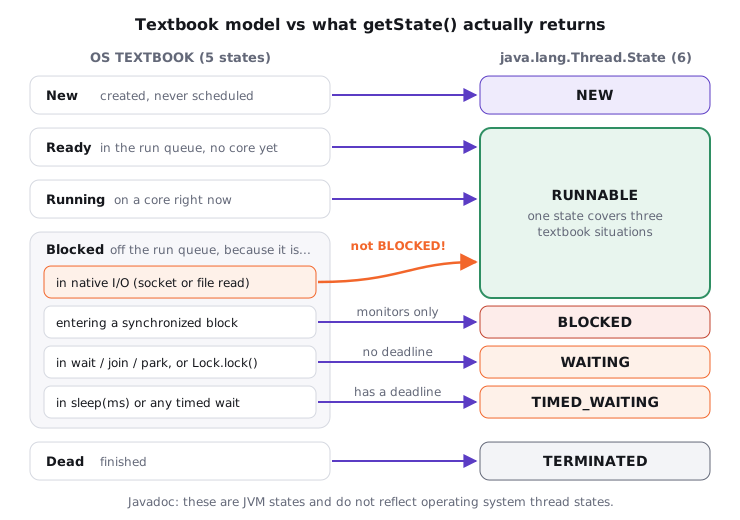
The surprise is the orange arrow. A platform thread waiting in a blocking socket read is asleep in the kernel, but the JVM only tracks that it's executing native code, so getState() says RUNNABLE.
Try it yourself first
Predict the output: a thread calls read() on a socket whose server never replies. What state and top frame do you expect?
import java.io.InputStream;
import java.net.ServerSocket;
import java.net.Socket;

public class SocketReadState {
    public static void main(String[] args) throws Exception {
        try (ServerSocket server = new ServerSocket(0);                    // a server that never replies
             Socket client = new Socket("localhost", server.getLocalPort());
             Socket accepted = server.accept()) {
            Thread reader = new Thread(() -> {
                try (InputStream in = client.getInputStream()) {
                    in.read();                                             // no timeout: waits forever
                } catch (Exception e) {
                    System.out.println("reader stopped: " + e.getClass().getSimpleName());
                }
            }, "reader");
            reader.start();
            Thread.sleep(500);                                             // plenty of time to reach read()

            System.out.println("state: " + reader.getState());
            StackTraceElement top = reader.getStackTrace()[0];
            System.out.println("top frame: " + top.getClassName() + "." + top.getMethodName()
                    + (top.isNativeMethod() ? " (native)" : ""));
            client.close();                                                // unblocks the read
            reader.join();
        }
    }
}
state: RUNNABLE
top frame: sun.nio.ch.SocketDispatcher.read0 (native)
reader stopped: SocketException
Since JDK 13 (JEP 353) the socket implementation is NioSocketImpl, so on Java 21 you see SocketDispatcher.read0 or Net.poll rather than the old SocketInputStream.socketRead0. The state is the same: RUNNABLE, using no CPU at all.
The reverse also holds. A RUNNABLE thread may be off-CPU, sitting in the OS run queue behind other threads. Java's RUNNABLE merges "ready" and "running", so to see what's actually burning CPU you need OS tools like top -H -p <pid> or a profiler, not getState().
07Reading states in a thread dump
A thread dump is a group photo of every thread in the JVM at one instant, with a caption under each face saying what it was doing. jcmd <pid> Thread.print (or jstack <pid>) prints every platform thread with its state and a hint in brackets. I ran a small program with a lock holder, a contender, a waiter and a ReentrantLock queuer, then dumped it (trimmed; frames from JDK 26, where Java 21 shows Thread.sleep0 instead of sleepNanos0):
"holder" ... waiting on condition
   java.lang.Thread.State: TIMED_WAITING (sleeping)
	at java.lang.Thread.sleepNanos0(java.base@26.0.1/Native Method)
	at StateZoo.lambda$main$0(StateZoo.java:7)
	- locked <0x0000000bc50160f8> (a java.lang.Object)

"contender" ... waiting for monitor entry
   java.lang.Thread.State: BLOCKED (on object monitor)
	at StateZoo.lambda$main$1(StateZoo.java:9)
	- waiting to lock <0x0000000bc50160f8> (a java.lang.Object)

"waiter" ... in Object.wait()
   java.lang.Thread.State: WAITING (on object monitor)
	at java.lang.Object.wait0(java.base@26.0.1/Native Method)
	- waiting on <0x0000000bc5016108> (a java.lang.Object)
	at StateZoo.lambda$main$2(StateZoo.java:10)
	- locked <0x0000000bc5016108> (a java.lang.Object)

"locker" ... waiting on condition
   java.lang.Thread.State: WAITING (parking)
	at jdk.internal.misc.Unsafe.park(java.base@26.0.1/Native Method)
	- parking to wait for  <0x0000000bc50161f0> (a java.util.concurrent.locks.ReentrantLock$NonfairSync)
Match the addresses: contender is waiting to lock <...60f8>, and holder has - locked <...60f8> while it sleeps. That one pairing is how you find who is blocking whom. Also notice the - locked line under waiter: it marks the frame that entered the monitor, even though wait() has released it for now.
| Dump line | Meaning | Usual cause |
|---|---|---|
RUNNABLE |
On CPU, ready, or in native code | Computing, or blocked in socket/file I/O |
BLOCKED (on object monitor) + waiting to lock |
Contended synchronized |
Lock contention; find the - locked owner |
WAITING (on object monitor) + waiting on |
In Object.wait() or platform Thread.join() |
Guarded wait, consumer waiting for work |
TIMED_WAITING (on object monitor) |
In wait(ms) or join(ms) |
Timed guarded wait |
WAITING (parking) + parking to wait for |
LockSupport.park() |
ReentrantLock, queue take(), Future.get() |
TIMED_WAITING (parking) |
parkNanos/parkUntil |
poll(timeout), tryLock(timeout), pool keep-alive |
TIMED_WAITING (sleeping) |
Thread.sleep |
Backoff, polling loops |
08Real world
fastThread published a dump from an unresponsive SOA application: a request thread stayed BLOCKED (on object monitor) across three dumps taken 10 seconds apart, waiting to lock a reference-number DAO, and so was every other thread calling that method. The owner was RUNNABLE inside SocketInputStream.socketRead0, executing a JDBC query that never returned, because no JDBC read timeout was set. One RUNNABLE thread in I/O plus a crowd of BLOCKED threads on its monitor: a stuck remote call, amplified by a lock. The driver default makes this easy: PostgreSQL's JDBC socketTimeout defaults to 0, meaning no timeout.
Three dump shapes I look for first:
- Many threads
BLOCKEDon one<0x...>. Lock contention or a slow lock holder. Find the thread with- locked <same address>and read what it's doing. - A pool full of
RUNNABLEthreads insocketRead0,SocketDispatcher.read0orNet.poll. Not busy, stuck: a downstream is slow and nothing bounds the wait. Set connect and read timeouts on every client. - All pool threads
WAITING (parking)inLinkedBlockingQueue.take. An idleThreadPoolExecutorwaiting for tasks. That's healthy; don't "fix" it.
One dump is a photo; take three, 5 to 10 seconds apart. A thread in the same state at the same frame in all three is stuck, not unlucky.
09Advanced: snapshots, virtual threads and the OS view
Many candidates suggest coordinating threads with getState(), for example while (t.getState() != TERMINATED) { }. The Javadoc says getState() is designed for monitoring, not for synchronization control. The value is stale the moment it returns, a spin loop burns a whole core, and the JLS only promises that a finished thread's writes are visible to a thread that detects termination through join() or isAlive(). Use join(), a CountDownLatch or a Future. The other slip is answering "a thread blocked on I/O is BLOCKED". It's RUNNABLE.
RUNNABLE tells you nothing about CPU share. I started 56 busy-looping threads on a 14-core laptop for 2,000 ms of wall time: all 56 reported RUNNABLE, but ThreadMXBean.getThreadCpuTime showed about 455 ms of CPU each, roughly 14/56 of the time. Each thread spent about three quarters of its "RUNNABLE" life in the OS run queue. When a dump shows 300 RUNNABLE threads on 4 cores, at most 4 are executing.
Some depth that separates strong answers:
- Platform
join()iswait()underneath. In Java 21,Thread.joinon a platform thread synchronizes on the targetThreadobject and loops onwait(), so its dump showsWAITING (on object monitor)withThread.joinframes. Never useThreadobjects as your own locks. yield()andonSpinWait()don't change state. The thread staysRUNNABLE.Thread.stop(),suspend()andresume()throwUnsupportedOperationExceptionin Java 21.- Monitoring from code.
ThreadMXBean.getThreadInforeturnsThreadInfowithgetThreadState(),getLockName()andgetLockOwnerName(), the same data a dump prints. - Virtual threads (Java 21, JEP 444) report the same six states. A virtual thread that is
sleeping showsTIMED_WAITING; one waiting for a carrier isRUNNABLE. In a socket read, a virtual thread unmounts and parks, so it showsWAITING, notRUNNABLElike a platform thread.jcmd Thread.printdoesn't list virtual threads; usejcmd <pid> Thread.dump_to_file -format=json <file>. - Pinning (Java 21). A virtual thread that blocks inside
synchronized, or in a native frame, can't unmount, so it holds its carrier OS thread. Its state looks normal; spot it with the JFR eventjdk.VirtualThreadPinned. JEP 491 removedsynchronizedpinning in Java 24, so newer JDKs behave differently here.
Every way to pause, side by side
| Call | State | Releases monitors? | Wakes on |
|---|---|---|---|
synchronized entry (contended) |
BLOCKED |
n/a (doesn't hold it yet) | owner exits |
Object.wait() |
WAITING |
That object's only | notify, notifyAll, interrupt, spurious |
Object.wait(ms) |
TIMED_WAITING |
That object's only | Same, or timeout |
Thread.join() / join(ms) |
WAITING / TIMED_WAITING |
No (keeps yours) | Target terminates, interrupt, timeout |
Thread.sleep(ms) |
TIMED_WAITING |
No | Timeout, interrupt |
LockSupport.park() / parkNanos |
WAITING / TIMED_WAITING |
No | unpark, interrupt, timeout, spurious |
lock.lock() on a held ReentrantLock |
WAITING |
No | Lock released and handed over |
| Blocking socket read (platform thread) | RUNNABLE |
No | Data, EOF, timeout, close |
10How to say it in the interview
When I ask this, I'm listening for three things. Can you name the six states and the calls behind each, without inventing a "running" state? Do you know BLOCKED is only for monitors, so ReentrantLock and I/O land elsewhere? And can you describe the wait() round trip through BLOCKED? Here's how I'd answer the four classic questions:
- "What are the thread states?" The six
Thread.Statevalues, plus "only one at a time, and they're JVM states, not OS states". - "BLOCKED vs WAITING?"
BLOCKEDwaits to acquire a monitor and needs nobody's help, only the owner leaving.WAITINGwaits for another thread to act: notify, unpark or finish. - "Does a thread blocked on I/O show as BLOCKED?" No,
RUNNABLE, because the JVM sees a thread in native code. That's why a pool stuck on a slow downstream looks "busy". - "sleep vs wait?"
sleepkeeps every lock and givesTIMED_WAITING;waitneeds and releases the monitor, then goes throughBLOCKEDto get it back.
In the interview
"Java has six thread states in Thread.State. A thread is NEW until start(), then RUNNABLE, which covers both ready and running and also threads sitting in native I/O like a socket read. BLOCKED is only for waiting on a monitor, entering synchronized or re-entering it after wait(). WAITING comes from wait(), join() or park() with no timeout, and TIMED_WAITING from sleep, wait(ms), join(ms) and parkNanos. When run() returns or throws it's TERMINATED and can't be restarted. Two subtleties: a notified thread goes WAITING to BLOCKED to RUNNABLE, because it has to re-acquire the monitor, and a thread waiting on a ReentrantLock shows WAITING (parking), not BLOCKED. In production I read these in thread dumps: many BLOCKED on one address is contention, and a pool RUNNABLE in socket reads usually means a missing read timeout."
Here's how this might look if you sketch it on the whiteboard:
On the whiteboard
Thread.State (6, one at a time, JVM not OS)
- NEW → start() → RUNNABLE (ready + running + native I/O)
- BLOCKED: synchronized entry / re-entry after wait only
- WAITING: wait(), join(), park() · Lock.lock(), take() = WAITING (parking)
- TIMED_WAITING: sleep(ms), wait(ms), join(ms), parkNanos/parkUntil
- notify: WAITING → BLOCKED → RUNNABLE
- sleep keeps locks; wait releases that monitor
- run() returns/throws → TERMINATED, start() again = IllegalThreadStateException
- getState() = snapshot for monitoring; isAlive() = started && !terminated
- dump: BLOCKED + "waiting to lock <0x..>" → find "- locked <0x..>"
Further reading (14)
- Thread.State (Java SE 21 API): the six states, the methods that cause WAITING and TIMED_WAITING, BLOCKED on monitor re-entry after wait; VM states, not OS states
- Thread (Java SE 21 API): getState() is for monitoring not synchronization; isAlive(); start() twice throws IllegalThreadStateException; stop/suspend/resume throw UnsupportedOperationException
- LockSupport (Java SE 21 API): park, parkNanos, parkUntil, unpark: the primitive under ReentrantLock and blocking queues
- Java Language Specification (Java SE 21) Chapter 17: Threads and Locks: §17.2 wait sets and notification, §17.4.4 termination is visible via join() or isAlive()
- OpenJDK jdk21u source: Thread.java and VirtualThread.java: platform join() loops on wait(); how virtual thread states map to Thread.State
- JEP 444: Virtual Threads: pinning, jdk.VirtualThreadPinned, jcmd Thread.dump_to_file for virtual threads
- JEP 491: Synchronize Virtual Threads without Pinning: delivered in JDK 24; removes synchronized pinning
- JEP 353: Reimplement the Legacy Socket API: NioSocketImpl since JDK 13, which is why Java 21 stacks show SocketDispatcher.read0 instead of socketRead0
- The jcmd command (Java SE 21): Thread.print and Thread.dump_to_file
- Baeldung: Life Cycle of a Thread in Java: background reading on the six states
- fastThread: Thread dump analysis pattern, Atherosclerosis: BLOCKED threads behind a lock holder RUNNABLE in socketRead0 with no JDBC read timeout
- fastThread: Threads stuck in java.net.SocketInputStream.socketRead0: threads in socket reads report RUNNABLE; fix with read timeouts
- PostgreSQL JDBC driver: connection parameters: socketTimeout defaults to 0, meaning disabled
- Java Concurrency in Practice (Goetz et al., 2006): §5.4 blocking and interruptible methods and thread states; §10.2.2 deadlock analysis with thread dumps