

Everyday List operations: find, copy, compare and remove
Everyday List operations in Java: finding, copying, comparing, removing values and nulls, and picking random elements safely.
On this page
- Picture it first: a checkout counter with labels
- Finding an element under the hood
- Copying a list: snapshot, mutable copy or overwrite
- Checking whether two lists are equal
- Removing from the front, by value and by predicate
- Removing nulls and handling null-hostile lists
- Advanced: costs, edge cases and recommended defaults
- Getting a random element
- How to say it in the interview
🧰 What are everyday List operations?
Everyday list operations are the small moves you write constantly: find this order, copy these rows, compare expected output, remove cancelled items, strip nulls and pick one random element. A List is still an ordered sequence, so every operation has to respect positions unless you deliberately choose a set or map helper. The trick is that the API names look friendly while the cost depends on the backing structure and on equals.
For this lesson, we'll focus on the list operations that show up in interviews and production reviews: find, copy, compare, remove and random selection. We'll use Java 21, so List is also a SequencedCollection and has getFirst, removeFirst and friends. Interviewers ask this because the code is short enough to write on a whiteboard, but the edge cases expose whether you understand equals, overloads, mutability and Big-O.
Below the line (out of scope)
- ArrayList growth, shifting and
subList: How ArrayList works - Choosing
ArrayList,LinkedListorArrayDeque: ArrayList vs LinkedList - Immutable factories and unmodifiable lists: Immutable collections
- Set and map backed algorithms: List algorithms: duplicates, intersection, difference and partition
The 30-second answer
contains, indexOf and lastIndexOf do a linear scan and depend on element equals; streams give you a predicate and findFirst, while Collections.binarySearch is O(log n) only on a list sorted with the same ordering. new ArrayList<>(source) and addAll make mutable shallow copies; List.copyOf makes an unmodifiable shallow snapshot and rejects null; Collections.copy(dest, src) overwrites an existing destination and fails if it is too small. List.equals means same size, same order and pairwise element equality. If order does not matter, sort copies or compare frequency maps, not containsAll alone. remove(0) and Java 21 removeFirst() are O(n) on ArrayList; use Deque.pollFirst() when you are really consuming from the front. Use removeIf for predicates, watch Integer's remove(int) vs remove(Object) overload, remove nulls with Objects::isNull, and use ThreadLocalRandom for one random pick or a seeded Random in tests.
What you’ll learn
- Choose between
contains,indexOf, streams andCollections.binarySearchwhen you find an element - Copy lists with a constructor,
addAll,List.copyOfandCollections.copy, and explain shallow copy semantics - Compare lists with
List.equals, and compare ignoring order without thecontainsAllduplicate trap - Remove the first element with
remove(0), Java 21removeFirst()orDeque.pollFirst()and state the cost - Remove values and
nulls withremoveIf,removeAlland theIntegeroverload fix - Pick random elements with
ThreadLocalRandom, seededRandomfor tests andCollections.shufflefor k distinct picks
Interview radar
Asked often: How do you find, copy, compare and remove elements from a Java list?
Senior rounds probe: Why equals and hashCode matter, why containsAll ignores duplicate counts, and why remove(1) is dangerous on List<Integer>.
Production angle: A test says two lists are equal ignoring order, but duplicates hide a bug because the assertion only checked containsAll both ways.
01Picture it first: a checkout counter with labels
Think of a List as a checkout counter with receipts laid out left to right. Finding by value means reading labels until one matches. Copying means making a second row of receipt references, not photocopying every receipt object. Removing by index means taking the receipt at slot 1; removing by value means looking for the receipt whose label equals 1.
Here is the overload trap I want you to draw before you code removals on an Integer list.
A decision chart shows that list.remove(1) removes index 1, while list.remove(Integer.valueOf(1)) removes the value 1 after an equals search
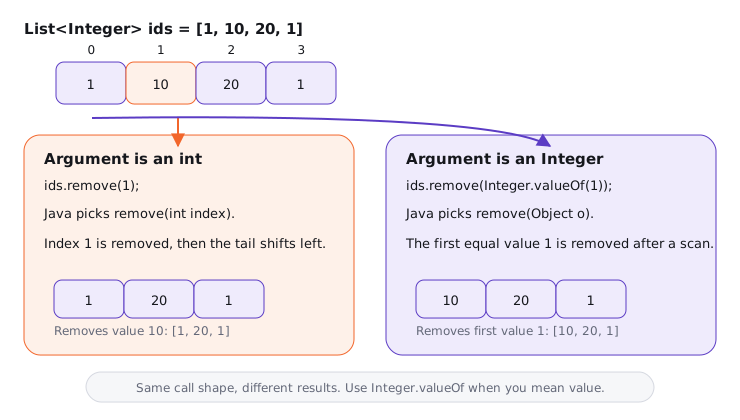
The picture has one practical message: make the overload visible. If the list stores Integer, remove(1) is almost never the line you want unless you truly mean index 1.
02Finding an element under the hood
The simplest find methods are value-based scans. contains(x) answers yes or no, indexOf(x) returns the first index or -1, and lastIndexOf(x) searches from the end. All three use equals semantics, with special handling for null in mutable JDK lists such as ArrayList.
Try it yourself first
Before reading the comments, decide which lookups find the first matching order and which ones need a sorted list first.
record Order(String id, int cents) { }

List<Order> orders = List.of(
    new Order("A-100", 4999),
    new Order("B-200", 1299),
    new Order("A-100", 4999)
);

Order target = new Order("A-100", 4999);
System.out.println(orders.contains(target));     // true, record equals compares components
System.out.println(orders.indexOf(target));      // 0
System.out.println(orders.lastIndexOf(target));  // 2

Order cheap = orders.stream()
    .filter(order -> order.cents() < 2000)
    .findFirst()
    .orElseThrow();                              // B-200
Notice three things:
containsandindexOfdepend onequals, not identity. A record gives you value equality by default.findFirstis still O(n) in the worst case, but it lets you search by a predicate such as price, status or timestamp.lastIndexOfis useful when the newest update was appended at the end and duplicates are possible.
Collections.binarySearch is different. It does not scan; it repeatedly checks the middle, so it is O(log n) on a random-access sorted list. But the list must already be sorted according to the same natural order or comparator you pass to the search.
List<String> sortedIds = new ArrayList<>(List.of("B-200", "A-100", "C-300"));
sortedIds.sort(Comparator.naturalOrder());       // [A-100, B-200, C-300]

int index = Collections.binarySearch(sortedIds, "B-200");
System.out.println(index);                       // 1

int missing = Collections.binarySearch(sortedIds, "B-250");
System.out.println(missing);                     // negative insertion-point encoding
If the list is unsorted, binary search gives undefined answers. It may return a wrong index, a negative value, or appear to work in a small test. The default I recommend is linear search until you already maintain sorted order for another reason.
Many candidates say "use binarySearch because it is faster" and skip the precondition. Sorting once costs O(n log n). Sorting before each lookup to get one O(log n) search is worse than a single O(n) scan.
03Copying a list: snapshot, mutable copy or overwrite
Copying a list is really three decisions: do you want the new list to be mutable, do you need a snapshot independent of future source changes, and do you need to copy the elements themselves? Most everyday copies are shallow snapshots: a new list object, same element references.
Try it yourself first
In the code below, which lists can be mutated, and which ones share the same LineItem objects?
record LineItem(String sku, int quantity) { }

List<LineItem> source = new ArrayList<>(List.of(
    new LineItem("book", 1),
    new LineItem("pen", 3)
));

List<LineItem> copyByConstructor = new ArrayList<>(source); // mutable, shallow
List<LineItem> copyByAddAll = new ArrayList<>();
copyByAddAll.addAll(source);                                // mutable, shallow
List<LineItem> snapshot = List.copyOf(source);              // unmodifiable, shallow

source.add(new LineItem("bag", 1));
System.out.println(copyByConstructor.size());               // 2
System.out.println(snapshot.size());                        // 2
new ArrayList<>(source) is the everyday mutable copy. addAll is useful when the destination already exists or when you are merging multiple sources. List.copyOf (Java 10+) returns an unmodifiable list, rejects null elements, and may return the same instance if the input is already one of the JDK's unmodifiable lists.
Collections.copy(dest, src) is the odd one. It does not grow dest; it overwrites existing positions. The destination must already have at least src.size() elements.
List<String> src = List.of("read", "write", "admin");
List<String> dest = new ArrayList<>(Collections.nCopies(src.size(), ""));

Collections.copy(dest, src);
System.out.println(dest);                         // [read, write, admin]

List<String> tooSmall = new ArrayList<>();
// Collections.copy(tooSmall, src);               // IndexOutOfBoundsException
The trade-off is clarity. Use a constructor for a new mutable copy, List.copyOf for an unmodifiable snapshot at a boundary, and Collections.copy only when you intentionally overwrite a pre-sized list.
We cover shallow versus deep copying fully in Deep copy vs shallow copy in Java. For this lesson, remember the interview line: copying a List<Customer> usually copies customer references, not customer objects.
04Checking whether two lists are equal
List.equals is strict in the way most tests should be strict. Two lists are equal when they have the same size and each element at index i is equal to the element at index i in the other list. Order matters.
List<String> expected = List.of("created", "paid", "shipped");
List<String> actual = List.of("created", "paid", "shipped");
List<String> reordered = List.of("paid", "created", "shipped");

System.out.println(expected.equals(actual));     // true
System.out.println(expected.equals(reordered));  // false
Ignoring order is where bugs enter. The naive pattern is a.containsAll(b) && b.containsAll(a). That checks membership, not multiplicity, so [A, A, B] and [A, B, B] both pass.
Try it yourself first
Write an order-insensitive equality check for List<String> that treats duplicate counts correctly.
static <T> Map<T, Long> frequencies(List<T> values) {
    return values.stream().collect(Collectors.groupingBy(
        Function.identity(),
        Collectors.counting()
    ));
}

List<String> left = List.of("A", "A", "B");
List<String> right = List.of("A", "B", "B");

System.out.println(left.containsAll(right) && right.containsAll(left)); // true, wrong
System.out.println(frequencies(left).equals(frequencies(right)));       // false
If elements are comparable and you are allowed to reorder copies, sorting copies is also fine: O(n log n) time and O(n) extra space. Frequency maps are O(n) expected time and O(u) space, where u is the number of distinct elements. For tests, AssertJ's containsExactlyInAnyOrder does the duplicate-aware thing; with plain JUnit, compare sorted copies or frequency maps using assertEquals.
Premium lesson
Keep reading with the Java Pass
The rest of this lesson is part of Java One-Stop Interview Prep: in-depth explanations, diagrams, model answers and how to say them in the interview.
- Removing from the front, by value and by predicate
- Removing nulls and handling null-hostile lists
- Advanced: costs, edge cases and recommended defaults
- Getting a random element
- How to say it in the interview
From ₹199 · one-time payment · No auto-renewal