

How ArrayList works
ArrayList internals: elementData, lazy default capacity, 1.5x growth, shifting, trimToSize, ensureCapacity, modCount, RandomAccess, subList views, nulls and practical initialization patterns.
On this page
- Picture it first: a row of seats with spare chairs
- Under the hood: elementData, size and lazy capacity
- Growth: old plus old shifted right one
- Indexed add and remove: shifting the tail
- Adding multiple items to an ArrayList
- Multi-dimensional ArrayList: rows are lists too
- One-line list initialization: mutability and nulls
- Advanced: modCount, RandomAccess, subList and thread-safety
- Edge cases and defaults
- How to say it in the interview
📦 What is an ArrayList?
An ArrayList is a resizable list backed by an Object[] array. It keeps elements in insertion order, supports O(1) indexed access, and grows when the backing array runs out of spare slots. If you add 11 items to a new ArrayList, Java allocates room for 10 on the first add, then grows and copies when the 11th arrives.
For this lesson, we'll focus on the internals you should be able to draw: elementData, size, lazy default capacity, 1.5x growth, Arrays.copyOf, System.arraycopy, shifting on indexed add/remove, trimToSize, ensureCapacity, modCount, RandomAccess, subList as a view, null handling and thread-safety. We'll also cover the practical checklist items: adding multiple items, multi-dimensional ArrayLists and one-line list initialization. Interviewers ask this because it tests whether you can connect a friendly API to the array underneath.
Below the line (out of scope)
ArrayListversusLinkedListbenchmarks and trade-offs: ArrayList vs LinkedList- Fail-fast iteration in depth: Fail-fast vs fail-safe iterators and ConcurrentModificationException explained
- Immutable factories in depth: Immutable collections
- Everyday search, copy, compare and remove recipes: Everyday List operations
The 30-second answer
ArrayList is an Object[] elementData plus an integer size. A no-arg list starts with a shared empty array, and the first add expands it to the default capacity 10. When full, grow() chooses roughly old + (old >> 1), a 1.5x increase, and copies references with Arrays.copyOf; indexed add and remove shift a tail segment with System.arraycopy. get(i) is O(1), append is amortised O(1), and middle insert/remove is O(n). It implements RandomAccess, allows null, is not thread-safe, and uses modCount so iterators are fail-fast on structural changes. subList is a view over the same backing list, not a copy.
What you’ll learn
- Explain
ArrayListas an **Object[]plussize**, including lazy default capacity 10 - Walk through growth by 1.5x with
Arrays.copyOfand shifting withSystem.arraycopy - Use
ensureCapacity,trimToSize,addAllandCollections.addAllwithout guessing their costs - Describe
modCount, fail-fast iterators,RandomAccess,subListviews,nullelements and thread-safety - Build multi-dimensional ArrayLists safely and avoid the
Collections.nCopiesshared-row aliasing bug - Compare one-line list initialization choices:
List.of,Arrays.asList,new ArrayList<>(...)andStream.toList
Interview radar
Asked very often: Why is append amortised O(1), and why is middle insertion O(n)?
Senior rounds probe: Lazy capacity, 1.5x growth, modCount, subList views and one-line initialization mutability traps.
Production angle: A caller keeps a subList, the parent list changes, and later the view throws ConcurrentModificationException or sees surprising data.
01Picture it first: a row of seats with spare chairs
Think of an ArrayList as a row of chairs reserved for a meeting. size is how many chairs are occupied. capacity is how many chairs are in the room. Adding at the end takes the next empty chair until the room is full; then facilities moves everyone to a bigger room and keeps the order.
The diagram below shows the two ideas you need: size is not capacity, and growth copies references into a larger array.
An ArrayList starts with an elementData array of capacity 10 and size 6, appends into the next empty slot, then grows from capacity 10 to 15 by copying references when the 11th element is added
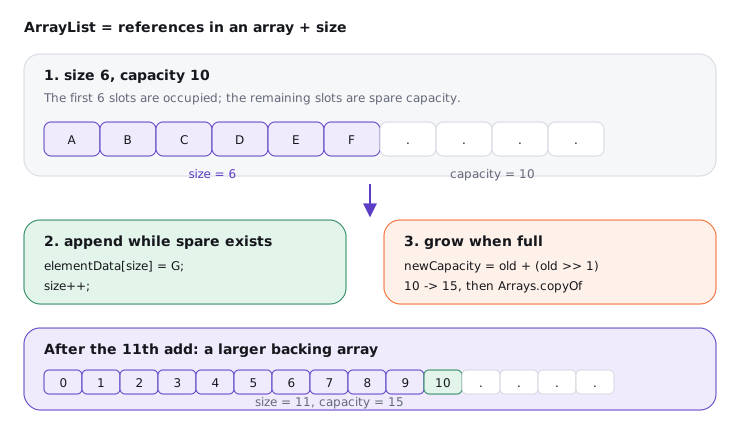
Notice that the elements themselves are not copied during growth. The array holds references. Arrays.copyOf creates a new reference array and copies those references, so mutable objects remain the same objects.
02Under the hood: elementData, size and lazy capacity
Internally, the important fields are conceptually this small:
public class ArrayList<E> extends AbstractList<E>
        implements List<E>, RandomAccess, Cloneable, java.io.Serializable {
    transient Object[] elementData;
    private int size;
}
The no-argument constructor does not allocate a 10-element array immediately. It points elementData at a shared sentinel called DEFAULTCAPACITY_EMPTY_ELEMENTDATA. On the first add, ArrayList expands to DEFAULT_CAPACITY, which is 10.
Try it yourself first
Before reading on, predict the size and capacity story for this code. Which line allocates the first real backing array?
ArrayList<String> tags = new ArrayList<>();  // shared empty array, capacity 0
System.out.println(tags.size());             // 0

tags.add("new");                             // first real array, capacity 10
tags.add("sale");                            // writes elementData[1]

System.out.println(tags.get(0));             // O(1): array load at index 0
System.out.println(tags.size());             // 2
Notice three things:
size()is the number of stored elements, not the backing-array length.get(index)checks bounds againstsize, then readselementData[index].- Capacity is an implementation detail. You can influence it with constructors and
ensureCapacity, but you do not normally read it.
ArrayList(Collection<? extends E>) is different. It copies the incoming collection into a new array sized to the collection's contents. That is why new ArrayList<>(List.of("a", "b")) is a concise way to get a mutable list with two elements.
03Growth: old plus old shifted right one
When ArrayList needs more room, JDK 21's growth path computes a preferred new capacity roughly as oldCapacity + (oldCapacity >> 1). Shifting right by one divides by 2, so this is 1.5x. Capacity 10 becomes 15, then 22, then 33, with exact handling for minimum required capacity and maximum array size.
ArrayList<Integer> ids = new ArrayList<>(10);
for (int i = 0; i < 11; i++) {
    ids.add(i); // the 11th add grows from 10 to at least 15
}
The grow step is O(n) for that operation because it copies the old references into a new array. Append is still amortised O(1) over many appends because growth happens occasionally, after many cheap slot writes.
If you know the size, say it and presize:
List<OrderLine> lines = new ArrayList<>(expectedLineCount);
for (OrderLine line : incomingLines) {
    lines.add(line);
}
ensureCapacity(minCapacity) performs the same idea explicitly. Use it before a large batch append when you know the final size. Do not sprinkle it everywhere; an accurate constructor capacity is usually clearer.
With compressed ordinary object pointers, each reference slot in the backing array is typically 4 bytes. Growing a list from 1,000,000 to 1,500,000 slots copies about 4 MB of references and allocates a new array of about 6 MB of slots. That is still often cheaper than a linked structure because the copy is a contiguous memory move.
04Indexed add and remove: shifting the tail
Appending at the end usually writes one slot. Inserting at an index has to open a gap. Removing from an index has to close a gap. Both use System.arraycopy, which is efficient, but it is still proportional to the number of references shifted.
Try it yourself first
What has to move when we insert "gift-wrap" at index 1 and then remove index 2?
ArrayList<String> options = new ArrayList<>(List.of("standard", "express", "insured"));

options.add(1, "gift-wrap");
// [standard, gift-wrap, express, insured]
// shifts express and insured one slot to the right

String removed = options.remove(2);
// removed = express
// shifts insured one slot to the left and clears the old last slot for GC
Notice two important details. First, the cleared last slot matters: otherwise the array would keep a stale reference and prevent garbage collection. Second, remove(Object) must first search with equals, so it is O(n) for the search plus a possible O(n) shift.
trimToSize() goes the other direction. It copies the backing array down so capacity equals size. That can save memory after a temporary spike, but it makes the next append likely to grow again. The default is to leave spare capacity alone until memory pressure gives you a reason to trim.
05Adding multiple items to an ArrayList
There are three common ways to add many items, and they differ mostly in readability and whether the source is already a collection.
ArrayList<String> roles = new ArrayList<>();

roles.addAll(List.of("ADMIN", "USER", "SUPPORT"));
Collections.addAll(roles, "AUDITOR", "BILLING");

List<String> defaults = List.of("READ", "WRITE");
roles.addAll(defaults);
Use addAll(collection) when you already have a collection. Use Collections.addAll(list, a, b, c) when you have varargs and want to avoid creating a temporary List yourself. Use new ArrayList<>(List.of(...)) when you want a mutable list initialized with known values in one expression.
Bulk add is not magic. If the target needs more capacity, it grows once to fit the incoming batch, then copies references. Adding m items at the end is O(m) after any growth, while adding m items at index i also shifts the existing tail.
ArrayList<String> queue = new ArrayList<>(List.of("A", "D"));
queue.addAll(1, List.of("B", "C"));
System.out.println(queue); // [A, B, C, D]
Here the existing tail (D) shifts right by two slots. For small lists, readability wins. For very large middle inserts, ask whether a different algorithm can batch work or avoid maintaining a list in sorted order by repeated insertion.
06Multi-dimensional ArrayList: rows are lists too
Java does not have a special ArrayList matrix type. You build a list of row lists: List<List<Integer>>. Each row must be a different list object.
int rows = 3;
int cols = 4;
List<List<Integer>> grid = new ArrayList<>(rows);

for (int r = 0; r < rows; r++) {
    List<Integer> row = new ArrayList<>(Collections.nCopies(cols, 0));
    grid.add(row);
}

grid.get(1).set(2, 99);
System.out.println(grid.get(0).get(2)); // 0
System.out.println(grid.get(1).get(2)); // 99
The common bug is using Collections.nCopies(rows, sameRow). That creates a list containing the same row reference multiple times. Changing one row changes every row because there is only one inner list.
List<Integer> sameRow = new ArrayList<>(Collections.nCopies(3, 0));
List<List<Integer>> broken = new ArrayList<>(Collections.nCopies(3, sameRow));

broken.get(0).set(1, 7);
System.out.println(broken); // [[0, 7, 0], [0, 7, 0], [0, 7, 0]]
Many candidates build a 2D ArrayList with Collections.nCopies(rows, new ArrayList<>(...)) and think they have copied rows. They have copied references to one row. Create each row inside a loop or with a stream supplier so every row is independent.
07One-line list initialization: mutability and nulls
One-line initialization is mostly about what kind of list you get. The syntax is less important than mutability, null handling and whether later changes to the source are visible.
| Expression | Mutable size? | Allows null? |
Notes |
|---|---|---|---|
List.of("a", "b") |
no | no | Java 9+, compact unmodifiable list |
Arrays.asList("a", "b") |
fixed size | yes | set works, add/remove throw, backed by array |
new ArrayList<>(List.of("a", "b")) |
yes | source rejects null | common mutable one-liner |
new ArrayList<>(Arrays.asList("a", null)) |
yes | yes | mutable copy that can contain null |
stream.toList() |
no | yes | Java 16+, unmodifiable result |
stream.collect(Collectors.toList()) |
usually yes | yes | spec does not guarantee exact implementation |
List<String> fixed = Arrays.asList("A", "B");
fixed.set(0, "X");          // OK
// fixed.add("C");          // UnsupportedOperationException

List<String> mutable = new ArrayList<>(List.of("A", "B"));
mutable.add("C");           // OK

List<String> immutable = List.of("A", "B");
// immutable.set(0, "X");   // UnsupportedOperationException
We go deeper on factory methods in Immutable collections. For this lesson, remember the interview line: List.of is unmodifiable and rejects nulls; Arrays.asList is fixed-size and allows set; wrap either in new ArrayList<>(...) when you need a normal mutable ArrayList.
08Advanced: modCount, RandomAccess, subList and thread-safety
modCount and fail-fast iterators
ArrayList inherits modCount from AbstractList. Structural changes, such as add, remove, clear and capacity-changing operations, increment it. An iterator captures the current value as expectedModCount and checks it during iteration.
List<String> names = new ArrayList<>(List.of("Asha", "Ravi", "Mina"));
for (String name : names) {
    if (name.startsWith("R")) {
        names.remove(name);      // structural change outside the iterator
    }
}
This usually throws ConcurrentModificationException, but fail-fast is best-effort, not a correctness guarantee. The right fixes are Iterator.remove(), removeIf, collecting changes separately, or using a collection designed for concurrent access.
RandomAccess is a marker
ArrayList implements RandomAccess, a marker interface with no methods. It tells generic algorithms that indexed access is cheap. Collections.binarySearch and similar utilities can choose different strategies for random-access lists versus sequential lists.
The marker is also useful in your own code when you accept List<E> and are tempted to loop by index. For an ArrayList, list.get(i) in a loop is fine. For a LinkedList, the same loop becomes O(n²) because each get(i) walks from an end.
subList is a view, not a copy
subList(from, to) returns a view backed by the original list. Changes through the view write into the parent, and structural changes to the parent outside the view can invalidate the view.
ArrayList<String> days = new ArrayList<>(List.of("Mon", "Tue", "Wed", "Thu"));
List<String> workStart = days.subList(0, 2);

workStart.set(1, "Tues");
System.out.println(days);       // [Mon, Tues, Wed, Thu]

days.add("Fri");
// workStart.size();            // may throw ConcurrentModificationException
If you need an independent list, copy it: new ArrayList<>(days.subList(0, 2)). This is the default I recommend at API boundaries, because views are powerful but easy to leak accidentally.
Nulls and thread-safety
ArrayList allows null elements. contains(null), indexOf(null) and remove(null) all work by checking for null specially. List.of, by contrast, rejects nulls at creation time.
ArrayList is not synchronized. Multiple threads may read it safely only if no thread mutates it after publication and the publication itself is safe. If multiple threads mutate it, use external locking, Collections.synchronizedList, CopyOnWriteArrayList for read-heavy cases, or a different concurrent design.
The production bug I see most often is not a failed append. It is exposing an internal ArrayList from a getter, then watching a caller mutate it while another part of the object assumes it is stable. Return List.copyOf(list) for snapshots, or an unmodifiable view only when you deliberately want later internal changes to be visible.
09Edge cases and defaults
An ArrayList can hold any reference type, including records, arrays and mutable objects. It cannot hold primitive int directly; List<Integer> stores Integer references, so large numeric lists pay boxing overhead. For dense primitive data, use int[], long[] or a primitive collection library.
clone() on an ArrayList is shallow. The new list has its own backing array, but the elements are the same object references. The same is true for new ArrayList<>(oldList).
The default trade-off is straightforward. Use ArrayList for ordered, indexable, growable lists. Presize when you know the count. Avoid repeated middle inserts on huge lists unless you have measured the cost or can batch them.
Many candidates say "ArrayList is backed by an array, so it has fixed size." The backing array has fixed length, but the ArrayList object replaces it with a larger array when needed. The fixed-size list is Arrays.asList, not ArrayList.
10How to say it in the interview
When I ask how ArrayList works, I'm listening for the mental model first: array, size, capacity and growth. Then I want the operation costs and the traps: middle shifts, subList view, Arrays.asList fixed size, List.of immutability and not thread-safe.
In the interview
"An ArrayList is an Object array plus a size. The no-arg constructor starts with a shared empty array, and the first add allocates the default capacity 10. Appending usually writes into the next slot, so it is amortised O(1), but when the array is full grow creates a new array around 1.5 times larger and copies references with Arrays.copyOf. get by index is O(1). add or remove in the middle is O(n) because it shifts the tail with System.arraycopy and clears removed slots for GC. It implements RandomAccess, allows nulls, and is not thread-safe. Iterators are fail-fast through modCount, and subList is a backed view, so I copy it if I need independence. For initialization, List.of is unmodifiable and rejects nulls, Arrays.asList is fixed-size, and new ArrayList<>(List.of(...)) gives me a normal mutable ArrayList."
On the whiteboard
ArrayList = Object[] elementData + int size
new ArrayList<>() -> shared empty array -> first add capacity 10
grow() -> old + (old >> 1) ~= 1.5x -> Arrays.copyOf
get(i) O(1) after bounds check
add(e) amortised O(1); add(i,e) O(n) shift right
remove(i) O(n) shift left, clear old last slot for GC
ensureCapacity(n) before known batch; trimToSize() after spike
addAll / Collections.addAll for multiple items
List<List<T>> matrix: create each row separately
List.of: unmodifiable, no nulls; Arrays.asList: fixed size; wrap for mutable
modCount -> fail-fast; RandomAccess marker; subList backed view
allows null; not thread-safe