

Collections and Arrays utility methods
Collections and Arrays utility methods, sorting and searching preconditions, shuffling, wrappers, array copying, deep operations and Java 9 comparison helpers.
On this page
🧰 What are Collections and Arrays utility methods?
java.util.Collections and java.util.Arrays are the toolbox classes for everyday collection and array jobs: sort, search, shuffle, fill, copy, compare and wrap. They act like the small drawer in a workshop: you do not build a new machine for every screw, you reach for the right wrench. For example, Collections.rotate(queue, 1) moves the last list element to the front, while Arrays.copyOf(ids, ids.length + 10) grows an array snapshot.
For this lesson, we'll focus on the methods that show up in code reviews and interviews: sorting, binary search, reversing, shuffling, max/min, frequency, disjoint checks, fill, rotate, swap, wrapper factories, Arrays.asList, array sort/search/copy/deep operations, streams, generators and Java 9 comparison helpers. Interviewers ask this because the methods look like trivia, but the real signal is whether you know the preconditions and mutability traps.
Below the line (out of scope)
- Picking the collection type before using utilities: Choosing the right collection
- Comparator design and ordering rules: Comparable vs Comparator
- Map-specific helpers such as
merge,computeIfAbsentand sorting maps: Everyday Map operations: iterate, merge, sort and compare - Deep immutable collection choices: Immutable collections
- Array/list/set/map conversion recipes: Converting between arrays, lists, sets and maps
The 30-second answer
Collections works mostly on List and Collection objects; Arrays works on raw arrays. Use sort before binarySearch, because binary search only makes sense on data sorted with the same ordering. A failed binary search returns -(insertionPoint) - 1, so decode it with int ip = -result - 1. Collections.shuffle is Fisher-Yates under the hood and accepts a seeded Random when tests need repeatable order. Collections.unmodifiableList, synchronizedList and checkedList are wrappers, not new data structures. Arrays.asList(array) is fixed-size and write-through, and Arrays.asList(int[]) gives one element, the whole int[]. For arrays, remember primitive sort uses dual-pivot quicksort, object sort uses stable TimSort, and deep methods only matter when arrays contain arrays.
What you’ll learn
- Choose the right
Collectionshelper for sorting, searching, shuffling and rotating lists - Explain the
binarySearchsorted input precondition and decode the negative insertion point - Use
Collections.max,min,frequency,disjoint,swap,fill,rotateandaddAllwithout hiding bigger design problems - Tell
Arrays.asListfrom a real mutable list, including the fixed-size, write-through behaviour and primitive array trap - Compare
Arrays.sort,parallelSort,binarySearch,copyOf,deepEquals,deepToString,stream,setAll,mismatchandcompare - Recognize when
unmodifiable,synchronizedandcheckedwrappers are useful, and when a deeper immutable collection is better
Interview radar
Asked often: What does binarySearch return when the element is missing, and why must the input be sorted first?
Core follow-up: What is wrong with Arrays.asList(new int[] {1, 2, 3})?
Production angle: A test shuffles data without a seed, fails once every few hundred runs, and nobody can reproduce the order.
01Picture it first: sort the toolbox by job
Think of these utilities as labelled drawers. One drawer changes order, one searches, one fills or copies, one compares structure, and one controls mutability at the boundary. The hard part is not remembering every method name. The hard part is picking the drawer that matches the job.
Collections and Arrays methods grouped by job: ordering, searching, copying, comparing, wrapping, randomizing and generating
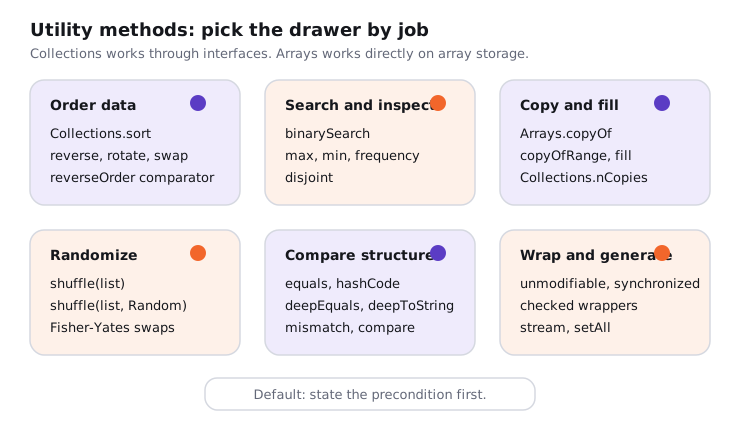
Notice the split. Collections rearranges objects through collection interfaces, so it can swap elements in a list but cannot resize an array. Arrays can use array length and component type directly, so it owns copyOf, primitive sorting and deep array operations.
02Collections under the hood: ordering, searching and randomizing
Sorting is the gateway method. If you sort a list with natural order, search it with natural order. If you sort with a comparator, search it with the same comparator. Otherwise the return value is not a little wrong, it is undefined for your data.
Try it yourself first
Before reading on, predict the two insertion points. Where would "delta" and "aa" be inserted in the sorted list?
import java.util.ArrayList;
import java.util.Collections;
import java.util.Comparator;
import java.util.List;

public class CollectionsSearchDemo {
    public static void main(String[] args) {
        List<String> statuses = new ArrayList<>(List.of("paid", "new", "refunded"));
        Collections.sort(statuses);

        int found = Collections.binarySearch(statuses, "paid");
        int missing = Collections.binarySearch(statuses, "delta");
        int first = Collections.binarySearch(statuses, "aa");

        System.out.println(statuses);                 // [new, paid, refunded]
        System.out.println(found);                    // 1
        System.out.println(missing);                  // -1, insertion point 0
        System.out.println(-missing - 1);             // 0
        System.out.println(first);                    // -1, insertion point 0

        statuses.sort(Comparator.reverseOrder());
        int wrong = Collections.binarySearch(statuses, "paid");
        System.out.println(wrong);                    // not meaningful: list order changed
    }
}
Premium lesson
Keep reading with the Java Pass
The rest of this lesson is part of Java One-Stop Interview Prep: in-depth explanations, diagrams, model answers and how to say them in the interview.
- Advanced: max, min, frequency, wrappers and tiny factories
- Arrays under the hood: fixed size, primitive engines and deep operations
- How to say it in the interview
From ₹199 · one-time payment · No auto-renewal