

How HashMap works
HashMap basics through Java 21 internals: Node table, lazy allocation, hash spreading, bucket indexing, put and get flow, null keys, equality contracts, thread-safety and initialization choices.
On this page
- Picture it first: mailboxes and envelopes
- HashMap under the hood: table, hash and index
- The put() flow: what putVal does
- The get() flow: hash, bucket, compare
- Advanced: the key contract and the mutable-key bug
- Iteration order, nulls and thread-safety
- Initializing a HashMap: pick the mutability first
- Everyday helper methods: know what they promise
- How to say it in the interview
🗺️ What is a HashMap?
A HashMap is a key-value lookup table backed by an array of buckets. You give it a key like "order-42", it turns the key's hashCode() into a bucket index, then searches only that bucket for the matching key. It acts like a hotel front desk: the room number gets you to the right corridor, but the name on the booking still decides which guest record is yours.
For this lesson, we'll focus on the core HashMap path you should be able to draw in an interview: Node<K,V>[] table, lazy allocation, hash() spreading, power-of-two indexing, putVal, getNode, the equals/hashCode contract, initialization choices and the everyday helper methods. Interviewers love this one because it is small enough for a whiteboard and subtle enough to expose memorised answers.
Below the line (out of scope)
- Collision probabilities, resize splitting, treeification and load factor in full: Hashing, collisions, treeification and load factor
- Ordered maps and LRU caches: LinkedHashMap and building an LRU cache
- Sorted maps: TreeMap and red-black trees
- Concurrent maps: Hashtable, synchronizedMap and the concurrent maps and the Concurrency module
- The object contract itself: The equals() and hashCode() contracts
The 30-second answer
A HashMap is a lazily allocated Node<K,V>[] bucket table. The no-arg map has no table until the first put, then allocates 16 buckets with threshold 12. For a key, it computes hash = h ^ (h >>> 16), picks index = (n - 1) & hash, and searches that bucket by comparing the stored hash, then ==, then equals. A bucket is normally a linked list of nodes with hash, key, value and next; later lessons cover when it becomes a tree. null keys are allowed and always use hash 0, so they live in bucket 0. Iteration order is not guaranteed, keys must not mutate while in the map, and HashMap is not thread-safe.
What you’ll learn
- Draw a
HashMapas a power-of-two bucket array ofNode<K,V>chains - Explain lazy table allocation, default capacity
16,hash()spreading and(n - 1) & hashindexing - Walk the
putValandgetNodeflows, including updates, collisions and thenullkey in bucket0 - Apply the **
equals/hashCodecontract** and spot the mutable-key bug before it leaks memory - Choose safe initialization styles:
new HashMap<>(capacity),HashMap.newHashMap(n),Map.of,Map.ofEntriesand collectors - Use
getOrDefault,putIfAbsent,computeIfAbsentandmergewith the right mental model
Interview radar
Asked very often: How does HashMap find a key without scanning the whole map?
Core follow-up: Why must capacity be a power of two, and why does Java spread the hash first?
Production angle: A cache keyed by a mutable object grows forever because remove can no longer find the entry.
01Picture it first: mailboxes and envelopes
Picture an apartment wall with numbered mailboxes. The HashMap table is the wall, each bucket is one mailbox, and each Node is an envelope inside that mailbox. A good hash spreads envelopes across mailboxes, but the final check is still the name on the envelope: equals.
The important model is array first, chain second. We jump to one bucket in O(1), then handle whatever is inside that bucket.
A HashMap bucket array with bucket 0 holding the null key, bucket 3 holding one node, bucket 6 holding a chain of three nodes, and each node storing hash, key, value and next
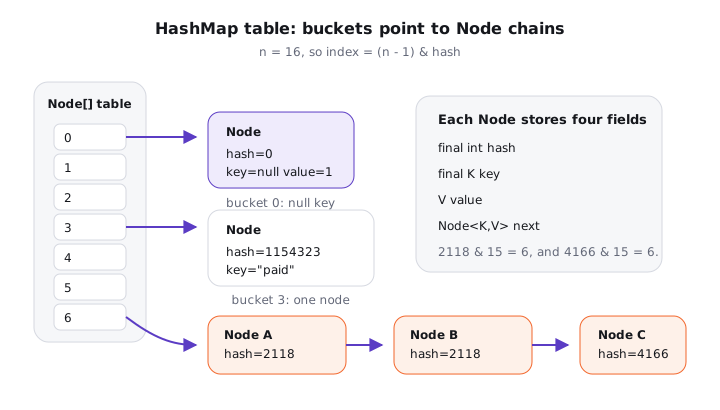
Notice the shape. The table slot does not store your value directly; it stores the head Node. Each node caches the spread hash so later lookups, resizes and equality checks do not have to call hashCode() again.
Conceptually, a node is this small:
static class Node<K,V> implements Map.Entry<K,V> {
    final int hash;
    final K key;
    V value;
    Node<K,V> next;
}
That final K key does not make the key object immutable. It only means the node points to the same key reference for its lifetime. If that key's fields change and its hashCode() changes, the node stays in the old bucket and future lookups go to the new bucket. That's the famous mutable-key bug.
02HashMap under the hood: table, hash and index
A no-argument new HashMap<>() starts light. The object is created, but the bucket table is not. On the first put, resize() allocates the default table length of 16 and sets the resize threshold to 16 * 0.75 = 12.
Try it yourself first
Before reading on, predict which line allocates the first real bucket array and which bucket receives the null key.
Map<String, Integer> counts = new HashMap<>();

counts.put("paid", 7);      // first put allocates 16 buckets
counts.put(null, 1);        // null key gets hash 0, bucket 0
counts.put("PAID", 2);

System.out.println(counts.get("paid")); // 7
System.out.println(counts.get(null));   // 1
Notice three things:
HashMapallows onenullkey and manynullvalues.- The
nullkey is not special storage outside the table. It is a normal node with hash 0, found in bucket 0. - A missing key and a key mapped to
nullboth makegetreturnnull, so usecontainsKeywhen that distinction matters.
Step 1: spread the hash
JDK 21's hash helper is short:
static final int hash(Object key) {
    int h;
    return (key == null) ? 0 : (h = key.hashCode()) ^ (h >>> 16);
}
With 16 buckets, only 4 low bits choose the index. That is a problem if two keys differ mostly in the high bits, because (n - 1) & hash would ignore those high bits. h ^ (h >>> 16) folds some high-bit information into the low bits with one shift and one XOR. It is not cryptography. It is a cheap guardrail against common poor distributions.
Step 2: use a power-of-two mask
HashMap keeps table lengths as powers of two: 16, 32, 64 and so on, up to 1 << 30. That makes bucket selection:
int index = (table.length - 1) & hash;
For a table length of 16, table.length - 1 is binary 1111, so the mask keeps the low 4 bits. This behaves like hash % 16 for non-negative values, but it is one bitwise operation and does not produce a negative index. The trade-off is that low bits matter a lot, which is why spreading happens first.
Many candidates say, "it uses modulo". I would be more precise: it uses a bit mask because the capacity is a power of two. That sentence usually earns the follow-up instead of ending the conversation.
03The put() flow: what putVal does
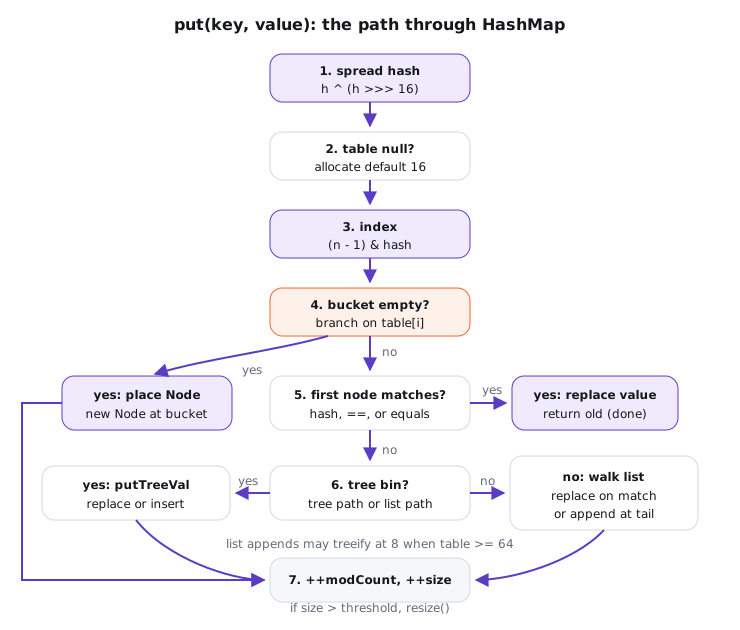
Here is the path I draw on a whiteboard. The method names in the JDK are put and putVal, but you do not need to recite the source line by line. You need to tell the story in the right order.
The put flow spreads the hash, allocates the table if needed, masks to a bucket, inserts into an empty bucket, replaces a matching key, or handles a tree bin or list before checking resize
Try it yourself first
Two strings, "Aa" and "BB", have the same hashCode() value, 2112. What should the map print after both are inserted?
Map<String, Integer> scores = new HashMap<>();
scores.put("Aa", 10);
scores.put("BB", 20);

System.out.println(scores.size());       // 2
System.out.println(scores.get("Aa"));    // 10
System.out.println(scores.get("BB"));    // 20
A collision is not a lost value. Both keys land in the same bucket, but they are not equal, so the bucket stores two nodes. The hash gets you to a small search area; equals tells you whether a node is the one you asked for.
putVal is roughly this:
- Spread the key hash, using 0 for
null. - If the table is empty, allocate it through
resize(). - Compute
i = (n - 1) & hash. - If
table[i]is empty, create a new node there. - Otherwise compare the first node: same cached hash, and keys are
==orequals. - If it matches, replace the value and return the old value.
- If it is a tree bin, delegate to the tree path. We'll cover that in the next lesson.
- Otherwise walk the linked list. A matching key updates; reaching the end appends a new node.
- A new mapping increments
sizeandmodCount; ifsizepassesthreshold, resize.
Two details are worth saying out loud. First, updating an existing key does not increase size. Second, since Java 8, new list nodes are appended at the tail, not inserted at the head, which also removed one cause of the old Java 7 resize cycle bug.
04The get() flow: hash, bucket, compare
get is the same mental path without mutation. It spreads the hash, masks to a bucket, checks the first node, and then either walks the list or searches the tree bin.
record UserId(String tenant, long id) { }

Map<UserId, String> names = new HashMap<>();
UserId key = new UserId("acme", 42);
names.put(key, "Mina");

System.out.println(names.get(new UserId("acme", 42))); // Mina
This works because records implement value-based equals and hashCode from their components. The lookup key is a different object, so == is false, but the cached hash matches and equals returns true. That's exactly what map keys are for.
The comparison order is important:
if (first.hash == hash &&
        ((k = first.key) == key || (key != null && key.equals(k)))) {
    return first;
}
Premium lesson
Keep reading with the Java Pass
The rest of this lesson is part of Java One-Stop Interview Prep: in-depth explanations, diagrams, model answers and how to say them in the interview.
- Advanced: the key contract and the mutable-key bug
- Iteration order, nulls and thread-safety
- Initializing a HashMap: pick the mutability first
- Everyday helper methods: know what they promise
- How to say it in the interview
From ₹199 · one-time payment · No auto-renewal