

Built-in and custom annotations
Java annotations from @Override to annotation processors: the built-in annotations, meta-annotations (@Retention, @Target, @Inherited, @Repeatable, @Documented), writing your own with elements and defaults, reading them at runtime and checking them at compile time.
On this page
- Picture it first: sticky notes with an expiry date
- The built-in annotations under the hood
- Meta-annotations: annotating your annotations
- Writing and reading a custom annotation
- Real world: annotations as configuration you can grep
- Advanced: annotation processors at compile time
- How to say it in the interview
🏷️ What are annotations?
An annotation is structured metadata you attach to code with @: @Override on a method, @Deprecated(since = "3.2", forRemoval = true) on a class, @Retry(attempts = 5) on a client call. Annotations don't change what the code does by themselves. Something has to read them: the compiler, an annotation processor at build time, or a framework through reflection at runtime.
For this lesson, we'll focus on the five built-in annotations you'll use every week, the meta-annotations that control where an annotation can go and how long it survives, writing and reading your own, and processors that check annotations while javac runs. Interviewers ask about annotations because one question ("what does @Retention do?") quickly shows whether you understand the difference between compile time and runtime, which is the whole foundation of how frameworks work.
Below the line (out of scope)
- The reflection API itself (A guide to Java reflection)
- How DI containers, proxies and test runners consume annotations (How frameworks use annotations and reflection)
- Bean Validation, JPA and other library-specific annotations beyond quick examples
The 30-second answer
Annotations are metadata declared with @interface. Built-ins like @Override and @FunctionalInterface ask the compiler to verify something, @Deprecated and @SuppressWarnings control warnings, and @SafeVarargs promises a varargs method is heap-safe. Meta-annotations configure your own: @Retention says whether it is dropped after compiling (SOURCE), kept in the class file but invisible to reflection (CLASS, the default), or readable at runtime (RUNTIME); @Target says where it may appear. Elements can only be primitives, String, Class, enums, other annotations or arrays of those, with constant defaults. Frameworks read RUNTIME annotations with reflection, while annotation processors read them at compile time and can generate code or fail the build.
What you’ll learn
- Use
@Override,@Deprecated(forRemoval),@SuppressWarnings,@FunctionalInterfaceand@SafeVarargscorrectly and know what each one checks - Explain the three retention policies and where each annotation physically lives (source, class file attribute, runtime)
- Write a custom annotation with elements, defaults and the right
@Target, and know which element types are legal - Read annotations at runtime, including repeatable and @Inherited ones, and know what object you get back
- Write a small annotation processor that fails the build on a bad value
Interview radar
Asked very often: What does @Retention control, and how do you write and read a custom annotation?
Senior rounds probe: Why does getAnnotation return null for a repeated annotation, what does @Inherited not inherit, and how do annotation processors differ from runtime reflection?
Production angle: A custom annotation that "does nothing" in production because someone forgot @Retention(RUNTIME).
01Picture it first: sticky notes with an expiry date
Think of annotations as sticky notes on your code, each with an expiry date. Some notes are for the compiler only and get thrown away when compiling finishes (SOURCE). Some are stapled into the class file for bytecode tools but nobody at runtime can see them (CLASS). And some stay readable for the whole life of the program, so a framework can walk up and read them (RUNTIME).
This diagram follows one class through compilation and shows which notes survive each stage.
SOURCE annotations are discarded by javac, CLASS annotations are stored in the class file as invisible attributes, and RUNTIME annotations are stored as visible attributes that reflection can read
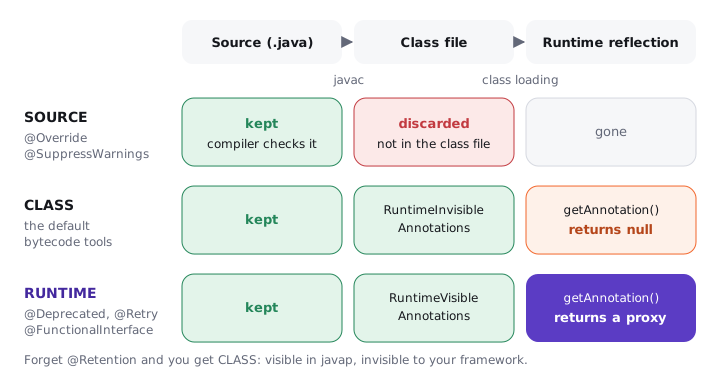
Notice that CLASS is the default. If you write a custom annotation and forget @Retention, it compiles, it shows up in javap, and getAnnotation still returns null. That one detail causes more "my annotation is ignored" bugs than anything else in this lesson.
02The built-in annotations under the hood
Try it yourself first
Before reading on, guess which of these lines fail to compile, and which only produce a warning.
class LegacyGateway {
    @Deprecated(since = "3.2", forRemoval = true)
    public void chargeV1(long cents) { }
}

class PaymentGateway extends LegacyGateway {
    @Override
    public String toString() { return "PaymentGateway"; }   // ok: overrides Object.toString()

    @Override
    public boolean equals(PaymentGateway other) { return true; }
    // compile error: method does not override or implement a method from a supertype

    @SuppressWarnings("removal")
    void migrate() { chargeV1(100); }                         // warning suppressed
}

@FunctionalInterface
interface FeeRule {
    long feeFor(long cents);
    String toString();                       // fine: Object's methods don't count
    // long refundFeeFor(long cents);        // adding this would be a compile error
}
Here's what each one actually does:
@Override(retentionSOURCE) makes the compiler prove the method overrides or implements something. Theequals(PaymentGateway)above is an overload, not an override, and without@Overrideit would compile silently andHashSetwould never call it. Effective Java Item 40 says to put it on every override for this reason.@Deprecated(retentionRUNTIME) marks an API you shouldn't use. Since Java 9 (JEP 277) it hassinceandforRemoval. Callers of aforRemoval = trueAPI get a removal warning, which is on by default and louder than an ordinary deprecation warning. Pair it with the@deprecatedJavadoc tag that says what to use instead.@SuppressWarnings(retentionSOURCE) silences named warnings:"unchecked","rawtypes","deprecation","removal". Put it on the smallest scope possible, ideally a single local variable declaration, with a comment saying why it's safe.@FunctionalInterface(retentionRUNTIME) makes the compiler check the interface has exactly one abstract method. Any interface with one abstract method works as a lambda target anyway; the annotation stops a teammate from adding a second one. More in Functional interfaces in Java.@SafeVarargs(retentionRUNTIME) promises a generic varargs method doesn't misuse itsT[]array, which removes the "possible heap pollution" warning at every call site. It's only allowed where the method can't be overridden: constructors,staticmethods,finalinstance methods and, since Java 9,privateinstance methods.
final class Batches {
    @SafeVarargs
    static <T> List<T> of(T... items) {   // only reads the array, never stores into it
        return List.of(items);
    }
}
Premium lesson
Keep reading with the Java Pass
The rest of this lesson is part of Java One-Stop Interview Prep: in-depth explanations, diagrams, model answers and how to say them in the interview.
- Meta-annotations: annotating your annotations
- Writing and reading a custom annotation
- Real world: annotations as configuration you can grep
- Advanced: annotation processors at compile time
- How to say it in the interview
From ₹199 · one-time payment · No auto-renewal
Further reading (11)
- JLS §9.6: Annotation Interfaces
- JLS §9.7: Annotations
- JVMS §4.7.16: The RuntimeVisibleAnnotations Attribute
- java.lang.annotation package (Java SE 21 javadoc)
- javax.annotation.processing.Processor (Java SE 21 javadoc)
- JEP 277: Enhanced Deprecation
- The Java Tutorials: Annotations
- Effective Java, 3rd ed., Items 39 and 40: Prefer annotations to naming patterns; consistently use @Override
- Baeldung: Overview of Java Built-in Annotations
- Baeldung: Creating a Custom Annotation in Java
- Baeldung: Java Annotation Processing and Creating a Builder