

Java classes and objects
What a class and an object really are: fields and methods, references versus objects, the object header and field layout on the heap, Class objects, when a class is loaded and initialised, and object identity.
On this page
🧱 What are classes and objects?
A class is a type you define: it declares what data each instance carries (fields) and what it can do (methods). An object is one instance of that class, a block of memory on the heap holding its own copy of those fields. For example, one Order class can produce 2 million Order objects during a sale, each with its own id and quantity, all sharing the same method code loaded once.
This sounds like day-one material, and it is. That's exactly why interviewers use it as a warm-up that quietly separates people. Anyone can say "a class is a blueprint". Fewer can tell you what a == b actually compares, how many bytes an empty object takes, what getClass() returns, or why a class's static block didn't run when they expected it to.
What you’ll learn
- Explain the difference between a class (a type plus code, loaded once) and an object (state on the heap, created many times)
- Tell a reference variable apart from the object it points to, and predict what
==compares - Sketch an object's heap layout: mark word, klass pointer, fields and padding, and size a small object in bytes
- Describe the
java.lang.Classobject and whygetClass()returns the same instance for every object of a type - List what triggers class initialisation (
<clinit>) and what does not, such asOrder.classornew Order[10] - Define object identity, identity hash codes, and how class identity depends on the class loader
For this lesson, we'll focus on the class and object model itself: fields and methods, references versus objects, what an object looks like on the heap, the java.lang.Class object, the basics of class loading and initialisation, and identity.
Below the line (out of scope)
- Constructors in depth: covered in A guide to constructors in Java
- All the ways to create an object (reflection, cloning, deserialisation): covered in A guide to creating objects in Java
staticmembers and the full initialisation rules: covered in The static keyword in Java- Equality beyond
==: covered in The equals and hashCode contracts
The 30-second answer
A class is a type: a template that declares fields and methods. It is loaded into the JVM once (per class loader), and its metadata and bytecode live in Metaspace. An object is an instance of that class, allocated on the heap with new. Every object starts with a header (a mark word for hash and lock state, plus a pointer to its class), followed by its instance fields, padded to 8 bytes. Variables never hold objects, they hold references, so == on two references asks "same object?", not "same contents?". Each loaded class is also represented by one java.lang.Class object, which is what getClass() and Order.class return. A class is initialised, running its static initialisers, on first active use, not when it is merely mentioned.
Interview radar
Asked very often: What is the difference between a class and an object, and what does == compare for two object references?
Senior rounds probe: How big is an object in memory, what is in its header, and when exactly does a class get initialised?
Production angle: The ClassCastException: com.shop.Order cannot be cast to com.shop.Order you get when two class loaders load the same class.
01Picture it first: a blueprint and the houses built from it
The classic analogy holds up well if you push it one step further. A class is an architect's blueprint for a house: rooms, doors, where the wiring goes. An object is one house built from it. Ten houses from the same blueprint each have their own furniture (their own field values), but they all follow the same plan (the same methods).
The step most people skip is the address. You never carry a house around in your pocket. You carry a slip of paper with its address, and that's what a Java variable is: a reference. Give the slip to a friend and you now both point at the same house. Paint the door through one slip and the other sees it painted.
The diagram below shows all three pieces: the class loaded once, objects on the heap, and references on the stack pointing at them.
The Order class sits once in Metaspace with its fields and methods; two Order objects on the heap each hold their own id and quantity; on the stack, references a and b point to the first object and c points to the second
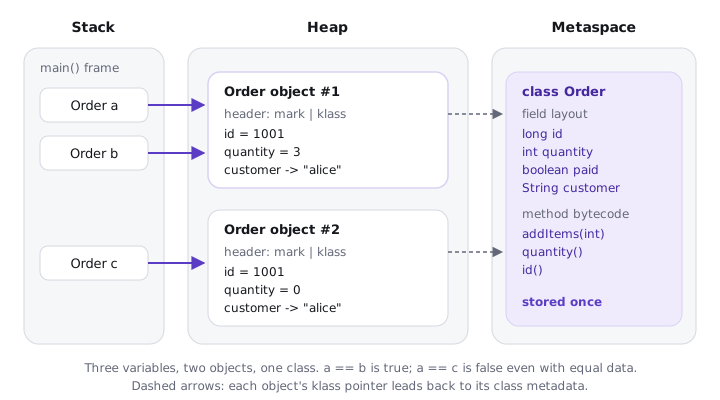
Notice three things:
- One class, many objects. Method bytecode is stored once in the class metadata, not copied into each object.
- Each object carries a pointer back to its class. That's how a call like
order.total()finds the right code at run time. aandbare two references to one object. There are three variables but only two objects.
02Classes and objects under the hood
Let's start with a small class you'd see in any order service.
public class Order {
    // fields: the state each object carries
    private final long id;
    private int quantity;
    private boolean paid;
    private String customer;

    public Order(long id, String customer) {
        this.id = id;
        this.customer = customer;
    }

    // methods: behaviour shared by every Order
    public void addItems(int n) { quantity += n; }
    public int quantity()       { return quantity; }
    public long id()            { return id; }
}
A class body holds members: fields (state), methods (behaviour), constructors (setup, which technically aren't members because they aren't inherited), initialiser blocks and nested types. Instance fields exist once per object; static fields exist once per class. Methods are never per object, only their data is.
References, not objects
Try it yourself first
Before reading on, predict the four printed lines.
Order a = new Order(1001, "alice");
Order b = a;
Order c = new Order(1001, "alice");

b.addItems(3);
System.out.println(a.quantity());                    // ?
System.out.println(a == b);                          // ?
System.out.println(a == c);                          // ?
System.out.println(a.getClass() == c.getClass());    // ?
The answers are 3, true, false, true. Notice:
Order b = a;copies the reference, not the object. CallingaddItemsthroughbchanges the one object both variables point at.a == cisfalseeven though both orders hold identical data. For references,==compares identity (same object), never contents. Contents are whatequalsis for, if the class overrides it.- Both objects report the same
Classobject, which we'll come back to.
This is also why Java is pass-by-value even for objects: a method receives a copy of the reference, so it can mutate the object but can't make your variable point somewhere else. We covered that in Methods and why Java is always pass-by-value.
What new compiles to
new Order(1001, "alice") is one expression in Java but three steps in bytecode. Running javap -c on the caller shows:
new           #7   // class com/shop/Order      1. allocate, fields zeroed
dup                                             2. keep a copy of the reference
ldc2_w        #9   // long 1001
ldc           #11  // String alice
invokespecial #13  // Method Order."<init>":(JLjava/lang/String;)V   3. run constructor
astore_1                                        4. store reference in local a
The new instruction allocates memory and sets every field to its default (0, false, null). Only then does invokespecial run the constructor, which the JVM calls <init>. In HotSpot, the allocation itself is usually a pointer bump inside a thread-local allocation buffer (TLAB), so it costs a few nanoseconds.
What an object looks like on the heap
Try it yourself first
Before reading on, guess how many bytes one Order object takes on a 64-bit JVM with default settings. It has a long, an int, a boolean and a String reference.
Every HotSpot object starts with a header:
- Mark word (8 bytes): the identity hash code once computed, GC age bits and lock state.
- Klass pointer (4 bytes with compressed class pointers, the default): points to the class metadata in Metaspace.
Then come the instance fields, which HotSpot reorders to pack them tightly, and finally padding so the size is a multiple of 8. For our Order, that's 12 bytes of header, 8 for the long, 4 for the int, 4 for the compressed String reference and 1 for the boolean: 29 bytes, padded to 32. The diagram lays out the bytes.
A 32-byte bar for one Order object: an 8-byte mark word, a 4-byte klass pointer, the int quantity filling the gap at offset 12, the 8-byte long id, the 4-byte customer reference, the 1-byte boolean and 3 bytes of padding; below it, a bare new Object() takes 16 bytes
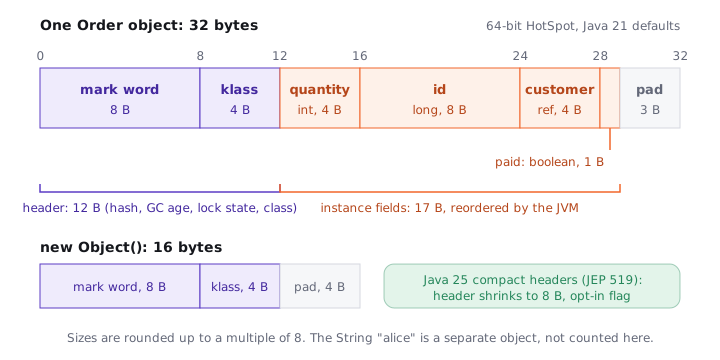
Notice that the String reference costs 4 bytes, but the String it points to is a separate object with its own header and its own byte[]. That's why "how big is this object" has a shallow answer (32 bytes) and a retained answer (everything it keeps alive). You can verify layouts yourself with the OpenJDK JOL tool: ClassLayout.parseClass(Order.class).toPrintable().
03Class objects and class loading
Every loaded class has exactly one java.lang.Class instance representing it, per class loader. It's an ordinary heap object, and it's your doorway to the class at run time: its name, its methods, its static fields (HotSpot stores them in this mirror object).
Order a = new Order(1001, "alice");

Class<? extends Order> k1 = a.getClass();          // from an object
Class<Order> k2 = Order.class;                     // class literal, no object needed
Class<?> k3 = Class.forName("com.shop.Order");     // by name, may throw ClassNotFoundException

System.out.println(k1 == k2 && k2 == k3);          // prints: true
System.out.println(k2.getSimpleName());            // prints: Order
A class goes through a fixed lifecycle before you can use it. The diagram below walks through it, including the part interviewers probe most: what actually triggers initialisation.
Five numbered stages: load the class file, link it (verify, prepare static fields with defaults, resolve symbols), initialise it by running clinit once, use it, and finally unload it when its class loader is collected; below, a list of what triggers initialisation and what does not
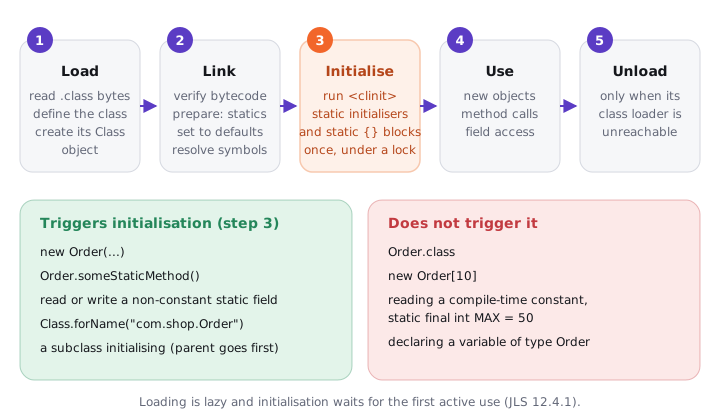
Loading is lazy: the JVM reads Order.class when something first needs it. Initialisation, which runs static field initialisers and static {} blocks in a method called <clinit>, happens on the first active use: creating an instance, calling a static method, or reading or writing a static field that isn't a compile-time constant. A subclass initialising triggers its superclass first.
Try it yourself first
Before reading on, decide which of the four lines below prints PricingRules initialised.
class PricingRules {
    static { System.out.println("PricingRules initialised"); }
    static final int MAX_ITEMS = 50;                          // compile-time constant
    static final List<String> REGIONS = List.of("EU", "US");  // not a constant
}

System.out.println(PricingRules.MAX_ITEMS);   // prints: 50 (no init, value inlined by javac)
Class<?> k = PricingRules.class;              // no init
PricingRules[] slots = new PricingRules[4];   // no init, only the array class is created
System.out.println(PricingRules.REGIONS);     // prints: PricingRules initialised, then [EU, US]
Notice that only the last line triggers it. MAX_ITEMS is a primitive static final with a constant initialiser, so javac copies 50 straight into the caller's bytecode and the class never needs to run. A class literal and an array type don't count as active use either. Class.forName("..."), on the other hand, does initialise by default.
04Real world: identity and class loaders in production
Two consequences of the model above show up in real systems, not only in interviews.
First, identity is not equality. Putting Order objects in a HashSet without overriding equals and hashCode means two orders with the same id are two different entries, because the default methods use identity. The default hashCode() is the identity hash code: generated on first call (in HotSpot, from a thread-local random generator, not from the memory address) and then stored in the mark word, so it stays stable even when the GC moves the object.
Second, a class's identity is its name plus the loader that defined it. Load com.shop.Order through two different class loaders and you get two unrelated classes with two different Class objects.
A team hot-reloads code in development with Spring Boot DevTools, which uses a separate "restart" class loader for application classes. An object cached in a library loaded by the base class loader survives the restart, and the next request fails with ClassCastException: class com.shop.Order cannot be cast to class com.shop.Order. Same name, different loaders, so different types. The same thing happens in application servers with multiple deployments and in plugin systems. The fix is to make sure one loader owns the class, or to stop caching instances across reloads.
05Advanced: header sizes, identity and the edge cases
A few sizes worth knowing for a 64-bit HotSpot JVM with default flags (compressed oops and compressed class pointers, heaps under ~32 GB):
| What | Size | Why |
|---|---|---|
new Object() |
16 bytes | 12-byte header plus 4 bytes padding |
Object with one int |
16 bytes | the int fits in the padding |
Our Order |
32 bytes | 29 bytes of data, rounded up to 8 |
new int[0] |
16 bytes | header plus a 4-byte length field |
| Reference field | 4 bytes | compressed oop; 8 bytes with heaps of 32 GB or more |
Headers dominate small objects. A million Order objects is about 32 MB shallow, and 12 MB of that is headers. That's the motivation for Compact Object Headers, which shrink the header to 8 bytes: experimental in Java 24 (JEP 450) and a product feature in Java 25 (JEP 519) behind -XX:+UseCompactObjectHeaders. On Java 21, the practical levers are fewer objects (primitive arrays instead of lists of wrappers) and staying under the 32 GB compressed-oops limit.
Many candidates say "objects live on the heap, so new always allocates on the heap". That's the language-level truth, but the JIT may scalar-replace an object that never escapes a method (escape analysis), keeping its fields in registers with no allocation at all. Say "semantically on the heap; the JIT can eliminate allocations that don't escape". It shows you know the difference between the model and the implementation.
Some other edge cases interviewers like:
- A class is not an object, but it is represented by one.
Order.classis aClass<Order>object; the metadata itself (bytecode, vtable, constant pool) lives in Metaspace, native memory outside the heap since Java 8. getClass()returns the runtime class. ForObject o = new Order(...),o.getClass()isOrder.class, notObject.class. The static type decides what compiles; the runtime class decides which override runs.- Objects die by reachability, not scope. When
agoes out of scope, the object is eligible for GC only if nothing else (likeb, or a cache) still references it. - Initialisation runs once and is thread-safe. The JVM holds an initialisation lock per class, so two threads racing to first use see
<clinit>run exactly once. If it throws, you getExceptionInInitializerErrorthe first time andNoClassDefFoundErroron every later use.
06How to say it in the interview
When I ask "what's the difference between a class and an object?", I'm listening for three things beyond the blueprint line: that variables hold references, so == is identity; that an object has a header and a real size you can estimate; and that classes are loaded lazily and initialised on first active use. Mentioning that class identity includes the class loader is a strong senior signal.
In the interview
"A class is a type: it declares fields and methods and is loaded once per class loader, with its metadata in Metaspace and one java.lang.Class object representing it. An object is an instance allocated on the heap with new. In HotSpot each object has a 12-byte header by default, an 8-byte mark word for hash, GC age and locking and a 4-byte compressed class pointer, then its fields, padded to a multiple of 8, so an empty object is 16 bytes. Variables hold references, so == compares identity, and equals is what compares contents. Classes are initialised lazily on first active use: new, a static method call or a non-constant static field access, and reading a compile-time constant or writing Order.class doesn't trigger it. And class identity is the name plus the loader, which is why you can see Order cannot be cast to Order across class loaders."
On the whiteboard
class  = type + code, loaded once per loader (Metaspace) + 1 Class object (heap)
object = header + fields + padding (heap), created by new
  header: mark word 8B (hash, GC age, lock) + klass ptr 4B
  new Object() = 16B; Order{long,int,boolean,ref} = 32B
variable = reference; b = a copies the reference
== on refs  -> identity;  equals -> contents (if overridden)
new -> new / dup / invokespecial <init>
lifecycle: load -> link (verify, prepare, resolve) -> <clinit> -> use -> unload
init on: new, static call, non-constant static field, subclass init, forName
not on:  Order.class, new Order[n], static final constants
class identity = name + defining class loader