

Comparing objects in Java
Identity with ==, equality with equals and Objects.equals, natural order with Comparable, custom order with Comparator chains, and the overflow, BigDecimal and array traps interviewers use to test it.
On this page
⚖️ What does "comparing objects" mean in Java?
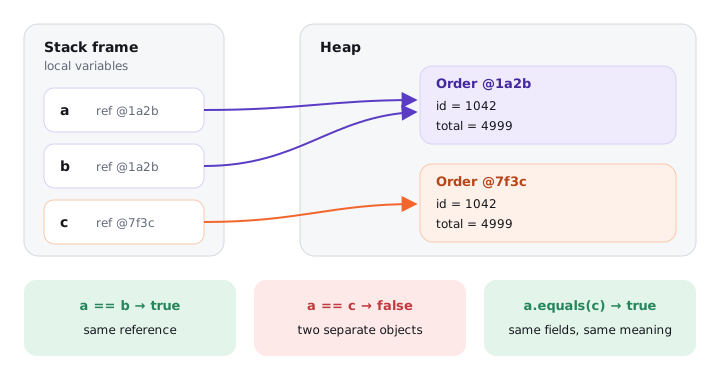
Java gives you three different questions you can ask about two objects. a == b asks "are these the same object in memory?". a.equals(b) asks "do these two objects mean the same thing?". a.compareTo(b) (or a Comparator) asks "which one comes first?". Two Order objects for order #1042 loaded by two different queries are not ==, should be equals, and sort to the same position.
For this lesson, we'll focus on how you pick the right question, how Comparable and Comparator work, the contracts behind them, and the bugs that show up when those contracts are broken. Interviewers love this topic because it starts as a warm-up ("== vs equals?") and can be escalated, three questions later, into BigDecimal scale, integer overflow and TimSort exceptions. That makes it a quick way to find where your knowledge stops.
Below the line (out of scope)
- How to write
equals()andhashCode()correctly: The equals() and hashCode() contracts - String-specific equality and the string pool: String equality
- Locale-aware text ordering with
java.text.Collatorbeyond a mention
The 30-second answer
== compares references for objects (identity), equals() compares meaning (by default it's also identity, until a class overrides it), and Objects.equals(a, b) is the null-safe version. For ordering, a class implements Comparable<T> to define its natural order through compareTo, and a Comparator<T> defines any other order from outside the class. Build comparators with Comparator.comparing(...).thenComparing(...), never with a - b (it overflows). Keep compareTo consistent with equals, or sorted collections behave differently from hash collections: new BigDecimal("1.0") and new BigDecimal("1.00") are two elements in a HashSet but one in a TreeSet.
What you’ll learn
- Separate identity (
==), equality (equals,Objects.equals) and ordering (compareTo,compare) - State the
Comparablecontract and whycompareToshould be consistent with equals (BigDecimal 1.0 vs 1.00 inHashSetvsTreeSet) - Build comparators with
Comparator.comparing,thenComparing,comparingLong,nullsFirstand know whatreversed()reverses - Spot the subtraction-overflow comparator and TimSort's "violates its general contract" exception
- Know which sorts are stable, and when to reach for
Arrays.equals,Arrays.deepEqualsandArrays.compare
Interview radar
Asked very often: What's the difference between == and equals(), and when do you use Comparable versus Comparator?
Senior rounds probe: Why a - b is a broken comparator, what "consistent with equals" means for BigDecimal in a TreeSet, and how far reversed() reaches in a chain.
Production angle: A subtracting comparator that overflows and silently misorders a retry queue, or TimSort throwing "Comparison method violates its general contract!" only on large inputs.
01Picture it first: two identical invoices on your desk
Imagine two printed invoices on your desk. Same order number, same amount, same customer. Are they "the same invoice"? If you mean "the same sheet of paper", no: there are two sheets. If you mean "the same bill to pay", yes. And if your manager asks you to file them in date order, that's a third question entirely: neither "same paper" nor "same bill", but "which goes first".
Java keeps those three questions separate. The diagram below shows two variables pointing at one object and a third pointing at an equal but separate object.
Variables a and b hold the same reference so a == b is true, while c points to a separate Order with the same data, so a == c is false but a.equals(c) is true
Here are the three tools side by side:
| Question | Tool | Default behaviour | Who defines it |
|---|---|---|---|
| Same object? | == |
compares references | the JVM, cannot be changed |
| Same meaning? | equals(Object) |
Object.equals is this == obj |
the class, by overriding |
| Which comes first? | compareTo(T) / compare(T, T) |
none, you opt in | the class (Comparable) or a caller (Comparator) |
02Identity and equality under the hood
Try it yourself first
Before reading on, predict the four lines. Then think about which line would throw if paid were null.
record Money(long cents, String currency) {}

Money price = new Money(4_999, "INR");
Money paid  = new Money(4_999, "INR");
Money alias = price;

System.out.println(price == paid);              // false
System.out.println(price == alias);             // true
System.out.println(price.equals(paid));         // true (records generate equals)
System.out.println(Objects.equals(price, null)); // false, no exception
Notice three things:
==on references compiles to a single bytecode instruction,if_acmpeqorif_acmpne. It compares two pointers and nothing else. No method is called, so no class can change what it means.equalscompiles toinvokevirtual java/lang/Object.equals:(Ljava/lang/Object;)Z. It's a normal virtual call, so the runtime class of the receiver decides whichequalsruns. If the receiver isnull, you get aNullPointerExceptionbefore any comparison happens.Objects.equals(a, b)is(a == b) || (a != null && a.equals(b)). Two nulls are equal, one null is not equal to anything, and the identity short-circuit saves the call when both sides are the same object.
That last point is why I write Objects.equals(order.coupon(), other.coupon()) for nullable fields instead of order.coupon().equals(...). For primitives, == compares values, and for floating point you should prefer Double.compare(a, b) == 0 when NaN or -0.0 might appear: 0.0 == -0.0 is true but Double.compare(0.0, -0.0) is 1.
Arrays never override equals. int[] a = {1, 2}; int[] b = {1, 2}; a.equals(b) is false, because it's still Object.equals. We'll come back to Arrays.equals at the end of this lesson.
03Comparable: teaching a class its natural order
Comparable<T> has one method, int compareTo(T other). It returns a negative number if this comes before other, zero if they rank equally, and a positive number if this comes after. Any class that implements it gets a natural order, and every sorting API in the JDK picks that up: Collections.sort, List.sort(null), TreeMap, TreeSet, PriorityQueue, Stream.sorted().
Try it yourself first
Write a compareTo for an invoice that sorts by due date, then by amount. Don't subtract anything.
import java.time.LocalDate;

public record Invoice(String id, LocalDate dueDate, long amountCents)
        implements Comparable<Invoice> {

    @Override
    public int compareTo(Invoice other) {
        int byDate = dueDate.compareTo(other.dueDate);
        if (byDate != 0) return byDate;
        int byAmount = Long.compare(amountCents, other.amountCents);
        if (byAmount != 0) return byAmount;
        return id.compareTo(other.id);   // tie-breaker keeps it consistent with equals
    }
}
The javadoc for Comparable lists the contract. For every x, y and z:
- Antisymmetry:
sgn(x.compareTo(y)) == -sgn(y.compareTo(x)). Ifxis beforey,yis afterx. - Transitivity:
x > yandy > zmeansx > z. - Consistent ties: if
x.compareTo(y) == 0, thenxandycompare the same way against everyz. - Recommended, not required:
(x.compareTo(y) == 0) == x.equals(y). This is called being consistent with equals. x.compareTo(null)should throwNullPointerException, even thoughx.equals(null)returnsfalse.
Notice the tie-breaker on id in the example. Without it, two different invoices with the same date and amount would compare as 0 but not be equals, which breaks rule 4. That sounds academic until you put them in a TreeSet.
Why "consistent with equals" matters: BigDecimal 1.0 vs 1.00
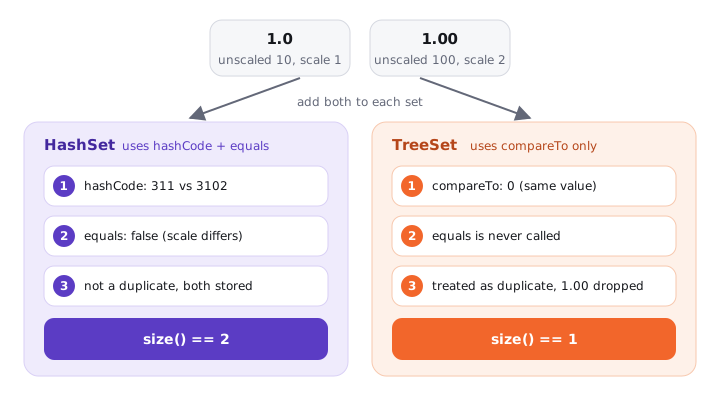
BigDecimal is the famous class that is not consistent with equals. Its equals compares value and scale, so 1.0 (scale 1) and 1.00 (scale 2) are not equal. Its compareTo compares numeric value only, so they compare as 0.
Try it yourself first
Predict both sizes before you look at the comments.
BigDecimal a = new BigDecimal("1.0");
BigDecimal b = new BigDecimal("1.00");

System.out.println(a.equals(b));      // false (scale 1 vs scale 2)
System.out.println(a.compareTo(b));   // 0

Set<BigDecimal> hash = new HashSet<>(List.of(a, b));
Set<BigDecimal> tree = new TreeSet<>(List.of(a, b));
System.out.println(hash.size());      // 2
System.out.println(tree.size());      // 1
A HashSet decides duplicates with hashCode and equals. A TreeSet never calls equals at all: it walks a red-black tree using compareTo, and a result of 0 means "already present". The same two objects, two different answers. The figure below follows both paths.
The same two BigDecimal values go into a HashSet, which uses equals and keeps both, and into a TreeSet, which uses compareTo and keeps only one
The Set interface says a set contains no two elements where e1.equals(e2), and TreeSet's javadoc admits it breaks that promise when the ordering isn't consistent with equals. Use stripTrailingZeros() or setScale(2, RoundingMode.HALF_EVEN) before storing money in hash-based collections, or compare with compareTo(...) == 0 in your own code.
04Comparator: ordering from the outside
Comparable gives a class one natural order. Real systems need many: the orders screen sorts by date, the finance export by amount, the support view by customer name. Comparator<T> is a functional interface, int compare(T a, T b), that lives outside the class. You can have as many as you like, and you can order classes you don't own, like String by length.
Since Java 8, you rarely write compare by hand. The static and default methods on Comparator compose:
record Order(String customer, long totalCents, String coupon) {}

List<Order> orders = new ArrayList<>(List.of(
        new Order("bob", 500, null),
        new Order("amy", 900, "WELCOME"),
        new Order("bob", 900, "APRIL")));

// customer A to Z, then biggest order first
orders.sort(Comparator.comparing(Order::customer)
        .thenComparing(Order::totalCents, Comparator.reverseOrder()));
// amy 900, bob 900, bob 500

// orders without a coupon first, then coupon A to Z
orders.sort(Comparator.comparing(Order::coupon,
        Comparator.nullsFirst(Comparator.naturalOrder())));
// bob 500 (null), bob 900 (APRIL), amy 900 (WELCOME)

// primitive key, no boxing
Comparator<Order> byTotal = Comparator.comparingLong(Order::totalCents);
Notice these details, because interviewers probe each one:
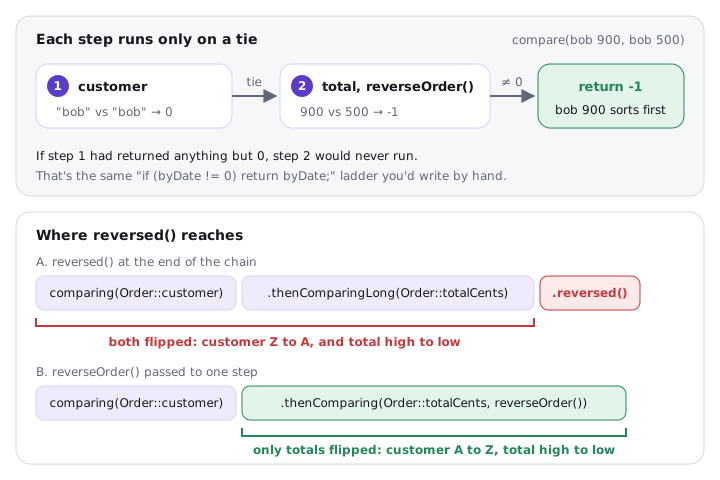
comparing(keyExtractor)pulls aComparablekey out of each object and compares the keys.comparing(keyExtractor, keyComparator)lets you choose how keys compare.thenComparingonly runs when the previous comparator returned0. It's the "tie-breaker" chain, same as theif (byDate != 0)code inInvoice.comparingInt/comparingLong/comparingDoubleavoid boxing every key. On a sort of 1 million orders that's around 20 million comparisons, and the boxed version may allocate aLongfor each key outside the -128 to 127 cache.nullsFirst/nullsLastwrap another comparator and handlenullelements or keys (depending on where you put them). Without them,naturalOrder()throwsNullPointerExceptionon the first null.reversed()reverses everything before it in the chain, not only the last step.
That last one bites people. comparing(Order::customer).thenComparingLong(Order::totalCents).reversed() sorts customers Z to A and totals high to low. If you only want the totals reversed, pass Comparator.reverseOrder() to that one step, as in the first example.
The picture below puts both ideas side by side: each step in the chain runs only on a tie, and reversed() covers every step to its left.
Top: comparing two bob orders, the customer step ties at 0 so the reverse-order total step runs and returns -1; bottom: reversed() at the end flips both customer and total, while reverseOrder() on one step flips only the total
Many candidates write Comparator.comparing(o -> o.customer()).reversed() and are surprised it doesn't compile. With a lambda and a chained call, the compiler can't infer T from the target type, so o is Object and o.customer() doesn't exist. Use a method reference (Order::customer), or give the lambda a type: Comparator.comparing((Order o) -> o.customer()).reversed().
05Real world: the comparator that subtracts
Here's a bug I've seen in code review more than once. Someone needs to sort by an int and writes the shortest comparator they can think of.
Try it yourself first
What does this sort produce? Work it out before reading the comment.
Comparator<Integer> bySubtraction = (a, b) -> a - b;   // looks fine

List<Integer> balances = new ArrayList<>(List.of(5, Integer.MIN_VALUE, 3));
balances.sort(bySubtraction);
System.out.println(balances);   // [3, 5, -2147483648]  wrong!

System.out.println(bySubtraction.compare(Integer.MIN_VALUE, 1)); // 2147483647
Integer.MIN_VALUE - 1 overflows and wraps to Integer.MAX_VALUE, a large positive number, so the comparator claims the most negative number is bigger than 1. Subtraction only works when the difference of any two values fits in an int, and you rarely know that for IDs, balances, timestamps or hash codes. The fix is Integer.compare(a, b) (or Comparator.comparingInt), which compares instead of subtracting.
In one service, a priority queue of retry jobs used (a, b) -> (int) (a.nextAttemptMillis() - b.nextAttemptMillis()). The long difference was cast to int, so any two jobs more than about 24.8 days apart (2^31 ms) compared in the wrong direction. Jobs scheduled for next month jumped ahead of jobs due now. Nothing crashed; the queue was quietly wrong. Comparator.comparingLong(Job::nextAttemptMillis) fixed it in one line.
Broken comparators can also throw. List.sort and Arrays.sort on objects use TimSort, which checks its invariants while merging runs. If your comparator violates transitivity or antisymmetry (a random comparator, or one that reads a mutable field another thread is changing), you can get IllegalArgumentException: Comparison method violates its general contract!. It usually appears only above a few dozen elements, so unit tests with 5 items pass and production fails.
06Advanced: records, stability and comparing arrays
Records give you equals, not order
A record gets equals, hashCode and toString generated from its components (through an invokedynamic call to ObjectMethods.bootstrap), so two Money(4999, "INR") instances are equal. A record does not get compareTo. You implement Comparable yourself, and the cleanest way is to delegate to a static comparator:
public record Employee(String department, String name, int level)
        implements Comparable<Employee> {

    private static final Comparator<Employee> ORDER =
            Comparator.comparing(Employee::department)
                      .thenComparingInt(Employee::level)
                      .thenComparing(Employee::name);

    @Override
    public int compareTo(Employee other) {
        return ORDER.compare(this, other);
    }
}
Because every component appears in the chain, compareTo returns 0 only when all components are equal, which is exactly when the generated equals returns true. The record is consistent with equals for free. Records are covered in depth in Records in Java.
Sorting stability
A stable sort keeps equal elements in their original relative order. That matters when you sort in passes: sort by amount, then sort by customer, and a stable sort leaves each customer's orders still sorted by amount.
| API | Algorithm | Stable? |
|---|---|---|
List.sort, Collections.sort, Arrays.sort(Object[]) |
TimSort | yes, guaranteed by the javadoc |
Arrays.sort(int[]) and other primitives |
Dual-Pivot Quicksort | not stable, but equal primitives are indistinguishable |
Arrays.parallelSort(Object[]) |
parallel merge sort | yes |
stream.sorted() |
delegates to the above | stable for ordered streams only |
PriorityQueue |
binary heap | no ordering guarantee among equals |
Even with a stable sort, I prefer one comparator chain (comparing(customer).thenComparing(amount)) over two passes. It's one sort instead of two and it states the intent.
Arrays.equals, deepEquals and friends
Try it yourself first
Three comparisons of two 2D arrays with the same numbers. Which ones are true?
int[][] gridA = {{1, 2}, {3}};
int[][] gridB = {{1, 2}, {3}};

System.out.println(gridA.equals(gridB));              // false (identity)
System.out.println(Arrays.equals(gridA, gridB));      // false (rows compared with int[].equals, identity)
System.out.println(Arrays.deepEquals(gridA, gridB));  // true

System.out.println(Arrays.equals(new int[]{1, 2}, new int[]{1, 2})); // true
System.out.println(Arrays.compare(new int[]{1, 2}, new int[]{1, 3})); // negative (Java 9+)
Arrays.equals(Object[], Object[]) compares elements with equals, and each row is an int[] whose equals is identity, so the rows don't match. Arrays.deepEquals recurses into nested arrays. The same split exists for hashing (Arrays.hashCode vs Arrays.deepHashCode) and printing (toString vs deepToString). Since Java 9, Arrays.compare gives arrays a lexicographic order and Arrays.mismatch returns the first differing index, which is handy in tests.
equals on a well-written class is a few field comparisons, nanoseconds. compareTo through a Comparator.comparing chain adds a lambda call and possibly boxing per key. For a one-off sort of 10,000 items it doesn't matter. For a sort of 10 million primitives, sort a long[] of keys instead of a list of objects: a primitive array is contiguous and avoids a pointer chase per comparison.
Comparing strings properly
String implements Comparable by UTF-16 code unit, so "Zara" sorts before "amy" (uppercase letters have lower codes). Use String.CASE_INSENSITIVE_ORDER for case-insensitive ASCII-ish sorting, and Collator.getInstance(locale) for user-facing names where accents and locale rules matter.
07How to say it in the interview
When I ask "how do you compare objects in Java?", I'm listening for three things: that you separate identity, equality and ordering cleanly; that you know compareTo should be consistent with equals and can name what breaks when it isn't; and that you'd never write a subtraction comparator. Bonus points if you mention reversed() scoping or TimSort's "violates its general contract" exception.
In the interview
"There are three questions. == is identity: same reference, one bytecode instruction, nothing to override. equals is logical equality, defined by the class; I use Objects.equals when either side can be null. For ordering, Comparable gives a class its natural order through compareTo, and Comparator gives any other order from outside. I build comparators with Comparator.comparing and thenComparing, using comparingInt or comparingLong for primitive keys and nullsFirst when keys can be null. I never subtract in a comparator because it overflows; Integer.compare doesn't. And I keep compareTo consistent with equals, otherwise a TreeSet and a HashSet disagree: BigDecimal 1.0 and 1.00 are two elements in a HashSet and one in a TreeSet."
Here's how this might look if you sketch it on the whiteboard:
On the whiteboard
Comparing objects
==identity (if_acmpeq) ·equalsmeaning ·compareToorderObjects.equals(a, b)null-safe- compareTo: antisymmetric, transitive, ==0 consistent, NPE on null
- consistent with equals → else TreeSet ≠ HashSet (BigDecimal 1.0/1.00)
comparing().thenComparing(),comparingInt,nullsFirst,reversed()= whole chain- never
a - b→Integer.compare - List.sort = TimSort, stable · arrays:
Arrays.equals/deepEquals
Further reading (9)
- Comparable (Java SE 21 API)
- Comparator (Java SE 21 API)
- Object.equals (Java SE 21 API)
- BigDecimal (Java SE 21 API)
- Arrays (Java SE 21 API)
- JLS §15.21.3: Reference Equality Operators == and !=
- The Java Tutorials: Object Ordering
- Effective Java, 3rd ed., Item 14: Consider implementing Comparable
- Baeldung: Comparing Objects in Java