

Intermediate vs terminal operations
Intermediate and terminal stream operations, laziness, operation catalogues, one-shot stream reuse, onClose handlers and closing file-backed streams.
On this page
- Picture it first: writing the ticket, then pulling the line
- Laziness under the hood: a pipeline without a terminal does nothing
- The intermediate operation catalogue
- The terminal operation catalogue
- Advanced: why reuse throws "operated upon or closed"
- Closing streams: onClose, close() and Files.lines
- How to say it in the interview
🧭 What are intermediate and terminal stream operations?
An intermediate operation adds another stage to a stream pipeline and returns a stream, like filter, map or sorted. A terminal operation starts traversal and returns a non-stream result or performs a final side effect, like count, toList, findFirst or forEach. Think of a stream as a coffee order ticket: intermediate operations add instructions to the ticket, and the terminal operation is the barista actually making the drink.
For this lesson, we'll focus on the line you need to draw in interviews: which operations build the pipeline, which operations execute it, why a stream without a terminal operation does nothing, and why a stream is single-use once it has been linked or consumed. Interviewers ask this because it is the quickest way to tell whether you learned streams as syntax or as a lazy execution model.
Below the line (out of scope)
- Pipeline internals like
Sink,Spliteratorand stream flags: How a stream pipeline executes - Basic stream creation and sources: Introduction to Java streams
findFirst,findAnyand match operations in depth: findFirst vs findAny and short-circuiting- Grouping and downstream collectors: Grouping and partitioning
The 30-second answer
Intermediate operations return another stream and are lazy. They usually record work to do later, so orders.stream().filter(...).map(...) does not touch the source until a terminal operation such as toList(), count(), sum() or findFirst() starts traversal. Stateless intermediate operations like filter and map can be fused into one pass; stateful operations like sorted, distinct, limit and skip may buffer or remember elements. Terminal operations end the pipeline and make the stream unusable afterwards. If you try to reuse the same stream object, the JDK throws IllegalStateException: stream has already been operated upon or closed; store the source or a Supplier<Stream<T>>, not the stream.
What you’ll learn
- Separate intermediate operations from terminal operations by return type and execution behavior
- Explain why
filter,map,sortedandpeekdo nothing without a terminal operation - Use a catalogue of stateless, stateful, short-circuiting and non-short-circuiting operations in Java 21
- Reproduce and explain
IllegalStateException: stream has already been operated upon or closed - Avoid stream reuse by storing the source, using
Supplier<Stream<T>>, or collecting then re-streaming - Use
onClose,close()and try-with-resources correctly forFiles.lines
01Picture it first: writing the ticket, then pulling the line
Picture a cafe ticket printer. Each intermediate operation adds one instruction to the ticket: keep paid orders, turn them into cents, sort them by amount. Nothing is made yet, because the ticket has not reached the barista.
The terminal operation is the barista pulling the next order through the line. No terminal operation means no traversal. That one sentence prevents half the beginner stream bugs I see in code review.
A stream source has intermediate stages that only add instructions until a terminal operation pulls elements through the pipeline
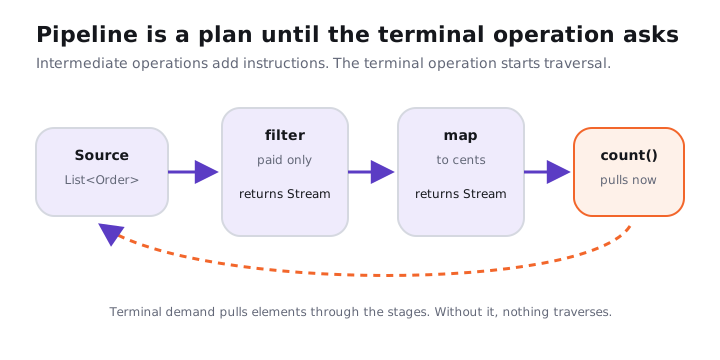
Notice the direction. The source sits on the left, the intermediate stages sit in the middle, and the terminal operation is the thing that asks for elements. We cover the Sink chain behind that pull in How a stream pipeline executes; here we care about the public API boundary.
02Laziness under the hood: a pipeline without a terminal does nothing
Try it yourself first
Before reading the output, say which lines print when the pipeline is assigned and which lines print when count() runs.
import java.util.List;
import java.util.stream.Stream;

record Order(String id, int cents, boolean paid) { }

final class LazyIntermediateDemo {
    public static void main(String[] args) {
        List<Order> orders = List.of(
                new Order("o-1", 1200, true),
                new Order("o-2", 900, false),
                new Order("o-3", 300, true)
        );

        Stream<Integer> paidCents = orders.stream()
                .peek(order -> System.out.println("peek " + order.id()))
                .filter(Order::paid)
                .map(Order::cents);

        System.out.println("pipeline built");
        System.out.println(paidCents.count());
    }
}
On Java 21, the output is:
pipeline built
peek o-1
peek o-2
peek o-3
2
peek, filter and map did not run when paidCents was assigned. They ran when count() started consuming the pipeline. If you remove the terminal operation, the program prints only pipeline built.
Notice three things:
filterandmapreturn stream objects, so they can be chained.count()returns along, so the pipeline is over after it runs.peekis not a reliable business side-effect hook. It only runs if traversal happens, and some terminals can skip traversal when the size is already known.
Here is the trade-off I recommend. Use streams when your code reads like a transformation from source to result. Use a loop when the important part is mutation, early break with complex rules, checked exceptions, or logging that must happen exactly once per element.
03The intermediate operation catalogue
Intermediate operations answer the question, "What should happen to each element before the final answer is produced?" Some are stateless, meaning they do not need to remember other elements. Some are stateful, meaning they may need memory, coordination, buffering, or knowledge of encounter order.
| Operation | Kind | Returns | What it does | Interview note |
|---|---|---|---|---|
filter(Predicate) |
Stateless | Stream<T> |
Keeps elements whose predicate is true | Often fused with map in one traversal |
map(Function) |
Stateless | Stream<R> |
Converts each element one-to-one | Usually clears sorted and distinct knowledge |
mapToInt, mapToLong, mapToDouble |
Stateless | Primitive stream | Converts references to primitive values | Avoids boxing for numeric work |
flatMap(Function<T, Stream<R>>) |
Mostly stateless per element | Stream<R> |
Replaces each element with zero or more elements | Closes each mapped stream after use |
flatMapToInt, flatMapToLong, flatMapToDouble |
Mostly stateless per element | Primitive stream | Flattens to primitive streams | Useful before sum, average, summaryStatistics |
mapMulti(BiConsumer) |
Stateless | Stream<R> |
Emits zero or more results without creating a stream per element | Since Java 16, good for small expansions |
mapMultiToInt, mapMultiToLong, mapMultiToDouble |
Stateless | Primitive stream | Primitive version of mapMulti |
Avoids nested primitive streams |
peek(Consumer) |
Stateless | Stream<T> |
Runs an action as elements pass | Debugging only, not business logic |
unordered() |
Stateless flag change | Stream<T> |
Removes the encounter-order constraint if possible | Can help parallel short-circuiting |
sequential() |
Mode change | Stream<T> |
Marks the pipeline sequential | Last mode-setting call wins |
parallel() |
Mode change | Stream<T> |
Marks the pipeline parallel | Not a performance promise |
onClose(Runnable) |
Close-handler stage | Stream<T> |
Registers a handler for close() |
Terminal operations do not automatically call close() |
distinct() |
Stateful | Stream<T> |
Keeps the first equal element according to equals |
Needs remembered keys, especially costly on ordered parallel streams |
sorted() |
Stateful | Stream<T> |
Sorts by natural order | Must see all finite input before emitting sorted output |
sorted(Comparator) |
Stateful | Stream<T> |
Sorts by a comparator | Comparator must be consistent enough for your result |
limit(long) |
Short-circuiting stateful | Stream<T> |
Takes at most n elements |
Can make infinite streams finite |
skip(long) |
Stateful | Stream<T> |
Drops the first n elements |
Ordered parallel streams may pay coordination cost |
takeWhile(Predicate) |
Short-circuiting stateful | Stream<T> |
Since Java 9, takes the longest prefix matching the predicate | Prefix means encounter order matters |
dropWhile(Predicate) |
Stateful | Stream<T> |
Since Java 9, drops the longest matching prefix | After the first false, later elements pass through |
The table is dense, but the mental split is small. Stateless operations can usually stream element by element. Stateful operations may need to remember what came before or wait for more input before sending anything downstream.
Try it yourself first
Predict the print order. Does sorted() let the first two source elements flow straight to limit(2), or does it have to wait?
import java.util.List;

final class StatefulIntermediateDemo {
    public static void main(String[] args) {
        List.of("paid", "failed", "created", "refunded").stream()
                .peek(status -> System.out.println("source " + status))
                .sorted()
                .limit(2)
                .forEach(status -> System.out.println("out " + status));
    }
}
The output is:
source paid
source failed
source created
source refunded
out created
out failed
sorted() is the barrier. It must see the finite input before it knows the first sorted value, so limit(2) cannot save it from reading all four elements. This is why stream.sorted().findFirst() is often the wrong way to get a minimum; use min(comparator) when you only need one best element.
04The terminal operation catalogue
Terminal operations answer the question, "What final result do we want?" They trigger traversal, produce the answer, and consume the stream. After one terminal operation, you should treat the stream object as dead.
| Operation | Short-circuits? | Returns | What it does | Empty-stream behavior |
|---|---|---|---|---|
toList() |
No | List<T> |
Since Java 16, collects to an unmodifiable list | Empty unmodifiable list |
collect(Collector) |
No | Collector result | General mutable reduction, often maps or groups | Depends on collector |
collect(Supplier, BiConsumer, BiConsumer) |
No | Mutable result | Custom mutable reduction without a Collector object |
Supplier result |
toArray() |
No | Object[] |
Copies elements to an array | Empty array |
toArray(IntFunction<A[]>) |
No | A[] |
Copies elements to a typed array | Empty typed array |
reduce(BinaryOperator) |
No | Optional<T> |
Combines elements without an identity | Optional.empty() |
reduce(identity, BinaryOperator) |
No | T |
Combines elements starting from identity | Identity |
reduce(identity, accumulator, combiner) |
No | U |
Parallel-friendly mapped reduction | Identity |
count() |
Sometimes optimized | long |
Counts elements | 0 |
min(Comparator) |
No | Optional<T> |
Finds the smallest element by comparator | Optional.empty() |
max(Comparator) |
No | Optional<T> |
Finds the largest element by comparator | Optional.empty() |
forEach(Consumer) |
No guaranteed short-circuit | void |
Performs an action for each element | Does nothing |
forEachOrdered(Consumer) |
No | void |
Performs actions in encounter order when one exists | Does nothing |
anyMatch(Predicate) |
Yes | boolean |
True if at least one element matches | false |
allMatch(Predicate) |
Yes | boolean |
True if every element matches | true |
noneMatch(Predicate) |
Yes | boolean |
True if no element matches | true |
findFirst() |
Yes | Optional<T> |
Returns the first element in encounter order | Optional.empty() |
findAny() |
Yes | Optional<T> |
Returns any element, useful in parallel | Optional.empty() |
iterator() |
Pull terminal | Iterator<T> |
Gives an iterator over pipeline results | Empty iterator |
spliterator() |
Pull terminal | Spliterator<T> |
Gives a spliterator over pipeline results | Empty spliterator |
iterator() and spliterator() surprise people because they do not look like count() or toList(). They still consume the pipeline contract: once you ask a stream for its traversal cursor, do not keep using the original stream. The cursor becomes the way you consume it.
The bug I see in production is a repository method that returns a Stream<Row> from a database or file and a caller that logs stream.count() before handing the same stream to the mapper. The log line works. The mapper then throws IllegalStateException because the stream has already been consumed. The fix is not to catch the exception; the fix is to make the ownership clear and run one terminal operation.
05Advanced: why reuse throws "operated upon or closed"
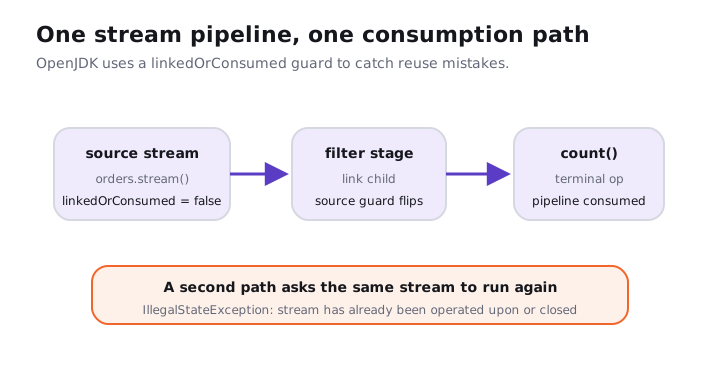
Streams are deliberately one-shot. In OpenJDK's AbstractPipeline, the source stage has a boolean named linkedOrConsumed. When you attach another intermediate stage, the previous stage is marked as linked. When a terminal operation evaluates the pipeline, the source stage is marked as consumed.
That guard catches two families of mistakes. First, you cannot use the same stream for two terminal operations. Second, you should not keep using an earlier stream reference after you have already linked a child pipeline from it.
A stream source flips its linkedOrConsumed guard when a child stage is linked and again when a terminal operation consumes the pipeline
Try it yourself first
Read this code and predict which two lines throw IllegalStateException. The first one surprises more people than the second.
import java.util.List;
import java.util.stream.Stream;

final class StreamReuseDemo {
    public static void main(String[] args) {
        Stream<String> statuses = List.of("paid", "failed", "paid").stream();
        Stream<String> paid = statuses.filter("paid"::equals);

        try {
            statuses.count();
        } catch (IllegalStateException e) {
            System.out.println(e.getMessage());
        }

        System.out.println(paid.count());

        try {
            paid.findFirst();
        } catch (IllegalStateException e) {
            System.out.println(e.getMessage());
        }
    }
}
On Java 21, both caught messages are:
stream has already been operated upon or closed
stream has already been operated upon or closed
The first exception happens because statuses.filter(...) already linked a new stage to statuses. The second happens because paid.count() consumed the pipeline. The JDK does not try to rewind the source, because many sources cannot be rewound: a socket, a file reader, a generator, or a spliterator over a mutable data structure.
Common causes are boring and common:
| Cause | What it looks like | Fix I prefer |
|---|---|---|
| Storing a stream in a field | this.rows = files.lines(path) then multiple methods use rows |
Store Path, List<T> or Supplier<Stream<T>> |
| Reusing a local variable | Stream<T> s = ...; s.count(); s.toList(); |
Create a fresh stream from the source for each terminal operation |
| Returning the same stream twice | A getter returns a cached stream field | Return a new stream each call, or return a collection |
| Debug terminal before real terminal | log.info("{}", stream.count()); return stream.toList(); |
Collect once, or log during the one real traversal |
| Closing early | stream.close(); stream.count(); |
Scope stream ownership with try-with-resources |
Here is the supplier pattern. It is useful when the source is reusable and you want to describe the same pipeline twice.
import java.util.List;
import java.util.function.Supplier;
import java.util.stream.Stream;

final class StreamSupplierFixDemo {
    public static void main(String[] args) {
        List<String> statuses = List.of("paid", "failed", "paid");
        Supplier<Stream<String>> paidStatuses = () -> statuses.stream()
                .filter("paid"::equals);

        System.out.println(paidStatuses.get().count());
        System.out.println(paidStatuses.get().toList());
    }
}
For a small result that you truly need more than once, collect and re-stream the collection. The simple option is Supplier<Stream<T>>; it stops being enough when the source is expensive, remote, or time-sensitive. In that case, materialize deliberately and name the cost.
import java.util.List;

record Invoice(String id, int cents, boolean overdue) { }

final class CollectThenRestreamDemo {
    public static void main(String[] args) {
        List<Invoice> overdue = List.of(
                new Invoice("i-1", 500, true),
                new Invoice("i-2", 700, false),
                new Invoice("i-3", 300, true)
        ).stream()
                .filter(Invoice::overdue)
                .toList();

        int total = overdue.stream().mapToInt(Invoice::cents).sum();
        List<String> ids = overdue.stream().map(Invoice::id).toList();

        System.out.println(total);
        System.out.println(ids);
    }
}
Many candidates say "a stream is like a list with methods." That's frequently a mistake because a list can be traversed many times, while a stream is a one-shot pipeline over a source. The safe default is to store the collection, path, supplier or query description, and create the stream at the edge where you consume it.
06Closing streams: onClose, close() and Files.lines
Most collection streams do not hold operating-system resources, so you normally do not close orders.stream(). But every stream implements BaseStream, which extends AutoCloseable. Closing a stream runs any registered onClose handlers, and after close, later use throws the same operated-upon-or-closed exception.
Try it yourself first
Predict the output order. Does the terminal operation call the close handler, or does explicit close() do it?
import java.util.List;
import java.util.stream.Stream;

final class OnCloseDemo {
    public static void main(String[] args) {
        Stream<String> stream = List.of("paid", "failed").stream()
                .onClose(() -> System.out.println("closed"));

        System.out.println(stream.count());
        stream.close();
    }
}
The output is:
2
closed
count() consumes the stream, but it does not automatically call close(). If you registered close handlers or opened a resource-backed stream, you own the close. Closing twice is allowed; close handlers run at most once for that stream chain.
Files.lines(path) is the important everyday case. It opens a file-backed stream and the JDK documentation says it should be used in a try-with-resources statement. That is the default I want you to use in services and coding interviews.
import java.io.IOException;
import java.nio.file.Files;
import java.nio.file.Path;
import java.util.stream.Stream;

final class FilesLinesCloseDemo {
    public static void main(String[] args) throws IOException {
        Path path = Path.of("orders-stream-demo.txt");
        Files.writeString(path, "paid\nfailed\npaid\n");

        try (Stream<String> lines = Files.lines(path)) {
            long paid = lines.filter("paid"::equals).count();
            System.out.println(paid);
        }

        Files.deleteIfExists(path);
    }
}
Laziness is not a promise of zero memory. filter().map().count() can run in one pass with constant extra memory, but sorted() must buffer the finite input before it can emit sorted output. Sorting 1,000,000 references means holding an array of 1,000,000 references, about 4 MB with compressed ordinary object pointers, before counting the objects themselves.
07How to say it in the interview
When I ask this question, I'm listening for three things: laziness, the return type split, and the one-shot rule. If you also mention stateful operations and Files.lines, I know you have written streams outside toy examples.
In the interview
"Intermediate operations return another stream and are lazy, so they build the pipeline but do not traverse the source. A terminal operation returns the final result or performs the final side effect, and that is what starts traversal. After that, the stream is consumed; reusing it throws IllegalStateException, so I store the source or a Supplier<Stream<T>>, and I use try-with-resources for Files.lines."
On the whiteboard
Intermediate vs terminal
- Intermediate: returns
Stream, lazy, builds stages - Terminal: returns result or
void, starts traversal, consumes stream - Stateless:
filter,map,peek - Stateful:
sorted,distinct,limit,skip - Reuse bug:
stream has already been operated upon or closed - Fix: store source,
Supplier<Stream<T>>, or collect then re-stream