

Introduction to Java streams
Stream basics for Java 21: stream sources, intermediate and terminal operations, Iterable conversion, loop rewrites, one-shot consumption and when a loop is better.
On this page
🌊 What is a Java stream?
A Java stream is a pipeline of operations over a source. The source can be a collection, array, file, string, generator or custom Spliterator, and the stream describes what to do with the elements as they pass through. It acts like a checkout conveyor belt: items move past scanners and filters, but the belt is not the warehouse and it does not store your products.
For this lesson, we'll focus on the beginner model you need before any collector, parallel stream or puzzle makes sense: what a stream is, how a source becomes a pipeline, how to create streams from everyday inputs, how to convert an Iterable, and when a loop is still the better tool. Interviewers ask this because many candidates can write .filter().map().collect(), but fewer can explain what actually exists before the terminal operation runs.
Below the line (out of scope)
- Pipeline execution internals: How a stream pipeline executes
- The line between intermediate and terminal operations: Intermediate vs terminal operations
- Primitive streams in depth: Primitive streams: IntStream, LongStream and DoubleStream
- Grouping and partitioning results: Grouping and partitioning
- Functional interfaces and lambdas: Functional interfaces in Java
The 30-second answer
A stream is not a collection and not a data structure. It is a one-shot, possibly lazy pipeline over a source: source -> zero or more intermediate operations -> one terminal operation. Intermediate operations such as filter, map, sorted and limit return another stream; terminal operations such as toList, collect, count, findFirst and forEach trigger traversal and produce a result or side effect. Streams do not store elements, can be finite or unbounded, and after a terminal operation the stream is consumed and cannot be reused. Use streams when the code reads like a transformation; use loops when control flow, mutation, exception handling or debugging is the main story.
What you’ll learn
- Define a Java stream as a one-shot pipeline over a source, not a data structure
- Draw the source -> intermediate operations -> terminal operation shape and explain where work happens
- Create streams with
collection.stream(),Arrays.stream,Stream.of,Stream.ofNullable, ranges, files, strings, patterns, builders and generators - Convert an
Iterableto a stream withStreamSupport.stream(iterable.spliterator(), false) - Rewrite a realistic order-processing loop as a stream without hiding validation or side effects
- Choose a plain loop when early exits, checked exceptions, mutation or debugging matter more than pipeline style
01Picture it first: a recipe card, not a pantry
Think of a stream as a recipe card clipped to a source. The pantry is your List<Order> or file; the stream is the card that says, "keep paid orders, turn each into cents, add them up." Until someone starts cooking, no ingredients move.
The picture to keep in your head is source, pipeline, terminal operation. The stream object is the plan, not a box of copied elements.
A source feeds a stream pipeline with filter and map stages, then a terminal operation pulls results from the source
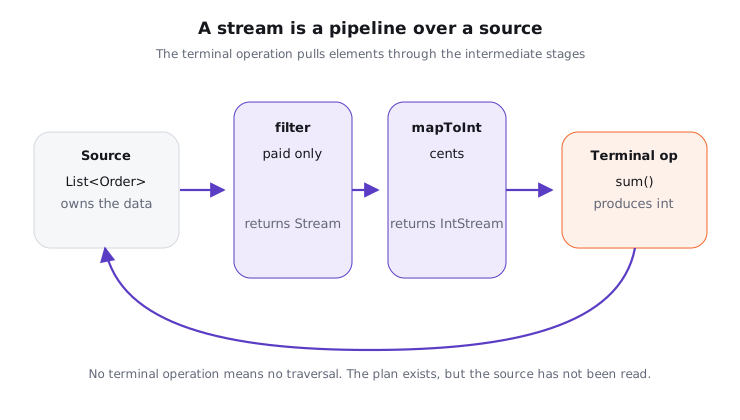
Notice three things. The source owns the data. The intermediate stages describe transformations. The terminal operation is the thing that pulls, counts, collects or performs side effects.
A stream may also be unbounded. Stream.generate(UUID::randomUUID) can keep producing values forever, so you normally pair it with limit, findFirst, anyMatch or another short-circuiting terminal operation. We cover infinite sources more deeply in Infinite streams with iterate and generate.
02Stream basics under the hood: build a pipeline
Try it yourself first
Before reading the code, say out loud which line creates the stream, which lines only describe work, and which line makes the work happen.
import java.util.List;

record Order(String id, String customerId, int cents, boolean paid) { }

final class StreamShapeDemo {
    public static void main(String[] args) {
        List<Order> orders = List.of(
                new Order("o-1", "c-1", 1200, true),
                new Order("o-2", "c-2", 800, false),
                new Order("o-3", "c-1", 300, true)
        );

        int paidCents = orders.stream()                 // source
                .filter(Order::paid)                    // intermediate
                .mapToInt(Order::cents)                 // intermediate
                .sum();                                 // terminal

        System.out.println(paidCents); // 1500
    }
}
Notice what did not happen. filter did not create a new List<Order>. mapToInt did not eagerly create an array of ints. The traversal happened when sum() asked the pipeline for elements.
This is the first correction I make in interviews: a stream has no storage of its own. Some operations may buffer internally, for example sorted, but that buffer belongs to pipeline execution, not to the stream as a reusable container.
Streams are also one-shot. Once a terminal operation has consumed the pipeline, the stream is considered operated upon or closed.
import java.util.List;
import java.util.stream.Stream;

final class OneShotStreamDemo {
    public static void main(String[] args) {
        Stream<String> statuses = List.of("paid", "refunded", "paid").stream();

        long paid = statuses.filter("paid"::equals).count();
        System.out.println(paid); // 2

        // statuses.count(); // IllegalStateException: stream has already been operated upon or closed
    }
}
The safe default is to store the source, not the stream. If you need the same calculation twice, call orders.stream() twice or extract a method that creates the pipeline from the source.
03Every common way to create a stream
The creation API is broad because Java code has many sources: collections, arrays, files, strings, regular expressions, ranges and custom iterables. You do not need to memorize every overload, but you should know the families.
Common stream sources include collections, arrays, factories, ranges, files, strings, regex splits, iterables, builders and generated sequences
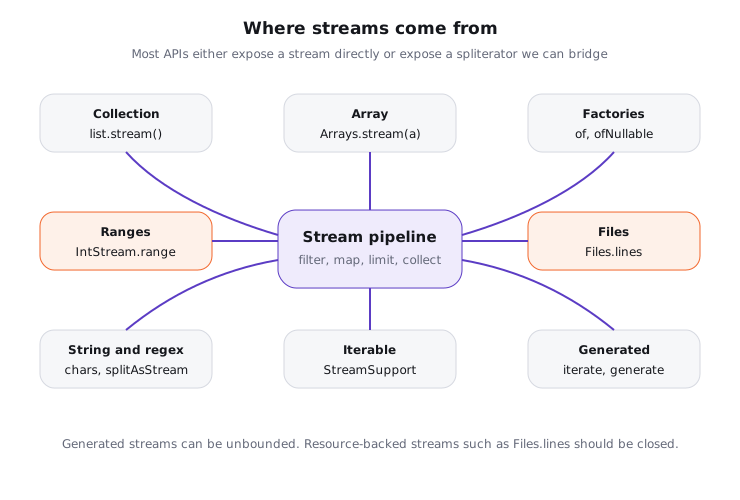
Here is the quick map I keep in my head.
| Source | Stream API | Use it when |
|---|---|---|
Collection<T> |
collection.stream() |
You already have a List, Set or other collection |
| Array | Arrays.stream(array) |
You have an array and want all or a slice |
| Values | Stream.of(a, b, c) |
You have a small fixed set of references |
| Nullable value | Stream.ofNullable(value) |
Since Java 9, turn null into an empty stream |
| Integer range | IntStream.range(0, n) or rangeClosed(1, n) |
You need indices or numeric loops |
| File lines | Files.lines(path) |
You need a lazy line stream that must be closed |
| String characters | text.chars() or codePoints() |
You need an IntStream of UTF-16 chars or Unicode code points |
| Regex split | pattern.splitAsStream(text) |
You want lazy tokens from a Pattern |
| Repeated values | Stream.iterate(...), Stream.generate(...) |
You have a sequence or supplier, often paired with limit |
| Manual construction | Stream.builder() |
You append a small number of values conditionally |
Plain Iterable |
StreamSupport.stream(iterable.spliterator(), false) |
You have something iterable but not a Collection |
Try it yourself first
Before reading on, decide which of these sources are finite, which can be unbounded, and which one needs try-with-resources.
import java.io.IOException;
import java.nio.file.Files;
import java.nio.file.Path;
import java.util.Arrays;
import java.util.List;
import java.util.regex.Pattern;
import java.util.stream.IntStream;
import java.util.stream.Stream;

final class StreamCreationDemo {
    public static void main(String[] args) throws IOException {
        List<String> statuses = List.of("paid", "failed", "paid");
        System.out.println(statuses.stream().filter("paid"::equals).count());

        int[] cents = {1200, 800, 300};
        System.out.println(Arrays.stream(cents).sum());

        System.out.println(Stream.of("card", "upi", "wallet").count());
        System.out.println(Stream.ofNullable(null).count());       // since Java 9
        System.out.println(IntStream.range(0, 3).boxed().toList());
        System.out.println("A🙂".codePoints().count());             // 2 code points
        System.out.println(Pattern.compile(",").splitAsStream("a,b,c").toList());
        System.out.println(Stream.iterate(1, n -> n + 1).limit(3).toList());
        System.out.println(Stream.generate(() -> "tick").limit(2).toList());

        Stream.Builder<String> builder = Stream.builder();
        builder.add("created");
        builder.add("paid");
        System.out.println(builder.build().toList());

        Path file = Path.of("stream-creation-demo-orders.txt");
        Files.writeString(file, "o-1\no-2\n");
        try (Stream<String> lines = Files.lines(file)) {
            System.out.println(lines.count());
        }
        Files.deleteIfExists(file);
    }
}
Files.lines is the one that should make you pause. It returns a stream backed by an open file, so use try-with-resources. A collection stream does not need manual closing, but closing is still legal and triggers registered close handlers if there are any.
For String, choose carefully. chars() gives UTF-16 code units, so an emoji outside the Basic Multilingual Plane appears as two char values. codePoints() is usually the safer choice when you mean user-visible Unicode code points. We revisit strings in Stream recipes: indices, last element and strings.
04Iterable to Stream in Java
Iterable is the interface behind the enhanced for loop. It gives you an Iterator, not a stream() method. If the concrete type is a Collection, prefer collection.stream(); if all you have is Iterable<T>, bridge through its Spliterator.
Try it yourself first
Before reading the code, ask yourself why this helper takes Iterable<T> instead of Collection<T>.
import java.util.List;
import java.util.stream.Stream;
import java.util.stream.StreamSupport;

final class IterableToStreamDemo {
    static <T> Stream<T> streamOf(Iterable<T> iterable) {
        return StreamSupport.stream(iterable.spliterator(), false);
    }

    public static void main(String[] args) {
        Iterable<String> ids = List.of("o-1", "o-2", "o-3");

        List<String> upper = streamOf(ids)
                .map(String::toUpperCase)
                .toList();

        System.out.println(upper); // [O-1, O-2, O-3]
    }
}
The second argument to StreamSupport.stream says whether to create a parallel stream. Use false by default. A random Iterable may not split well, and a parallel stream over a poor Spliterator usually adds overhead without useful parallelism.
You'll see this in code review when a library returns Iterable<Row> from a paged API. Converting it to a stream can make filtering and mapping pleasant, but the stream may still be pulling rows from a remote service one page at a time. The stream syntax does not make I/O disappear.
05Advanced: loop rewrite, trade-offs and good defaults
The best stream rewrites keep the business question visible. Here is a realistic loop: count the total paid cents for non-test orders in one region, skipping cancelled orders and ignoring tiny refund adjustments.
Try it yourself first
Before reading the stream version, identify the pipeline stages: reject test data, keep paid orders, keep a region, map to cents, add.
import java.util.List;

record Order(String id, String region, String status, int cents, boolean test) { }

final class LoopVsStreamDemo {
    static int paidCentsLoop(List<Order> orders, String region) {
        int total = 0;
        for (Order order : orders) {
            if (order.test()) continue;
            if (!"PAID".equals(order.status())) continue;
            if (!region.equals(order.region())) continue;
            if (order.cents() <= 0) continue;
            total += order.cents();
        }
        return total;
    }

    static int paidCentsStream(List<Order> orders, String region) {
        return orders.stream()
                .filter(order -> !order.test())
                .filter(order -> "PAID".equals(order.status()))
                .filter(order -> region.equals(order.region()))
                .mapToInt(Order::cents)
                .filter(cents -> cents > 0)
                .sum();
    }

    public static void main(String[] args) {
        List<Order> orders = List.of(
                new Order("o-1", "west", "PAID", 1200, false),
                new Order("o-2", "west", "FAILED", 800, false),
                new Order("o-3", "east", "PAID", 500, false),
                new Order("o-4", "west", "PAID", -100, false),
                new Order("o-5", "west", "PAID", 300, true)
        );

        System.out.println(paidCentsLoop(orders, "west"));
        System.out.println(paidCentsStream(orders, "west"));
    }
}
Both versions print 1200. The stream version is good because the operation is a straight transformation and reduction. The loop version is still good, and sometimes better, when each branch needs logging, metrics, checked exceptions, mutation, or a named reason that will show up in a debugger.
Many candidates convert every loop into a stream to look modern. That is frequently a mistake. The default I recommend is: use a stream when you can name the work as filter, map, flatMap, sort, limit, collect or reduce; use a loop when the work is control flow.
Many candidates describe streams as "faster loops". A sequential stream often has a little more overhead than a tight for loop, especially for tiny lists like 10 or 50 elements. The value is usually clarity and composability, not automatic speed. Parallel streams are a separate decision, covered later in the module.
For 100 in-memory orders, the difference between a loop and a sequential stream is usually below the noise floor of a service request. For 10 million primitive numbers, prefer IntStream, LongStream or DoubleStream over boxed Stream<Integer> to avoid millions of Integer objects and unboxing checks. Honestly, for 50 elements none of this matters; pick the clearer code.
| Situation | Good default | Why |
|---|---|---|
| Transforming and collecting immutable data | Stream | The pipeline reads like the business question |
| Complex branching with logs or reasons | Loop | Named branches are easier to debug |
| Checked exceptions inside the body | Loop | Streams do not handle checked exceptions gracefully |
| Need the first matching value | Stream with findFirst or loop |
Both are fine; prefer readability |
| Index-heavy algorithm | Loop or IntStream.range |
Streams do not expose indices directly |
| Resource-backed source | try-with-resources stream | Close the resource clearly |
06How to say it in the interview
When I ask this question, I'm listening for the mental model: a stream is a one-use pipeline over a source, not a collection. I also want to hear that you know several sources, that intermediate operations are lazy, and that you won't force streams into code where a loop is clearer.
In the interview
"A Java stream is a one-shot pipeline over a source. The source might be a collection, array, file or generator, and the pipeline has intermediate operations that return streams until a terminal operation pulls the data. It doesn't store elements, it may be unbounded, and after a terminal operation you need a new stream. I use streams for readable transformations and reductions; I keep loops when control flow or side effects are the main point."
On the whiteboard
Java streams
- Source -> intermediate ops -> terminal op
- Not storage, not reusable, may be unbounded
- Common sources: collection, array, values, nullable, range, file, string, regex, iterable
Iterablebridge:StreamSupport.stream(iterable.spliterator(), false)- Stream for transformations, loop for control flow