

Arrays and multi-dimensional arrays
Arrays as the JVM sees them: a header, a fixed length and a block of elements, plus covariance, jagged 2D arrays, the Arrays utilities and cache-friendly loops.
On this page
🧱 What is a Java array?
An array is a fixed-length object that holds elements of one type in numbered slots, starting at index 0. new int[1000] gives you one object on the heap with 1,000 int slots, all set to 0, and a length you can read but never change. Multi-dimensional arrays are arrays whose elements are references to other arrays.
For this lesson, we'll treat arrays the way the JVM does: as real objects with a header, a length and a block of elements. That one picture explains default values, why int[] and Integer[] behave so differently, why String[] can throw ArrayStoreException, and why the loop order over a 2D array can change its speed by 10x. We'll finish with the java.util.Arrays methods interviewers like to trip people up on.
Below the line (out of scope)
ArrayListinternals and growth policy belong to the Collections module- Passing arrays to methods follows the same rules as any reference: see Methods and why Java is always pass-by-value
The 30-second answer
Arrays are objects on the heap with a fixed length, zero-initialised elements and runtime bounds checks. An int[] stores values inline in one contiguous block; an Integer[] stores references to separate objects. Arrays are covariant (String[] is an Object[]), so the JVM checks every reference store and can throw ArrayStoreException. A 2D array is an array of row arrays, so rows can have different lengths, and traversing row by row is far more cache-friendly than column by column.
What you’ll learn
- How an array is laid out in memory, and why
int[]andInteger[]differ so much - What array covariance is and when it throws
ArrayStoreException - Why a 2D array is an array of row arrays, and what that means for
clone()and jagged rows - The traps in
Arrays.asList,equalsvsdeepEqualsandbinarySearch - Why row-major traversal is about 10x faster than column-major on large grids
01Picture it first: header, length, elements
Think of an array as a row of numbered lockers bolted to a wall. The row has a label on the end saying what type of item fits and how many lockers there are. You can swap what's inside a locker, but you can't add a locker to the row.
On HotSpot, Java 21, 64-bit with compressed pointers (the default under a 32 GB heap), every array starts with a 16-byte header: an 8-byte mark word (hash code, lock and GC bits), a 4-byte klass pointer to the type ([I for int[]), and a 4-byte length. The elements follow, and the total is padded to a multiple of 8 bytes. The figure below compares four numbers stored as int[] and as Integer[].
An int array stores its values inline after a 16-byte header; an Integer array of the same length stores 4-byte references to separate 16-byte Integer objects elsewhere on the heap
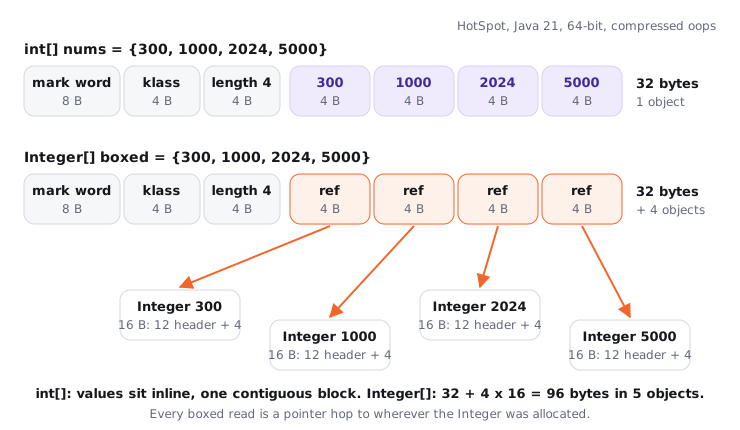
Same length, same values, but the boxed version is three times bigger and spread across five objects. Iterating it means one extra pointer dereference per element, often to a different cache line. Values from -128 to 127 come from the shared Integer cache, so they don't allocate, but they're still a pointer hop away. (Compact object headers, experimental in Java 24 and a product option in Java 25, shrink the header further; the picture above is the Java 21 default.)
02Under the hood: arrays are objects
Try it yourself first
Before reading on, predict each printed line. Two of them surprise most people.
import java.util.Arrays;

public class ArrayBasics {
    public static void main(String[] args) {
        int[] nums = new int[3];
        String[] names = new String[2];
        System.out.println(nums[0] + " " + names[0]);           // 0 null
        System.out.println(nums.getClass().getName());          // [I
        System.out.println(new int[2][2].getClass().getName()); // [[I

        int[] a = {1, 2, 3}, b = {1, 2, 3};
        System.out.println(a.equals(b));         // false
        System.out.println(Arrays.equals(a, b)); // true

        Object[] objs = new String[2];           // compiles: arrays are covariant
        objs[0] = 42;                            // ArrayStoreException: java.lang.Integer
    }
}
Notice four things:
- Default values are the zero of each type:
0,0.0,false,'\u0000'andnullfor references. The JVM zeroes the memory when it allocates, so there's no "uninitialised array element" in Java (unlike locals, which must be assigned before use). - The runtime class names come from the JVM descriptor syntax:
[Iisint[],[Ljava.lang.String;isString[],[[Iisint[][]. Every array type also implementsCloneableandSerializable. - Arrays don't override
equals, soa.equals(b)is the identity checka == b. UseArrays.equalsfor contents. objs[0] = 42compiles because the static type isObject[]. At runtime, theaastoreinstruction checks the store against the array's actual element type (String) and throwsArrayStoreException.
That last point is array covariance: if String is a subtype of Object, then String[] is a subtype of Object[]. It was added in Java 1.0 so methods like Arrays.sort(Object[]) could work before generics existed. The price is a type check on every reference store. Generics fixed this the other way: List<String> is not a List<Object>, so the mistake is caught at compile time. It's also why new List<String>[10] is illegal: the array couldn't check its stores against an erased type.
A few more mechanics worth knowing. length is a final field per JLS §10.7, and the JVM reads it with the arraylength instruction. Every index is bounds-checked, so nums[3] throws ArrayIndexOutOfBoundsException instead of reading neighbouring memory, and the JIT removes the check inside loops it can prove stay in range. Indices are int, so the maximum length is a little under Integer.MAX_VALUE; asking for more gives OutOfMemoryError: Requested array size exceeds VM limit. A negative size throws NegativeArraySizeException.
03Multi-dimensional arrays are jagged
Java has no true 2D array. int[][] is an array whose elements are references to int[] rows. The figure below shows a triangle-shaped array where each row is a separate object with its own length.
A jagged two-dimensional int array: the outer array holds three references, each pointing to a separate int array row of a different length
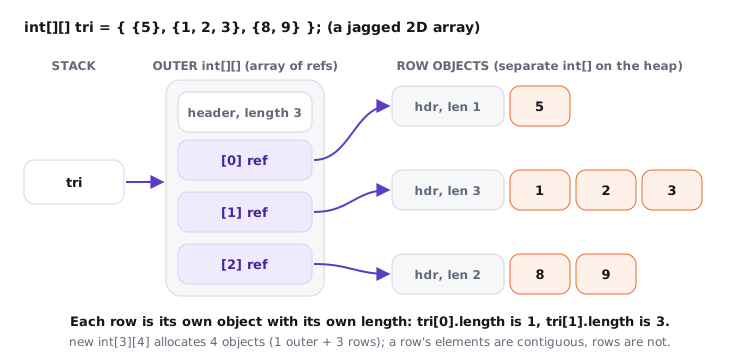
new int[3][4] uses the multianewarray instruction and allocates four objects: the outer array plus three rows of four. new int[3][] allocates only the outer array, with three null rows you fill in yourself. That's how you build triangles, adjacency lists or sparse rows without wasting memory.
Because rows are independent, grid.clone() copies only the outer array: both grids share the same row objects, so writing copy[0][0] = 9 changes grid[0][0] too. To copy deeply, clone each row.
04The Arrays toolbox and its traps
int[] s = {10, 20, 30, 40};
Arrays.binarySearch(s, 30);          // 2
Arrays.binarySearch(s, 25);          // -3, which is -(insertion point 2) - 1
Arrays.copyOf(s, 6);                 // [10, 20, 30, 40, 0, 0], padded with defaults
Arrays.fill(s, 7);                   // [7, 7, 7, 7]

int[][] g1 = {{1}, {2}}, g2 = {{1}, {2}};
Arrays.equals(g1, g2);               // false: compares row references
Arrays.deepEquals(g1, g2);           // true: recurses into rows
Arrays.toString(g1);                 // [[I@<hash>, [I@<hash>]
Arrays.deepToString(g1);             // [[1], [2]]

Arrays.asList(new int[]{1, 2, 3}).size();      // 1: a List<int[]>
List<String> view = Arrays.asList("b", "a");
view.set(0, "z");                    // fine: writes through to the backing array
view.add("q");                       // UnsupportedOperationException: fixed size

int[] o = {1, 2, 3, 4, 5};
System.arraycopy(o, 0, o, 1, 4);     // [1, 1, 2, 3, 4]: overlap handled correctly
The rules behind those lines:
binarySearchassumes a sorted array. On unsorted input the result is undefined, not an exception.Arrays.sort(int[])uses dual-pivot quicksort;Arrays.sort(Object[])uses TimSort, which is stable (equal elements keep their order). Both are O(n log n).Arrays.asListreturns a fixed-size view backed by the array. With a primitive array,Tbecomesint[], so you get a one-element list. UseIntStream.of(arr).boxed().toList()orList.of(1, 2, 3)instead.System.arraycopyis a native intrinsic that behaves as if it copied through a temporary buffer, so overlapping ranges are safe. It also type-checks reference copies and can throwArrayStoreException.Arrays.copyOfandArrayListgrowth are built on it.
Many candidates use Arrays.asList(array) to "convert" an array and then call add, or pass an int[] and wonder why contains(3) is false. Both are frequently mistakes in interviews and in production. Remember the two facts: fixed-size view and no primitives. If you need a growable list, wrap it: new ArrayList<>(Arrays.asList(arr)).
05Real world: memory and cache behaviour
A pattern that shows up again and again in heap dumps: per-user data held as Map<Long, Integer[]> with 1,000 slots per user. Each Integer[1000] is about 4 KB of references plus up to 16 KB of Integer objects, so a million users can cost around 20 GB. The same data as int[1000] is about 4 KB per user, up to 80% less heap and far fewer objects for the GC to trace. When the element type is a primitive and the size is known, a primitive array is the default choice.
The CPU reads memory in 64-byte cache lines, which is 16 ints. Walking a row of an int[] uses every byte of each line it loads, and the hardware prefetcher sees the pattern and fetches ahead. Walking down a column touches one int per row object, so each step can be a cache miss.
static long sumRows(int[][] g) {
    long sum = 0;
    for (int i = 0; i < g.length; i++)
        for (int j = 0; j < g[i].length; j++)
            sum += g[i][j];              // sequential within each row
    return sum;
}

static long sumCols(int[][] g, int cols) {
    long sum = 0;
    for (int j = 0; j < cols; j++)
        for (int i = 0; i < g.length; i++)
            sum += g[i][j];              // jumps to a different row object every step
    return sum;
}
On a 4096 x 4096 int[][] (64 MB), my laptop measures about 6 ms for sumRows and about 70 ms for sumCols, roughly 10x, after JIT warm-up. Exact numbers depend on the CPU and cache sizes, so measure with JMH before quoting your own. The default is clear: put the row index in the outer loop. For large numeric grids, a flat int[rows * cols] indexed as i * cols + j avoids the extra pointer per row as well.
06Advanced: comparison at a glance
| Question | int[] |
Integer[] |
ArrayList<Integer> |
|---|---|---|---|
| Storage | values inline | references to boxes | Object[] of references inside |
| Bytes for 1,000 elements | ~4 KB | ~4 KB + up to 16 KB of boxes | as Integer[], plus spare capacity |
| Default element | 0 |
null |
n/a (size starts at 0) |
| Can grow | no | no | yes, by about 1.5x per resize |
Holds null |
no | yes | yes |
Trade-off and default: start with a primitive array when the size is fixed and the type is numeric. Reach for ArrayList when the size changes or you need the Collections API, and accept the boxing cost until a profiler says otherwise.
07How to say it in the interview
When I ask about arrays, I'm listening for whether you see them as objects with a header and a fixed length, whether you can explain covariance and ArrayStoreException rather than only naming it, and whether you know that a 2D array is an array of arrays. If you can then explain why loop order matters with cache lines, you've moved from syntax to engineering.
In the interview
"In Java an array is a heap object: a header with the type and length, then the elements, zeroed at allocation. A primitive array stores values inline, while an Integer[] stores references to separate boxes, so it's bigger and slower to scan. Arrays are covariant, which is why Object[] o = new String[1]; o[0] = 1; compiles but throws ArrayStoreException at runtime. Multi-dimensional arrays are arrays of row arrays, so rows can be jagged, clone() is shallow, and you should traverse row by row for cache locality. For utilities, I watch for Arrays.asList being a fixed-size view and deepEquals for nested arrays."
Here's how this might look if you sketch it on the whiteboard:
On the whiteboard
Arrays
- object: 16 B header (mark, klass, length) + elements
- defaults: 0 / false / null
- int[] inline vs Integer[] refs to boxes
- covariant: String[] is Object[], store check, ArrayStoreException
- int[][] = array of row refs, jagged OK, clone shallow
- equals vs Arrays.equals vs deepEquals
- asList: fixed-size view, no primitives
- loop rows outer (cache lines, ~10x)