

Reading input and formatting output
System.in, Scanner and BufferedReader, the nextInt() + nextLine() trap, Console for passwords, and the printf specifiers and locale bugs every Java developer meets.
On this page
⌨️ How does a Java program read input and write output?
Every process gets three standard streams: stdin, stdout and stderr. Java exposes them as System.in (an InputStream of raw bytes), System.out and System.err (both PrintStreams). Everything else, Scanner, BufferedReader, printf, is a layer on top that turns bytes into text and numbers into nicely formatted strings.
This topic looks like beginner material, and that's why it catches people. Interviewers ask about it in two settings: as a warm-up ("why does my nextLine() return an empty string?") and in online coding rounds, where reading a million integers with Scanner can be the difference between passing and a time-limit error.
What you’ll learn
- How
System.in,InputStreamReader,BufferedReaderandScannerstack on top of each other - Why
nextInt()followed bynextLine()returns an empty string, and how to fix it - Why
BufferedReaderis several times faster thanScannerfor large input - Reading passwords safely with
Console.readPassword() - The
printfspecifiers to know (%d %s %.2f %n %,d %-10s %05d) and why to passLocale.ROOT - Why
System.outis slow in loops: a locked, auto-flushingPrintStream
For this lesson, we'll focus on the classes you actually use for console I/O, the nextInt() + nextLine() trap, why BufferedReader is several times faster, reading passwords with Console, and the printf format specifiers you should know by heart, including the locale bugs they cause.
Below the line (out of scope)
- Files, NIO channels and
Files.readAllLines: covered in Java I/O & NIO - Logging frameworks (SLF4J, Logback), which is what production code should use instead of
System.out - Character encodings in depth beyond the Java 18 UTF-8 default
The 30-second answer
System.in is a raw byte stream; you wrap it in InputStreamReader to decode characters and BufferedReader to read lines from an 8 KB buffer, or in Scanner for convenient token parsing. Scanner is regex-based and several times slower, and nextInt() leaves the newline behind, so a following nextLine() returns "". For large input I use BufferedReader and parse myself. Console.readPassword() reads without echo and returns a char[]. For output, printf and String.format use specifiers like %d, %s, %.2f, %n, %,d, %-10s and %05d, and they follow the default locale, so I pass Locale.ROOT for machine-readable text. System.out is a locked, auto-flushing PrintStream, so heavy output goes through a StringBuilder or a buffered PrintWriter.
01Picture it first: layers on a byte pipe
Think of stdin as a water pipe carrying bytes. InputStreamReader is the filter that turns bytes into characters using a charset. BufferedReader is a tank that fills 8,192 characters at a time, so you don't open the tap for every drop. Scanner is a different kind of tap: it has its own small tank and a regex engine that hands you one token at a time.
System.in delivers raw bytes; InputStreamReader decodes them and BufferedReader reads whole lines, while Scanner wraps the same stream and tokenizes with regular expressions
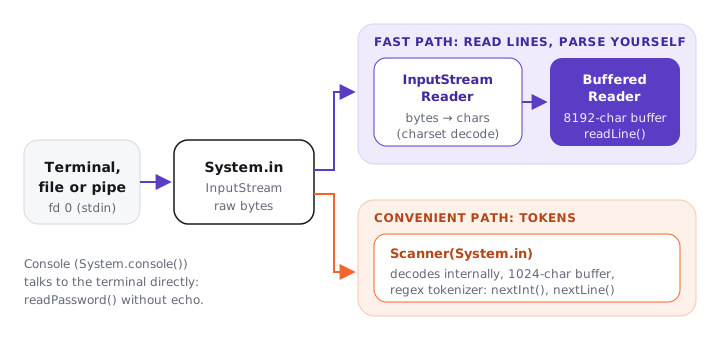
These work together like this: when you call br.readLine(), BufferedReader serves the line from its buffer, and only when the buffer is empty does it ask InputStreamReader for more, which asks System.in, which makes a read system call. Fewer system calls and no regex is where the speed comes from.
02How it works under the hood: Scanner and its famous trap
Try it yourself first
Before reading on: the user types 42, presses Enter, types Alice and presses Enter. What do age and name hold?
Scanner sc = new Scanner(System.in);
System.out.print("Age: ");
int age = sc.nextInt();        // reads "42", leaves "\n" in the buffer
System.out.print("Name: ");
String name = sc.nextLine();   // reads up to that "\n": returns ""
age is 42 and name is the empty string. The program doesn't even wait for the user to type a name. nextInt(), nextDouble() and next() read a token and stop right before the delimiter. nextLine() reads "everything up to the end of the current line", and the current line still has its \n waiting.
Here's how I'd fix it, in order of preference:
// 1. Read whole lines and parse them yourself (no leftover state at all)
int age = Integer.parseInt(sc.nextLine().strip());
String name = sc.nextLine();

// 2. Or consume the rest of the line after a token read
int age2 = sc.nextInt();
sc.nextLine();                 // throw away the leftover "\n"
String name2 = sc.nextLine();
Many candidates fix this by switching every call to next(), which then breaks on names with spaces ("Mary Ann" becomes two tokens). Mixing token reads and line reads is the real problem. Pick one style per input format, and prefer line-based reads.
Two more Scanner details worth knowing: nextInt() throws InputMismatchException (not NumberFormatException) on bad input and does not consume the bad token, so a naive retry loop spins forever; and Scanner parses numbers with the default locale, so in a German locale nextDouble() rejects "1.5" and expects "1,5". Call sc.useLocale(Locale.ROOT) when the input format is fixed.
03BufferedReader for speed
Try it yourself first
Before reading on, guess the ratio: how much faster is BufferedReader than Scanner for reading one million integers?
import java.io.*;
import java.util.*;

public class Main {
    public static void main(String[] args) throws IOException {
        BufferedReader br = new BufferedReader(new InputStreamReader(System.in));
        int n = Integer.parseInt(br.readLine().strip());
        StringTokenizer st = new StringTokenizer(br.readLine());
        long sum = 0;
        for (int i = 0; i < n; i++) {
            sum += Integer.parseInt(st.nextToken());
        }

        // Batch the output too: one write instead of n
        PrintWriter out = new PrintWriter(new BufferedWriter(new OutputStreamWriter(System.out)));
        out.println(sum);
        out.flush();               // forget this and you print nothing
    }
}
On my machine (JDK 26, Apple silicon), reading 1,000,000 integers from a file took about 400 ms with Scanner and 80 to 130 ms with BufferedReader + StringTokenizer, roughly 3 to 5 times faster. The gap comes from Scanner's regex matching on every token and its 1,024-character buffer, versus a plain character scan over an 8,192-character buffer.
StringTokenizer is a legacy class, but it splits on fixed delimiter characters without any regex, which is exactly what you want here. line.split(" ") is also fine (single-char fast path); line.split("\\s+") compiles a regex per call.
In an online judge, default to the BufferedReader + PrintWriter template above. Use Scanner only when the input is tiny and the convenience matters more than time. At this point in a live coding round, it's worth asking the interviewer "how large can the input get?" because the answer decides which one you write.
Console for passwords
Console console = System.console();
if (console == null) {
    throw new IllegalStateException("No interactive console (IDE or redirected input?)");
}
String user = console.readLine("User: ");
char[] password = console.readPassword("Password: ");   // no echo on screen
try {
    authenticate(user, password);
} finally {
    Arrays.fill(password, '\0');                        // wipe it from memory
}
readPassword returns a char[], not a String, so you can overwrite it when you're done. A String would sit in the heap, immutable, until the GC got round to it, and could show up in a heap dump. System.console() can return null when there's no interactive terminal, which is the usual case inside an IDE or when input is piped, so always check it.
04Formatting output with printf and String.format
Try it yourself first
Before reading on, predict each output. Watch the widths and the signs.
System.out.printf("%d items%n", 42);                // "42 items" + platform newline
System.out.printf("%s scored %.2f%n", "Ana", 9.876); // "Ana scored 9.88"   (rounds HALF_UP)
System.out.printf("%,d%n", 1234567);                // "1,234,567"          (grouping)
System.out.printf("|%-10s|%n", "left");             // "|left      |"       (left-justify, width 10)
System.out.printf("|%10s|%n", "right");             // "|     right|"       (right-justify)
System.out.printf("%05d%n", 42);                    // "00042"              (zero-pad)
System.out.printf("%+d %x %b%n", 5, 255, null);     // "+5 ff false"
System.out.printf("%5.1f%%%n", 99.5);               // " 99.5%"   (%% is a literal percent)

String row = String.format("%-12s%8.2f", "Coffee", 3.5);   // same syntax, returns a String
String msg = "%s=%d".formatted("retries", 3);               // Java 15 instance form
The general shape is %[flags][width][.precision]conversion. The ones to know by heart:
| Specifier | Meaning | Example output |
|---|---|---|
%d |
integer | 42 |
%s |
String.valueOf(arg) |
Ana, null |
%.2f |
2 decimal places, HALF_UP | 9.88 |
%n |
platform line separator | \n or \r\n |
%,d |
locale grouping | 1,234,567 |
%-10s |
left-justify in 10 columns | left |
%05d |
zero-pad to 5 digits | 00042 |
%x, %e, %b, %% |
hex, scientific, boolean, literal % |
ff, 1.234568e+04 |
Prefer %n over \n in printf when the output goes to a console or a file read by humans on several platforms. Use \n when a protocol defines the line ending.
The locale gotcha
String.format, printf and formatted all use the default locale (Locale.getDefault(Locale.Category.FORMAT)). Your laptop is probably en_US. A server, a container, or a colleague's machine might not be.
String.format("%.2f", 1.5);                       // "1.50" on en_US
String.format(Locale.GERMANY, "%.2f", 1.5);       // "1,50"
String.format(Locale.FRANCE, "%,d", 1234567);     // "1 234 567" (narrow no-break spaces)
String.format(Locale.forLanguageTag("ar-EG"), "%d", 42);   // "٤٢" (Arabic-Indic digits)

String.format(Locale.ROOT, "%.2f", 1.5);          // "1.50" everywhere
This is a classic production bug: code builds a CSV export, a SQL fragment or a JSON number with String.format("%.2f", price). It works in every test, then a customer in Germany gets "19,99" and the downstream parser splits the CSV row in the wrong place. Rule of thumb: anything a machine reads gets Locale.ROOT, anything a human reads gets the user's locale explicitly.
05Advanced: System.out, System.err and performance
System.out is a PrintStream with auto-flush turned on, and every method takes an internal lock (classically synchronized). That's what makes it safe to call from many threads at once: each println is atomic with respect to the others. It's also what makes it slow in a loop. Every println locks, encodes the text and flushes, which usually means a write system call.
// Slow: 1,000,000 locks + flushes
for (int i = 0; i < 1_000_000; i++) System.out.println(i);

// Fast: build once, write once (or use the buffered PrintWriter shown earlier)
StringBuilder sb = new StringBuilder();
for (int i = 0; i < 1_000_000; i++) sb.append(i).append('\n');
System.out.print(sb);
Printing 1,000,000 lines with System.out.println took 0.8 to 1.7 seconds on my machine, versus about 50 ms through a PrintWriter wrapping a BufferedWriter. That's a 15 to 30 times difference for the same bytes. In a request path, a stray System.out.println also serialises every thread on one lock.
A few more details that come up as follow-ups:
System.erris a separate stream. Output tooutanderrcan interleave in a surprising order in your terminal, because they're flushed independently. Don't rely on their relative order.- Encoding. Since Java 18 (JEP 400) the default charset is UTF-8, so
new InputStreamReader(System.in)decodes UTF-8 by default.System.outitself uses thestdout.encodingproperty, which follows the terminal. When it matters, pass the charset explicitly. - Redirecting.
System.setOut(new PrintStream(...))swaps the stream for the whole JVM. It's handy in tests that capture output, but remember to restore it. - Production code doesn't print. Use a logger: it's asynchronous or buffered, has levels, and doesn't take a global lock on every line.
06How to say it in the interview
When I ask about console I/O, I'm listening for whether you know the cost model, not just the API. Explaining the nextLine trap tells me you've debugged it; mentioning buffering, regex cost and the System.out lock tells me you think about performance; and bringing up Locale.ROOT tells me you've shipped code to real users.
In the interview
"System.in is a raw byte stream. For convenience I'd wrap it in a Scanner, but Scanner is regex-based and nextInt leaves the newline behind, so a following nextLine returns an empty string. For large input I use a BufferedReader over an InputStreamReader, read lines and parse them myself, which is several times faster. For passwords there's Console.readPassword, which returns a char array I can wipe. On output, printf and String.format follow the default locale, so for anything machine-readable I pass Locale.ROOT. And System.out is a locked, auto-flushing PrintStream, so for heavy output I build a StringBuilder or use a buffered PrintWriter and flush once."
On the whiteboard
System.in (bytes) → InputStreamReader (chars) → BufferedReader (8 KB, readLine)
                  → Scanner (1 KB buffer, regex tokens)
nextInt() + nextLine() → "" (leftover \n) → read lines, parse yourself
1M ints: Scanner ~400 ms vs BufferedReader ~100 ms
Console.readPassword() → char[] → Arrays.fill after use; console may be null
%d %s %.2f %n %,d %-10s %05d %x %%
format/printf use default locale → Locale.ROOT for machines
System.out: locked + autoflush → StringBuilder / PrintWriter + flush()