

Your first Java program and the main() method
Hello World line by line: why main is public static void, what breaks when the signature changes, how arguments and exit codes work, and the compact main of Java 25.
On this page
🚪 What is the main() method?
main is the entry point: the one method the java launcher looks for and calls to start your program. In Java 21 it must be public static void main(String[] args), and the launcher finds it by name and signature, not by position in the file. Run java Greet Ada 3 and the launcher calls Greet.main with an array of two strings, "Ada" and "3".
For this lesson, we'll read Hello World line by line, explain every keyword in the main signature, see exactly what breaks when you change it, and then cover arguments, exit codes, and the newer, shorter forms of main that arrived as a preview in Java 21 and became final in Java 25. Interviewers like "why is main static?" because it checks whether you understand how the JVM starts a program, not only the syntax.
Below the line (out of scope)
- Class loading and bytecode (see From source to bytecode to running program)
- Reading console input with
Scanner(see Reading input and formatting output) - Packaging, JAR manifests and modules in depth
The 30-second answer
The launcher calls public static void main(String[] args). It's public so code outside the class can call it, static so the JVM can call it without creating an object first, void because the exit status comes from System.exit or from how the program ends, and String[] args carries the command-line arguments. A wrong signature still compiles but fails at launch. Since Java 25 (preview in 21 to 24), you can also write an instance void main() in a compact source file with no class declaration.
What you’ll learn
- Why
mainis public, static and void, and whatString[] argsreally contains - What happens at launch when the
mainsignature is wrong (it still compiles) - How exit codes work:
System.exit, uncaught exceptions, shutdown hooks andfinally - How to choose between several classes with
mainwhen launching - Instance main methods and compact source files: preview in Java 21 to 24, final in Java 25 (JEP 512)
01Picture it first: the front door
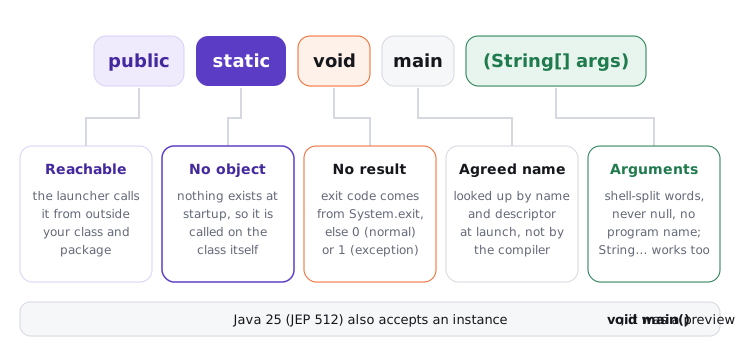
Think of the launcher as a courier with one instruction: "go to the class I named, find the door labelled exactly main, accepting a String[], and knock". If the door is locked (not public), needs a key (an instance, because it isn't static), or has a different label, the courier gives up. Your class may have a hundred other methods; the courier ignores them.
Each word of the signature answers one question the launcher has:
The main signature, keyword by keyword: public so the launcher can reach it, static so no object is needed, void because nothing is returned, main as the agreed name, and a String array for command-line arguments
02Under the hood: Hello World, line by line
Try it yourself first
Before reading on, try to explain every token of this program. Which ones could you remove or rename without breaking java Hello?
public class Hello {
    public static void main(String[] args) {
        System.out.println("Hello, Atlas");
    }
}
public class Hello: declares a class. A public top-level class must live in a file namedHello.java, so the file name is not a free choice.public static void main(String[] args): the entry point. Only the parameter nameargsis free;String... args(varargs) is also accepted, and so isstatic publicor addingfinal.System.out.println(...):Systemis a class injava.lang(imported automatically),outis a staticPrintStreamfield connected to standard output, andprintlnwrites the text plus a line separator.- The braces close the method and the class. There's no
returnstatement and no return value.
When you run java Hello, the launcher starts the JVM, loads and initializes Hello, looks up a method named main with descriptor ([Ljava/lang/String;)V, and invokes it on the main thread. Notice that the lookup happens through reflection at run time, so a signature mistake shows up at launch, not at compile time.
03Why each keyword is there
- public: the launcher calls
mainfrom outside your class and package. In Java 21 a package-privatestatic void maincompiles but the launcher reportsMain method not found. - static: at launch there is no object yet. If
mainwere an instance method, the JVM would have to pick a constructor and decide what to pass it. Making it static removes that question. - void: Java doesn't use the return value of
mainas the exit code (unlikeint mainin C). The status comes fromSystem.exit(n), or is 0 on normal completion and 1 after an uncaught exception. - String[] args: the arguments after the class name, already split by your shell. Unlike C's
argv, there's no program name at index 0, andargsis nevernull: with no arguments it's an empty array.
Here's what happens when the signature drifts, measured on JDK 21:
| You wrote | Compiles? | java on Java 21 |
|---|---|---|
public static void main(String[] args) |
Yes | Runs |
public static void main(String... args) |
Yes | Runs (same descriptor) |
public void main(String[] args) |
Yes | Error: Main method is not static in class X |
public static int main(String[] args) |
Yes | Error: Main method must return a value of type void |
public static void main() |
Yes | Error: Main method not found in class X |
static void main(String[] args) |
Yes | Error: Main method not found in class X |
Every failing row exits with status 1. All of them compile, because to javac it's an ordinary method; only the launcher cares.
04Arguments and exit codes
Try it yourself first
Predict the output and the exit status of java Greet.java "Ada Lovelace" 2, then of java Greet.java with no arguments, then of java Greet.java Ada two.
public class Greet {
    public static void main(String[] args) {
        if (args.length < 2) {
            System.err.println("usage: java Greet <name> <times>");
            System.exit(2);
        }
        String name = args[0];
        int times = Integer.parseInt(args[1]);
        for (int i = 0; i < times; i++) {
            System.out.println("Hello, " + name);
        }
    }
}
The first run prints Hello, Ada Lovelace twice and exits 0: the quotes made one argument out of two words, and they never reach Java. The second prints the usage line to standard error and exits 2. The third throws NumberFormatException: For input string: "two", prints the stack trace and exits 1. Every argument arrives as a String; converting it is your job.
System.exit(status) starts JVM shutdown and never returns. Registered shutdown hooks run, but finally blocks around the call do not, which surprises people:
public class Exit {
    public static void main(String[] args) {
        Runtime.getRuntime().addShutdownHook(new Thread(() -> System.out.println("hook runs")));
        try {
            System.out.println("about to exit");
            System.exit(3);
        } finally {
            System.out.println("finally runs?");   // never printed
        }
    }
}
It prints about to exit, then hook runs, and echo $? shows 3. On Unix-like systems only the low 8 bits survive, so System.exit(256) reports 0 and System.exit(-1) reports 255. Also note that returning from main doesn't end the program if other non-daemon threads are still running; the JVM waits for them.
Exit codes are an API. Shell scripts, CI pipelines and Kubernetes all read them: a batch job that catches every exception and returns normally reports 0, and the pipeline happily marks a failed run green. The opposite bug is a library calling System.exit inside a web server, which takes the whole process down. My rule: only the outermost main decides the exit code; everything else throws.
05Multiple classes, multiple mains
A file may contain several top-level classes (only one can be public), and each compiles to its own .class file. Any of them may declare main, and you choose the entry point at launch: java -cp app.jar com.acme.Admin or java -cp app.jar com.acme.Server. With java -jar app.jar, the Main-Class attribute in the JAR manifest makes that choice. You can also overload main with other parameter lists; the launcher only ever picks the String[] version (on Java 21).
06Advanced: instance main methods and compact source files
Java 21 shipped JEP 445 as a preview feature, aimed at making the first program shorter. It continued as a preview in Java 22 (JEP 463), 23 (JEP 477) and 24 (JEP 495), and became final in Java 25 with JEP 512, "Compact Source Files and Instance Main Methods". Two ideas:
- Instance main methods:
maincan be non-static, non-public (anything exceptprivate), and may dropString[] args. The launcher creates an instance with the no-argument constructor and calls it. - Compact source files: a file can contain methods and fields with no class declaration. The compiler wraps them in an implicitly declared, final class you can't reference by name.
// Hi.java: Java 25, or Java 21 with --enable-preview --source 21
void main() {
    System.out.println("Hello from a compact source file");
}
On Java 21, java Hi.java fails with unnamed classes are a preview feature and are disabled by default; java --enable-preview --source 21 Hi.java runs it with a preview warning. On Java 25 java Hi.java runs as-is. Java 25 also adds java.lang.IO, so IO.println("Hi") works, and compact source files automatically import every public class in the java.base module.
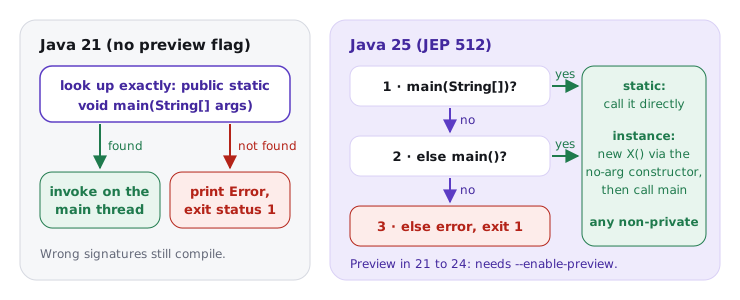
When a class has several candidates, Java 25 picks main(String[]) before main(), and calls a static one directly or an instance one on a fresh object. The flow below compares the classic Java 21 lookup with the Java 25 launch protocol:
On Java 21 the launcher accepts only a public static main taking a String array; on Java 25 it tries main with a String array, then main with no parameters, calling a static method directly or creating an instance first
The classic signature still works everywhere and is what you'll see in every production codebase.
Many candidates say "main must be public static void, or it won't compile". Two errors in one sentence: a wrong main compiles fine and fails at launch, and since Java 25 an instance void main() is legal. If the interviewer asks about Java 21 specifically, flag that the short form is a preview there and needs --enable-preview. Precise version numbers are what make this answer land.
java Hello.java compiles in memory on every run, which costs a few hundred milliseconds of javac time on top of normal JVM startup. That's fine for scripts and learning; for anything run repeatedly, compile once and run the .class or JAR.
07How to say it in the interview
When I ask "why is main static?", I'm listening for the launch-time reason (no object exists yet), for knowing that the signature is checked by the launcher rather than the compiler, and for whether you mention exit codes correctly. Candidates who add the Java 21 preview and Java 25 final story, with the right numbers, stand out.
In the interview
"The launcher looks up public static void main with a String array by name. It's public so the launcher can reach it, static because there's no instance at startup, and void because the exit status comes from System.exit, or 0 on normal completion and 1 after an uncaught exception. A different signature still compiles, but java reports that main wasn't found or isn't static. Since Java 25, after previews in 21 through 24, you can also write an instance void main in a compact source file, and the launcher creates the object for you."
On the whiteboard
public static void main(String[] args)
- public: launcher calls from outside
- static: no object at startup
- void: exit code via System.exit / 0 / 1
- args: shell-split, never null, no program name
- wrong signature: compiles, fails at launch
- System.exit: hooks run, finally doesn't
- instance
void main(): preview 21-24, final 25 (JEP 512)