

JDK, JRE and JVM explained
Three acronyms, one picture: what you install, what runs your program, what actually executes the bytecode, and how jlink replaced the separate JRE.
On this page
☕ What are the JDK, JRE and JVM?
Three nested layers of the same platform. The JVM is the engine that runs Java bytecode. The JRE is the JVM plus the standard class library, everything you need to run a Java program. The JDK is the JRE plus developer tools like javac, jshell and jcmd, everything you need to build one. On a typical JDK 21 install that is about 69 modules of library code wrapped around a single java launcher.
For this lesson, we'll focus on what each layer contains, what it does when you type java Hello, and how the picture changed after Java 9 and Java 11. It sounds like trivia, and it's usually the first warm-up question in a Java interview. A crisp answer sets the tone, and the JVM is the thing we'll keep coming back to for the rest of this course, so let's get the picture straight now.
Below the line (out of scope)
- Class loading, bytecode and the JIT in detail (that's From source to bytecode to running program)
- The
mainmethod and the launcher rules (see Your first Java program and the main() method) - Garbage collectors and JVM memory tuning
The 30-second answer
The JVM executes bytecode: it loads classes, verifies them, interprets them and JIT-compiles the hot parts to machine code. The JRE is the JVM plus the standard class library: everything needed to run Java. The JDK is the JRE plus tools like javac, jar, jshell and jcmd: everything needed to build and diagnose Java. Since Java 11 there is no separate JRE download; you install a JDK, or build a trimmed runtime with jlink.
What you’ll learn
- The difference between the JDK, the JRE and the JVM, and what lives inside each
- Which compiler does what:
javac(source to bytecode) versus the JIT (bytecode to machine code) - Why there is no separate JRE since Java 11, and how to build a custom runtime with
jlink - How HotSpot differs from other JVMs such as OpenJ9 and GraalVM, and from JDK distributions
- Why "write once, run anywhere" works, and where it doesn't
01Picture it first: three boxes
Think of a restaurant. The JVM is the stove: it does the actual cooking. The JRE is the stove plus a stocked pantry (the class library), enough to serve meals someone else wrote the recipes for. The JDK is the whole kitchen, including the knives and the recipe-writing desk (javac, javadoc, the profilers) you need to create new dishes.
The three are nested, like boxes inside boxes:
The JDK contains developer tools and the JRE; the JRE contains the class library and the JVM
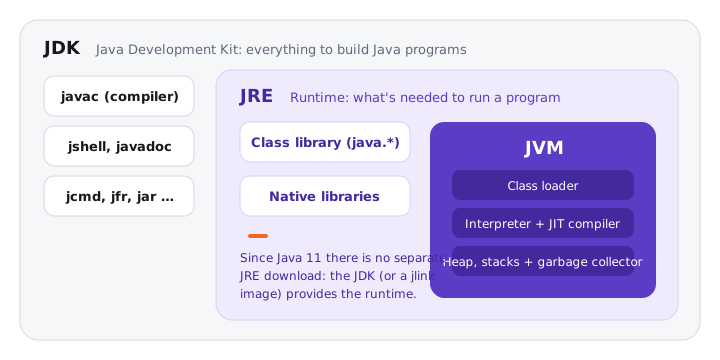
If you remember nothing else, remember this: JDK ⊃ JRE ⊃ JVM. Every tool you use to build software lives in the outer ring, and only the inner box ever executes your code.
02Under the hood: who does what when you run a program
Try it yourself first
Before reading on, try to say out loud what happens between typing java Hello and seeing output on the screen. Which tool produces which file, and which layer reads it?
Here's the smallest program that touches all three layers:
public class Hello {
    public static void main(String[] args) {
        System.out.println("Hello, Atlas");
    }
}
javac Hello.java      # JDK tool: source -> bytecode (Hello.class, 416 bytes on JDK 21)
java Hello            # launcher starts the JVM, which loads and runs Hello.class
java -version         # ask which VM you are actually running
On my machine, the last command prints OpenJDK 64-Bit Server VM (build 21.0.12, mixed mode, sharing). That one line tells you a lot: the VM is HotSpot's Server VM, "mixed mode" means it both interprets and JIT-compiles, and "sharing" means Class Data Sharing is on, so core classes are mapped from a pre-built archive instead of being parsed again at every start.
Notice three things:
javacis a JDK tool. It produces bytecode, instructions for an abstract machine, not machine code for your CPU.javais a small native launcher. It finds a JVM library (libjvm), creates the VM, and asks it to loadHello.System.out.printlnis not part of the JVM. It's library code in thejava.basemodule, which is the "JRE" part of the picture.
Inside the JVM box there are three moving parts: the class loader subsystem (finds .class bytes), the runtime data areas (heap, one stack per thread, metaspace for class metadata) and the execution engine (interpreter, JIT, garbage collector). We open each of these up in the next lesson.
"The JVM" is two things. It's a specification (the Java Virtual Machine Specification, which defines the class file format and every bytecode instruction) and it's an implementation of that spec, such as HotSpot. Saying which one you mean is a small detail that sounds senior.
03Why "write once, run anywhere" works, and where it doesn't
The same Hello.class runs on Linux, macOS and Windows because each platform has its own JVM that understands the same bytecode. The platform-specific work moved out of your code and into the JVM, which is itself a native program compiled separately for each OS and CPU. That's why you download a different JDK for linux-x64, macos-aarch64 and windows-x64, but ship the same JAR to all of them.
It's really "run anywhere there's a compatible JVM". Two limits matter in practice:
- Version. Bytecode carries a class-file version (65 for Java 21). An older JVM refuses newer bytecode with
UnsupportedClassVersionError. Compile withjavac --release 17if you must run on Java 17. - The world outside the JVM. Native libraries loaded through JNI, file path separators, line endings and default charsets (UTF-8 by default only since Java 18) can still differ per platform.
04Real world: where did the JRE go?
Up to Java 8, Oracle shipped two downloads: a JRE for end users and a JDK for developers. The JDK even contained a full copy of the JRE in a jre/ folder, and the whole class library lived in one rt.jar file of about 60 MB.
Java 9 changed the layout. The Java Platform Module System split the library into modules (java.base, java.sql, java.desktop and so on), rt.jar was replaced by a compact lib/modules image, and a new tool, jlink, arrived to assemble custom runtimes. Java 11 finished the job: Oracle stopped shipping a separate JRE, and applets and Java Web Start were removed. The intended model today is "the application ships its own runtime".
This is why production Dockerfiles changed around 2019. Teams used to start FROM a JRE base image of 200 to 300 MB. Today the common pattern is a multi-stage build: compile with a full JDK image, run jdeps to find which modules the app uses, jlink a runtime containing only those, and copy it into a small base image. For a service that needs only java.base, the runtime alone drops from roughly 330 MB (a full JDK 21) to under 30 MB.
Here's how I'd build one by hand:
# Which JDK modules does my app need?
jdeps --print-module-deps --ignore-missing-deps target/app.jar
# -> java.base,java.logging,java.sql

# Build a runtime with only those modules
jlink --add-modules java.base,java.logging,java.sql \
      --strip-debug --no-header-files --no-man-pages \
      --compress=zip-6 --output build/runtime

build/runtime/bin/java -jar target/app.jar
The picture below shows what jlink keeps and what it throws away:
jlink copies only the modules your application needs from the full JDK into a small custom runtime with its own java launcher
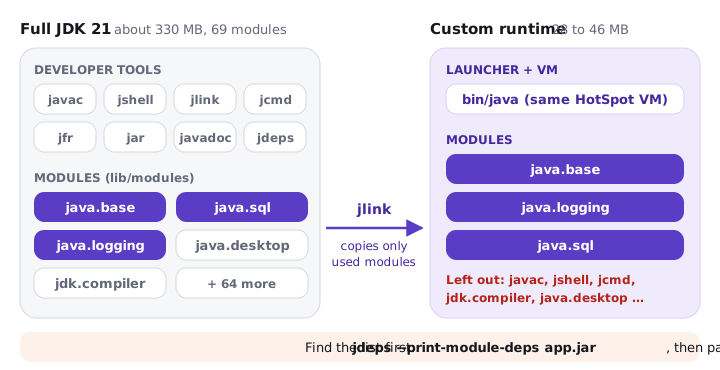
On JDK 21, a java.base-only image measured about 46 MB, and 28 MB with the stripping flags above. There's no javac inside, and that's the point: a production runtime shouldn't carry a compiler.
Try it yourself first
Predict what this prints on a full JDK and on the java.base-only runtime. Which line changes the most?
public class WhereAmI {
    public static void main(String[] args) {
        System.out.println("Java version : " + Runtime.version());
        System.out.println("VM           : " + System.getProperty("java.vm.name"));
        System.out.println("Runtime home : " + System.getProperty("java.home"));
        System.out.println("Modules      : " + ModuleLayer.boot().modules().size());
    }
}
Both runs report the same version and the same OpenJDK 64-Bit Server VM, because jlink copies the real HotSpot VM. Only java.home and the module count differ: 62 boot modules on the full JDK 21, exactly 1 on the trimmed image. Try java WhereAmI.java (source launch) on the trimmed runtime and it fails with Module jdk.compiler not in boot Layer, which is a neat proof that the compiler really is gone.
05Advanced: one spec, many JVMs
Many candidates treat "Java" and "HotSpot" as the same thing. There's a useful distinction between a JVM implementation and a JDK distribution:
- Distributions are builds of OpenJDK with different support policies: Eclipse Temurin, Amazon Corretto, Azul Zulu, Microsoft Build of OpenJDK, Oracle's own builds. Almost all of them run the HotSpot VM, so they behave the same at runtime.
- Implementations are different virtual machines. HotSpot is the reference, with the C1 and C2 JIT compilers and collectors like G1 and ZGC. Eclipse OpenJ9 (from IBM) targets lower memory footprint and faster startup. GraalVM replaces C2 with the Graal compiler written in Java, and its Native Image tool compiles ahead of time into a standalone binary with no JVM at runtime. Azul's Platform Prime ships its own Falcon JIT and pauseless collector.
All of them pass the same compatibility test kit (TCK), so your bytecode means the same thing everywhere. What differs is startup time, peak throughput, memory and tuning flags.
| JDK | JRE | JVM | |
|---|---|---|---|
| Purpose | Build, run and diagnose | Run | Execute bytecode |
| Contains | JRE + javac, jar, jshell, jlink, jcmd, jfr |
JVM + class library (java.base, java.sql, …) |
Class loader, runtime data areas, interpreter, JIT, GC |
| Who needs it | Developers, CI build images | End users (historically) | Every running Java program |
| Separate download today? | Yes, the only one | No, since Java 11 (build one with jlink) |
Bundled in both |
| Defined by | Java SE platform spec + tooling | Java SE platform spec | JVM Specification |
Many candidates say "Java is interpreted" and stop there. That was true in 1996. The JVM starts in the interpreter, profiles the code, and compiles hot methods to native code while the program runs. Others say "the JRE compiles the code", which mixes up javac (a JDK tool, source to bytecode) with the JIT (inside the JVM, bytecode to machine code). Name both compilers and you're past this trap.
The JVM layer is where startup cost lives. A HotSpot "hello world" starts in roughly 40 to 100 ms on a modern laptop, thanks largely to the default CDS archive (on since JDK 12). A GraalVM native image starts in a few milliseconds but gives up runtime JIT optimisation, so long-running services often reach higher peak throughput on HotSpot. Trade-off, then default: start with HotSpot from a mainstream distribution and only move when measured startup or memory is the bottleneck.
06How to say it in the interview
When I ask this, I'm listening for three things: do you get the nesting right without hesitating, do you know which compiler lives where (javac versus the JIT), and do you know that the separate JRE is gone since Java 11. This is where you can show depth by mentioning jlink and naming a second JVM implementation.
In the interview
"The JVM is the runtime that executes bytecode: it loads and verifies classes, interprets them and JIT-compiles the hot paths. The JRE is the JVM plus the standard library, enough to run a program, and the JDK adds the tools to compile, package and diagnose, like javac, jar and jcmd. Since Java 11 there's no separate JRE download, so in production I'd build a trimmed runtime with jlink. And the JVM itself is a specification: HotSpot is the usual implementation, but OpenJ9 and GraalVM run the same bytecode."
Here's how this might look on the whiteboard:
On the whiteboard
JDK ⊃ JRE ⊃ JVM
- JVM: class loader, heap/stacks, interpreter + JIT, GC
- JRE: JVM + class library (java.base …)
- JDK: JRE + javac, jar, jshell, jlink, jcmd
- javac: .java -> .class (bytecode)
- JIT: bytecode -> machine code at runtime
- Java 9: modules, jlink; Java 11: no separate JRE
- HotSpot (reference), OpenJ9, GraalVM