

From source to bytecode to running program
Follow one tiny program from javac to the JIT: the class file, the constant pool, class loaders, linking, initialization and tiered compilation.
On this page
⚙️ What happens between source code and a running program?
A .java file goes through two compilers and one loader before anything runs. javac turns source into bytecode inside a .class file. The JVM then loads, links and initializes that class, and its execution engine interprets the bytecode before the JIT compiles hot methods to native code. A three-line Hello becomes a 416-byte class file that starts with the four bytes CA FE BA BE.
For this lesson, we'll walk one tiny program through every stage and look at the real artifacts: the bytes, the javap listing and the class loaders. Interviewers ask "what happens when you run a Java program?" because it's open-ended: a junior answer stops at "javac then java", and a senior answer keeps going for five minutes. By the end, you'll be able to keep going.
Below the line (out of scope)
- Garbage collection and heap layout
- Writing custom class loaders and bytecode manipulation libraries
- JVM tuning flags beyond the ones named here
The 30-second answer
javac compiles source into platform-neutral bytecode in .class files: a magic number, a version, a constant pool of symbolic references and the method bytecode. java starts the JVM, which loads classes on demand through the bootstrap, platform and application class loaders (parent first), links them (verify, prepare, resolve), initializes them by running static initializers, then executes. Execution starts in the interpreter; hot methods are compiled by C1 and later C2 through tiered compilation.
What you’ll learn
- What
javacputs in a.classfile: the CAFEBABE magic, the version and the constant pool - How to read
javap -coutput and why bytecode is stack-based - How the bootstrap, platform and application class loaders delegate parent first
- What verify, prepare, resolve and initialize each do, and when
<clinit>runs - How the interpreter, C1 and C2 share the work, and what
java Hello.javadoes since Java 11
01Picture it first: two compilers, one pipeline
Think of sheet music. The composer writes the piece (source), a publisher prints it in standard notation (bytecode) that any orchestra can read, and each orchestra performs it on its own instruments (the JVM on your OS and CPU). After a few rehearsals, the musicians stop reading the score for the passages they play most and play them from memory: that's the JIT.
The diagram splits the journey into compile time and runtime:
javac turns Hello.java into Hello.class at compile time; at runtime the JVM loads, links, initializes and executes it, moving hot code from the interpreter to C1 and C2
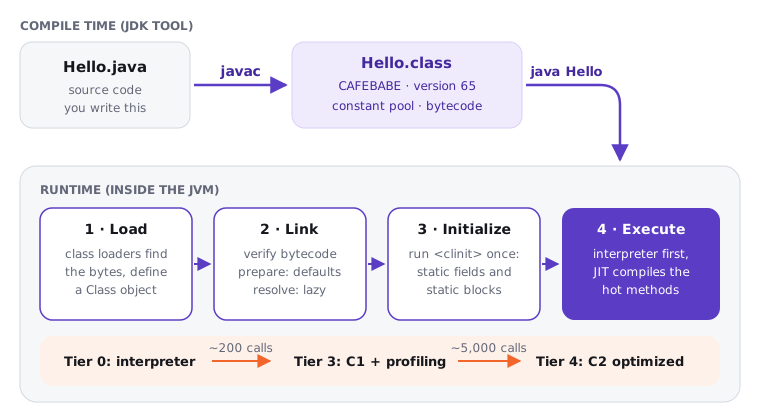
Keep this order in your head: load, link, initialize, execute. Almost every follow-up question maps to one of those four boxes.
02Under the hood: javac and the class file
Try it yourself first
Before reading on, guess what javac produces for System.out.println("Hello, Atlas"). Machine code? A call to a C function? Something else?
public class Hello {
    public static void main(String[] args) {
        System.out.println("Hello, Atlas");
    }
}
Compile it with JDK 21, then disassemble with javap -c Hello:
public class Hello {
  public Hello();
    Code:
       0: aload_0
       1: invokespecial #1   // Method java/lang/Object."<init>":()V
       4: return

  public static void main(java.lang.String[]);
    Code:
       0: getstatic     #7   // Field java/lang/System.out:Ljava/io/PrintStream;
       3: ldc           #13  // String Hello, Atlas
       5: invokevirtual #15  // Method java/io/PrintStream.println:(Ljava/lang/String;)V
       8: return
}
Notice four things:
- A constructor appeared. We never wrote
Hello(), butjavacadded the default constructor that callsObject.<init>. - Bytecode is stack-based.
getstaticpushesSystem.out,ldcpushes the string,invokevirtualpops both and callsprintln. There are no registers. - The
#7,#13,#15are constant pool indexes, not addresses. The class file says "the field namedoutof typePrintStreamin classjava/lang/System" as text. The JVM turns that into a real pointer later, during resolution. - Offsets jump (0, 3, 5, 8) because instructions have different lengths:
getstatictakes a 2-byte operand,ldca 1-byte one.
The file itself has a fixed layout defined in chapter 4 of the JVM Specification. Run xxd Hello.class | head -1 and you'll see cafe babe 0000 0041 001d:
| Bytes | Field | Our value |
|---|---|---|
CA FE BA BE |
magic number | identifies a class file |
00 00 / 00 41 |
minor / major version | 0 / 65 (Java 21; Java 17 is 61, Java 8 is 52) |
00 1D |
constant pool count | 29, meaning 28 entries (indexes start at 1) |
| … | access flags, this class, super class, interfaces | public, Hello, java/lang/Object |
| … | fields, methods, attributes | 0 fields, 2 methods, SourceFile |
javap -v Hello prints the whole constant pool: UTF-8 strings like java/lang/System, Class entries pointing at them, NameAndType pairs, and Fieldref/Methodref entries combining both. That's the symbol table the JVM links against, and it's why one class file can run against any compatible library version.
03Class loading: who finds the bytes
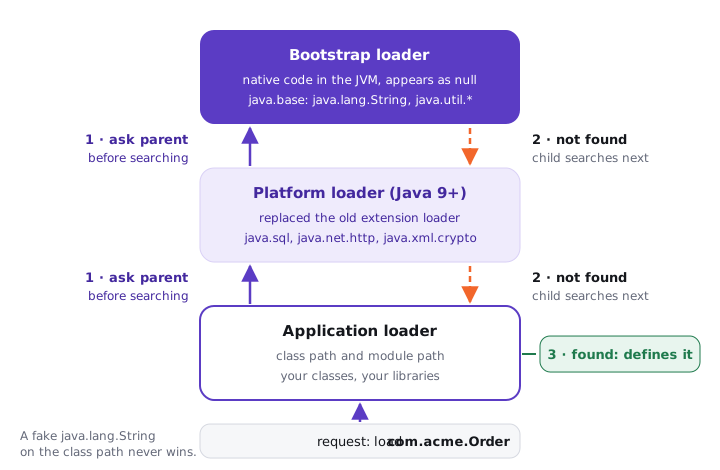
A class is loaded the first time it's needed, not at startup. Three built-in loaders cooperate, and each has a parent:
- Bootstrap loader: native code inside the JVM. Loads
java.baseand other core modules. In Java it shows up asnull. - Platform loader (Java 9+, replaced the old "extension" loader): loads platform modules such as
java.sqlandjava.net.http. - Application loader (also called the system loader): loads your classes and libraries from the class path and module path.
They follow parent-first delegation: asked to load a class, a loader first asks its parent, and only searches its own locations if the parent can't find it. That's how nobody can slip a fake java.lang.String onto the class path.
A load request travels up from the application loader to the platform and bootstrap loaders, and each child searches its own locations only if its parent fails
public class Loaders {
    public static void main(String[] args) {
        System.out.println(String.class.getClassLoader());
        System.out.println(java.sql.Connection.class.getClassLoader());
        System.out.println(Loaders.class.getClassLoader());
        System.out.println(Loaders.class.getClassLoader().getParent());
    }
}
On JDK 21 this prints null, then ...ClassLoaders$PlatformClassLoader@..., then ...ClassLoaders$AppClassLoader@..., then the platform loader again. Since Java 9 the built-in loaders first check which module owns the package and go straight to that module's loader, but the visible effect is the same as classic delegation.
A class's runtime identity is its name plus its defining loader. Two loaders can each define com.acme.Order, and the JVM treats them as unrelated types.
04Linking and initialization
After loading, the class is linked in three steps (JVMS chapter 5):
- Verify: the verifier checks the bytecode is type-safe: no stack underflow, no jumping into the middle of an instruction, no treating an
intas a reference. Since class version 50 it uses theStackMapTableattribute thatjavacemits, so verification is a fast single pass. - Prepare: memory for static fields is allocated and set to default values (
0,false,null). Your initial values are not assigned yet. - Resolve: symbolic references from the constant pool become direct references. HotSpot does this lazily, the first time each instruction runs.
Then comes initialization: the JVM runs the class's <clinit> method, which holds static field initializers and static {} blocks in textual order. It happens exactly once, on first active use (new, a static method call, a non-constant static field access, reflection, or initializing a subclass), and the JVM holds a lock while it runs, so it's thread-safe.
Try it yourself first
Predict the output, line by line, before reading on.
public class InitOrder {
    public static void main(String[] args) {
        System.out.println("main starts");
        System.out.println(Config.LIMIT);
        System.out.println(Config.name);
        System.out.println(Config.name);
    }
}

class Config {
    static final int LIMIT = 10;
    static String name = load();

    static {
        System.out.println("Config initialized");
    }

    static String load() {
        System.out.println("load() runs");
        return "atlas";
    }
}
It prints main starts, 10, load() runs, Config initialized, atlas, atlas. Notice that reading LIMIT did not initialize Config: it's a compile-time constant, so javac copied 10 straight into InitOrder's bytecode (bipush 10). Reading name triggers <clinit>, which runs load() and then the static block in source order, once.
05Execution: interpreter, then tiered JIT
HotSpot starts every method in a template interpreter, which is quick to start but slow per instruction. Meanwhile it counts invocations and loop iterations. Tiered compilation (the default since Java 8) moves hot code up through levels:
| Tier | Who | What it does |
|---|---|---|
| 0 | Interpreter | Runs bytecode, collects counts |
| 3 | C1 with full profiling | Compiles quickly, records types and branch frequencies (after about 200 calls, Tier3InvocationThreshold) |
| 4 | C2 | Aggressive optimisation using the profile: inlining, escape analysis, loop unrolling (after about 5,000 calls, Tier4InvocationThreshold) |
| 1, 2 | C1 variants | Trivial methods, or when C2's queue is busy |
Long-running loops switch to compiled code mid-loop through on-stack replacement (OSR). If an optimistic assumption breaks (say, a second implementation of an interface gets loaded), the JVM deoptimizes back to the interpreter and recompiles later. Run with -XX:+PrintCompilation to watch methods climb the tiers.
06Real world: the shortcut and the failures you'll meet
Since Java 11 (JEP 330) you can skip the explicit javac step for a single file:
java Hello.java                    # compiles in memory, runs, writes no .class file
java --source 21 Hello.java a b    # extra words become args
The launcher compiles the file in memory and runs the first top-level class, which must declare main. Since Java 22 (JEP 458) the source launcher can also pull in other .java files from the same directory tree. It's great for scripts and teaching; real projects still use a build tool.
The two loading failures I see most in production are version and visibility. UnsupportedClassVersionError: class file version 65.0, this version of the Java Runtime only recognizes class file versions up to 61.0 means a library built for Java 21 landed on a Java 17 runtime; fix it with javac --release 17 or upgrade the runtime. The other is ClassCastException: com.acme.Order cannot be cast to com.acme.Order in app servers and plugin systems, which means the same class name was defined by two different loaders.
07Advanced: what candidates miss
Many candidates say the JVM "loads all classes at startup" or "compiles everything to machine code before running". Both are wrong. Loading is lazy and per class, and JIT compilation is selective: most methods in a large service are never compiled at all. Saying "load, link, initialize, on first use" and "interpreter first, C1 then C2 for hot code" is what separates a memorised answer from an understood one.
This pipeline is why Java services have a warm-up curve: the first few thousand requests run partly interpreted while C1 and C2 catch up, and latency can be several times worse than at steady state. The default CDS archive (since JDK 12) cuts class loading cost at startup, and Java 24's AOT class loading and linking (JEP 483) goes further by caching loaded and linked classes from a training run. My default: measure warm-up first, then reach for CDS/AOT caches before tuning JIT thresholds.
08How to say it in the interview
When I ask "what happens when you run a Java program?", I'm listening for the order of the stages, one concrete detail from inside each (constant pool, delegation, <clinit>, tiers), and whether you know laziness is the rule. If you name a production symptom for any stage, you're clearly above the bar.
In the interview
"javac compiles source into bytecode in a class file: magic CAFEBABE, a version, a constant pool of symbolic references, and stack-based bytecode for each method. When I run java, the launcher starts the JVM and the application class loader loads my main class, delegating to the platform and bootstrap loaders first. The class is linked (verified, static fields prepared to defaults, references resolved lazily), then initialized by running its static initializers once. Execution starts in the interpreter, and hot methods are compiled by C1 with profiling and then by C2, which is why Java gets faster after warm-up."
On the whiteboard
.java -> .class -> running
- javac: source -> bytecode (CAFEBABE, v65, constant pool)
- load: bootstrap <- platform <- app (parent first)
- link: verify, prepare (defaults), resolve (lazy)
- init:
once, on first active use - execute: interpreter -> C1 (tier 3) -> C2 (tier 4)
java Hello.java: in-memory compile (Java 11+)