

Primitive types and their sizes
The eight primitives, the exact bits behind them, and the overflow and floating-point surprises that interviewers love to ask about.
On this page
🔢 What are primitive types?
Java has exactly eight primitive types: byte, short, int, long, float, double, char and boolean. A primitive holds a raw value, not a reference to an object, and its size is fixed by the language: an int is 32 bits on every JVM, on every operating system. That fixed size is why Integer.MAX_VALUE + 1 gives you -2147483648 everywhere, instead of a crash or a bigger number.
For this lesson, we'll focus on what each primitive can hold, how the bits are laid out (two's complement for integers, IEEE 754 for floating point) and where primitive values actually live in memory. Interviewers ask about this because it looks like trivia but quietly tests whether you understand overflow, precision and memory, the three things behind a surprising number of production bugs.
Below the line (out of scope)
- Wrapper classes and autoboxing (next lesson: Wrapper classes and autoboxing)
- Casting rules and numeric promotion (Type casting and numeric promotion)
- Object layout in detail (covered in the JVM internals module)
The 30-second answer
Java has eight primitives with sizes fixed by the spec: byte 8 bits, short 16, char 16 (unsigned), int 32, long 64, float 32 and double 64; boolean holds only true/false and its storage size is left to the JVM. Integers are two's complement, so they overflow silently and wrap around; Math.addExact throws instead. float and double are IEEE 754 binary floating point, so 0.1 + 0.2 isn't exactly 0.3 and money belongs in long cents or BigDecimal. Local primitives live in the method's stack frame; primitive fields live inside their object on the heap.
What you’ll learn
- The size and range of all eight primitive types, and why
booleanhas no fixed size - How two's complement makes
Integer.MAX_VALUE + 1wrap, and howMath.addExactstops it - Why
0.1 + 0.2 != 0.3, howNaNand-0.0behave, and what to use for money - Why a
charis a UTF-16 code unit, not a character - Where primitives really live: frame slots for locals, the heap for fields
01Picture it first: the size ladder
Think of primitives as fixed-size boxes on a shelf. Each box has a printed capacity, and the box never stretches: if you pour in more than it holds, the value doesn't spill over into a bigger box, it wraps around (integers) or loses precision (floating point).
The eight primitives drawn as rows of bytes: byte 1, short and char 2, int and float 4, long and double 8, boolean JVM-dependent
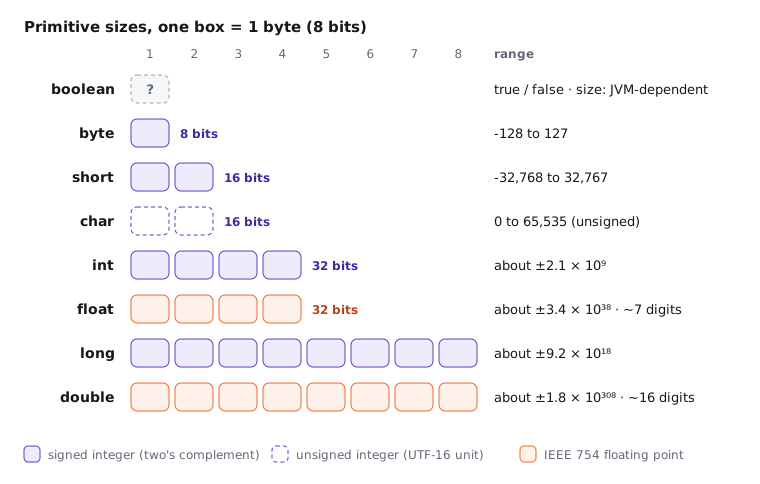
Here's the full table. You don't need every digit memorised, but you should know the sizes cold and the int and long limits roughly ("about 2.1 billion" and "about 9.2 quintillion").
| Type | Bits | Range | Default (fields) | Wrapper |
|---|---|---|---|---|
byte |
8 | -128 to 127 | 0 |
Byte |
short |
16 | -32,768 to 32,767 | 0 |
Short |
char |
16 | 0 to 65,535 ('\u0000' to '\uffff') |
'\u0000' |
Character |
int |
32 | -2,147,483,648 to 2,147,483,647 (about ±2.1 × 10⁹) | 0 |
Integer |
long |
64 | -2⁶³ to 2⁶³ - 1 (about ±9.22 × 10¹⁸) | 0L |
Long |
float |
32 | about ±3.4 × 10³⁸, 6 to 7 significant decimal digits | 0.0f |
Float |
double |
64 | about ±1.8 × 10³⁰⁸, 15 to 16 significant decimal digits | 0.0d |
Double |
boolean |
not specified | true or false |
false |
Boolean |
Notice two things. char is the only unsigned integral type, which is why it can't hold -1. And float has the same 32 bits as int but a far larger range, because it trades exactness for reach: past 2²⁴ (16,777,216) it can no longer represent every whole number.
You can always ask the JDK instead of memorising: Integer.MAX_VALUE, Long.MIN_VALUE, Character.MAX_VALUE, Float.MAX_VALUE and friends. Since Java 8 each wrapper also has a BYTES and SIZE constant (Integer.BYTES == 4).
02Integers are two's complement, so they wrap
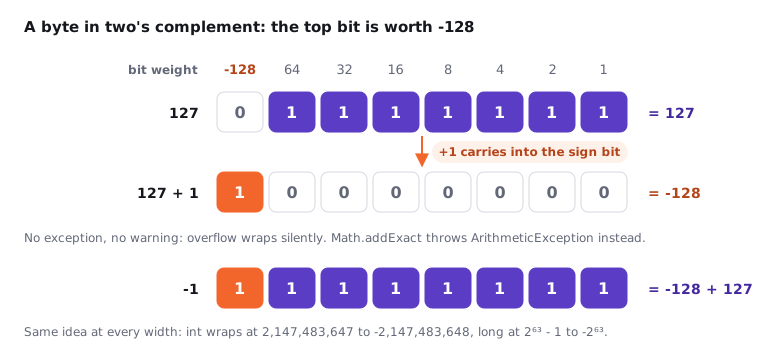
All four signed integer types (byte, short, int, long) store values in two's complement. The trick is that the top bit has a negative weight. In a byte, the bits are worth -128, 64, 32, 16, 8, 4, 2, 1. So 0111 1111 is 127, and adding one carries into the top bit and gives 1000 0000, which is -128.
A byte in two's complement: the top bit weighs -128, so 127 plus 1 carries into the sign bit and becomes -128
Try it yourself first
Before reading on, predict what each line prints. Two of them surprise most people.
System.out.println(Integer.MAX_VALUE + 1);        // ?
System.out.println(Math.abs(Integer.MIN_VALUE));  // ?
byte b = 127;
b++;
System.out.println(b);                            // ?
System.out.println(Math.addExact(Integer.MAX_VALUE, 1)); // ?
Here's what you get:
-2147483648
-2147483648
-128
Exception in thread "main" java.lang.ArithmeticException: integer overflow
Notice three things:
- Integer overflow is silent. No exception, no warning, just a wrapped value. The JLS defines it this way on purpose, because the hardware does it for free.
Math.abs(Integer.MIN_VALUE)is still negative. There's no +2,147,483,648 in anint, so negating the minimum gives the minimum back. UseMath.absExact(Java 15+) if that matters.Math.addExact,subtractExact,multiplyExact,incrementExact,negateExactandtoIntExactthrowArithmeticExceptionon overflow. They're intrinsified by the JIT, so the cost is a single overflow-flag check.
Many candidates are quick to say "use long and you're safe". It's frequently a mistake because the overflow often happens before the value reaches the long: long micros = 24 * 60 * 60 * 1000 * 1000; is computed entirely in int and stores 500654080. Making the first operand 24L fixes it. We dig into why in Type casting and numeric promotion.
One more consequence of two's complement: dividing integers by zero is an error (ArithmeticException: / by zero), because there's no bit pattern that means "infinity" in an int. Floating point is different.
03Floating point is IEEE 754 binary
float and double follow IEEE 754: a sign bit, an exponent and a fraction (8 + 23 bits for float, 11 + 52 for double). The fraction is binary, and most decimal fractions have no exact binary form, the same way 1/3 has no exact decimal form. So 0.1 is stored as the closest representable double, which is very slightly more than 0.1.
Try it yourself first
Predict the output before you run it.
System.out.println(0.1 + 0.2);                 // ?
System.out.println(0.1 + 0.2 == 0.3);          // ?
double nan = 0.0 / 0;
System.out.println(nan == nan);                // ?
System.out.println(Double.valueOf(nan).equals(nan)); // ?
System.out.println(0.0 == -0.0);               // ?
System.out.println(1 / -0.0);                  // ?
System.out.println(Double.compare(0.0, -0.0)); // ?
0.30000000000000004
false
false
true
true
-Infinity
1
Each line teaches one rule:
- Rounding error is normal. Compare doubles with a tolerance (
Math.abs(a - b) < 1e-9) or useBigDecimalwhen you need exact decimal arithmetic. NaNis not equal to anything, including itself.==follows IEEE 754, sonan == nanisfalse. Test withDouble.isNaN(x). ButDouble.equalsandDouble.comparetreat all NaNs as equal, soNaNworks as aHashMapkey.- There are two zeros.
0.0 == -0.0istrue, yet1 / -0.0is-Infinity, andDouble.compare(plusequals) says they differ. That's whyMath.min(0.0, -0.0)carefully returns-0.0. - Floating-point division by zero doesn't throw.
1.0 / 0isInfinity,0.0 / 0isNaN.
Never store money in double. 0.1 + 0.2 is the classic demo, but the real damage is rounding drift across millions of transactions. Use long minor units (cents, paise) or BigDecimal with an explicit RoundingMode.
04char is a UTF-16 code unit, not a character
A char is a 16-bit unsigned integer that holds one UTF-16 code unit. For most text, one code unit is one character, so 'A' is 65 and (char) ('A' + 1) is 'B'. But Unicode has more than 65,536 code points. Anything outside the Basic Multilingual Plane, like most emoji, takes two chars (a surrogate pair).
String s = "😀";
System.out.println(s.length());                       // 2  (UTF-16 code units)
System.out.println(s.codePointCount(0, s.length()));  // 1  (actual code points)
System.out.println('A' + 'B');                        // 131 (char + char is int arithmetic)
System.out.println("" + 'A' + 'B');                   // AB
So charAt(i) can hand you half an emoji. If you're processing user text (names, chat messages), iterate with codePoints() instead of charAt.
Since Java 9, a String may store its text as one byte per character internally (compact strings, JEP 254) when every character fits in Latin-1. That's a storage optimisation inside String. The char type itself is still 16 bits.
05boolean: the size the spec won't give you
The Java Language Specification defines boolean by its values, true and false, and deliberately doesn't give it a size. The JVM specification fills in a few details: there are almost no bytecode instructions for boolean, so locals and operands are treated as int (0 or 1), and boolean[] arrays use the same byte-array instructions as byte[].
In practice, on HotSpot:
- a
booleanfield takes 1 byte in the object layout; - a
boolean[]element takes 1 byte (not 1 bit); - a
booleanlocal variable occupies a full 32-bit slot in the frame, like anint.
If an interviewer asks "how big is a boolean?", the right answer is "it's JVM-dependent; on HotSpot it's 1 byte in fields and arrays and an int-sized slot as a local". If you need dense bits, use java.util.BitSet, which packs 64 flags into each long.
06Where primitives live: stack vs heap
Here's a common half-truth: "primitives live on the stack, objects live on the heap". The accurate version depends on where the variable is declared, not on its type.
class Order {
    long id;          // field: stored inside each Order object, on the heap
    int quantity;     // field: also on the heap, inside the object

    long total(int price) {           // parameter: a slot in the stack frame
        int qty = quantity;           // local: a slot in the stack frame
        long sum = (long) qty * price; // local long: takes two slots
        return sum;
    }
}
- Local variables and parameters of primitive type live in the method's frame, in the local variable array.
int,floatand references take one slot;longanddoubletake two. When the method returns, the frame is gone. - Fields live wherever their object lives, which is the heap. An
intfield inside anOrderis 4 bytes inside that object. - Array elements are always on the heap, because arrays are objects: an
int[1000]is about 4 KB plus a 16-byte header. - Static fields live with the class's static storage, which in HotSpot is also the heap (they sit in the class's
java.lang.Classmirror object).
The JIT can blur this picture in your favour. With escape analysis, if HotSpot proves an object never escapes a method, it can apply scalar replacement: the object is never allocated and its fields become plain locals in registers. HotSpot doesn't "allocate objects on the stack" in the literal sense, and you can't rely on this optimisation, but it's why short-lived small objects are often cheaper than you'd expect.
07Real world: where these limits bite
The most common production overflow I've seen isn't in fancy maths, it's in time. int milliseconds overflow after about 24.8 days (2³¹ ms), so a counter or timeout stored in an int works through every test and breaks in the fourth week of uptime. The same family: int row counts in a table that crosses 2.1 billion rows, and hashCode() % n going negative because the hash was negative (use Math.floorMod).
A few defaults I'd recommend:
| Need | Use | Why |
|---|---|---|
| Counters, IDs, timestamps | long |
int runs out at about 2.1 billion |
| Money | long minor units or BigDecimal |
double can't represent 0.10 exactly |
| Scientific or approximate values | double |
float saves 4 bytes but only gives about 7 digits |
| Large arrays of small values | byte[], short[] |
4× and 2× smaller than int[] |
| Many flags | BitSet or long bit masks |
1 bit per flag instead of 1 byte |
Start with int and double for everyday maths, long for anything that counts or measures time, and only reach for the small types when you're storing millions of values.
08How to say it in the interview
When I ask about primitive types, I'm not checking whether you can recite eight names. I'm listening for three things: do you know overflow is silent, do you know why 0.1 + 0.2 != 0.3, and can you say where a primitive lives without falling back on "primitives go on the stack".
In the interview
"Java has eight primitives with sizes fixed by the spec: byte, short, int, long at 8, 16, 32 and 64 bits in two's complement, char as a 16-bit unsigned UTF-16 code unit, float and double as 32- and 64-bit IEEE 754, and boolean, whose size the JVM decides. Integer overflow wraps silently, so for anything critical I use Math.addExact or a long. Floating point can't represent most decimals exactly, so I keep money in long cents or BigDecimal. Locals sit in the stack frame; fields sit inside their object on the heap, although escape analysis can scalar-replace objects that never escape."
Here's how this might look if you sketch it on the whiteboard:
On the whiteboard
Primitives
- byte 1 · short 2 · char 2 (unsigned) · int 4 · long 8
- float 4 · double 8 (IEEE 754) · boolean: JVM-dependent
- two's complement: MAX + 1 == MIN, silent
- Math.addExact / multiplyExact throw on overflow
- 0.1 + 0.2 != 0.3 · NaN != NaN · 0.0 == -0.0
- money: long cents or BigDecimal
- locals: frame slots · fields: in the object, on the heap
Further reading (7)
- Java Language Specification §4.2: Primitive Types and Values
- Java Virtual Machine Specification §2.3: Primitive Types and Values
- Java Virtual Machine Specification §2.6.1: Local Variables
- Math.addExact; Javadoc
- Double: equality, comparison and NaN; Javadoc
- JEP 254: Compact Strings
- What Every Computer Scientist Should Know About Floating-Point Arithmetic (Goldberg)