

Combining, flattening, zipping and splitting collections
Combining collections, flattening nested structures, zipping by position, joining and splitting strings, chunking lists and choosing forEach variants.
On this page
🧩 What are combining, flattening, zipping and splitting?
These are collection shape-changing operations. Combining appends sources, flattening removes one nesting level, zipping pairs elements by position, and splitting cuts one sequence into smaller parts. Think of paperwork: combining stacks folders together, flattening pulls every page out of folders into one pile, zipping staples page 1 from pile A to page 1 from pile B, and splitting packs the pile into envelopes.
For this lesson, we'll focus on practical Java 21 patterns for combining multiple collections, flattening nested collections and maps, zipping collections even though the JDK has no zip method, joining and splitting strings, joining arrays, and the small but interview-worthy difference between Collection.forEach() and Collection.stream().forEach(). We'll link out instead of repeating deeper material: chunking lists lives in List algorithms, iterator details live in Iterator, ListIterator and every way to iterate, and utility methods live in Collections and Arrays utility methods.
Below the line (out of scope)
- Hash-based dedupe after combining: Set operations
- Choosing
ArrayList,ArrayDequeorLinkedList: Choosing the right collection - Map grouping patterns: grouping and partitioning are covered later in the patterns topic
- Immutable results from streams: Immutable collections
The 30-second answer
To combine collections, create a new result and addAll each source when you want a mutable copy. For two streams, Stream.concat(a.stream(), b.stream()) is readable; for many collections, use Stream.of(a, b, c).flatMap(Collection::stream), not deeply nested Stream.concat, because the javadoc warns that deep concat chains can cause deep call chains or StackOverflowError. To flatten nested lists, use flatMap(List::stream) or mapMulti since Java 16 when you want to push elements without creating many small streams. Java has no built-in zip, so zip indexed lists with IntStream.range(0, Math.min(a.size(), b.size())), and use iterators for non-indexed collections. Join strings with String.join or Collectors.joining, split with split plus trimming or Pattern.splitAsStream, and reach for libraries such as Guava or Apache Commons only when the dependency is already part of the project.
What you’ll learn
- Combine multiple collections with copies,
addAll,Stream.concatandflatMap - Flatten nested
List<List<T>>andMap<K, List<V>>structures withflatMapormapMulti - Implement zip safely in Java even though the JDK has no built-in zip operator
- Join and split strings with
String.join,Collectors.joining,splitandPattern.splitAsStream - Recognize when chunking belongs in the list-algorithms lesson instead of hand-rolled stream tricks
- Explain
Collection.forEach()vsCollection.stream().forEach()without overstating the difference - Call out complexity, memory and
Stream.concatdeep-nesting risks
Interview radar
Asked sometimes: How do you flatten List<List<T>> or zip two lists in Java?
Core follow-up: Why can nested Stream.concat be a bad idea?
Production angle: A CSV import uses split(",") and silently mishandles quoted commas; the real fix is a CSV parser, not a clever regex.
01Picture it first: shapes before methods
The method names are easier once the shapes are clear. Combining keeps the boxes and puts their contents after each other. Flattening removes one box level. Zipping does not append at all; it walks two sources together and emits pairs.
Here's the picture I draw when someone gets tangled in stream syntax.
Flattening turns nested lists into one list, while zipping pairs names and scores by matching indexes and stops at the shorter collection
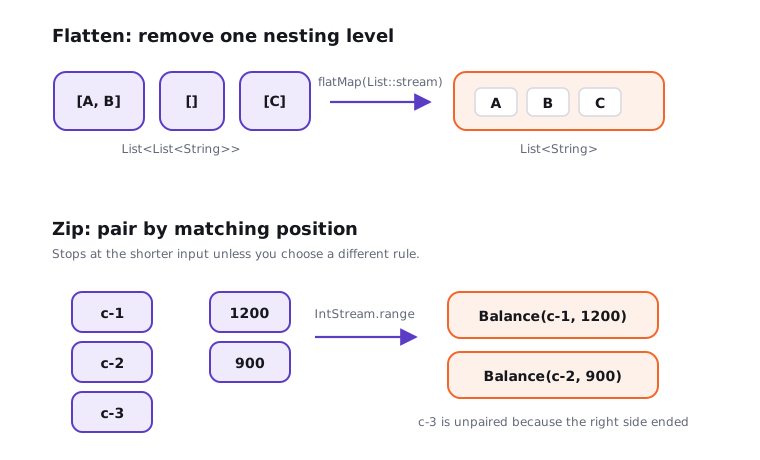
Notice the stop rule for zip: it normally stops at the shorter input. If you need padding, defaults or an error on different sizes, say that rule out loud before coding.
02Combining multiple collections
The most boring version is often the best version. Make a new list, size it if you know the sizes, then addAll in the order you want.
Try it yourself first
Combine web, store and partner orders into one mutable list. Which source lists should change if the result is edited?
import java.util.ArrayList;
import java.util.List;

List<String> web = List.of("W-1", "W-2");
List<String> store = List.of("S-1");
List<String> partner = List.of("P-1", "P-2");

List<String> all = new ArrayList<>(web.size() + store.size() + partner.size());
all.addAll(web);
all.addAll(store);
all.addAll(partner);

all.add("MANUAL-1");
System.out.println(all);                         // [W-1, W-2, S-1, P-1, P-2, MANUAL-1]
The result is a shallow copy of element references. Adding or removing from all does not change web, store or partner, but mutating a mutable element would be visible through both references. That's the same shallow-copy rule covered in Converting between arrays, lists, sets and maps.
For two streams, Stream.concat is readable:
Premium lesson
Keep reading with the Java Pass
The rest of this lesson is part of Java One-Stop Interview Prep: in-depth explanations, diagrams, model answers and how to say them in the interview.
- Flattening nested collections
- Zipping collections
- Join and split arrays and collections
- Collection.forEach() versus stream().forEach()
- Complexity and memory notes
- How to say it in the interview
From ₹199 · one-time payment · No auto-renewal