

Comparable vs Comparator
Natural ordering with Comparable, external ordering with Comparator, comparator chains, sorting stability, sorted collections and priority queues, and contract bugs that break TreeSet and TimSort.
On this page
⚖️ What are Comparable and Comparator?
Comparable is how a class teaches Java its natural order: an Invoice can say "sort me by due date, then id" through compareTo. Comparator is an ordering strategy you pass from the outside: the same invoices can be sorted by customer, amount or risk without changing the class. Think of Comparable as the default filing rule printed inside the form, and Comparator as the temporary instruction sheet you hand to the clerk.
For this lesson, we'll focus on ordering in the Collections module: the compareTo contract, when to use Comparable versus Comparator, safe comparator chains, the sorting APIs, and how TreeMap, TreeSet and PriorityQueue use comparison. We will link to the Core Java comparison lesson for identity and equality, so we do not repeat the whole == / equals story here. Interviewers ask this because a one-line comparator can look harmless while breaking a set, a heap or TimSort in production.
Below the line (out of scope)
- Identity,
equals,hashCode, arrays and the broader object-comparison picture: Comparing objects in Java - Hash-based uniqueness: How HashMap works and How HashSet, LinkedHashSet and TreeSet work
- Sorting maps by values and everyday map patterns: Everyday Map operations
- Tree internals behind sorted maps: TreeMap and red-black trees
The 30-second answer
Use Comparable<T> when a type has one obvious natural order, like String, Integer or an Invoice ordered by id. Its compareTo returns a negative, zero or positive int, and must be antisymmetric, transitive and consistent about ties; it should usually be consistent with equals, or sorted collections behave differently from hash collections. Use Comparator<T> when the caller chooses the order, and build it with Comparator.comparing(...).thenComparing(...), comparingInt, nullsFirst, naturalOrder and reversed. Never write a - b as a comparator because it can overflow; use Integer.compare(a, b). List.sort, Collections.sort and object Arrays.sort are stable TimSort-based sorts, primitive Arrays.sort uses an unstable dual-pivot quicksort, and TreeMap, TreeSet and PriorityQueue all depend on comparison to decide position.
What you’ll learn
- State the **
compareTocontract**: sign, antisymmetry, transitivity and consistent ties - Explain why ordering should usually be **consistent with
equals**, includingBigDecimal("1.0")vsBigDecimal("1.00") - Choose
Comparablefor a class's natural order andComparatorfor external strategies - Build safe comparator chains with
comparing,thenComparing,reversed,nullsFirst,naturalOrderandcomparingInt - Avoid the subtraction-overflow comparator and use
Integer.compareor primitive comparator helpers - Know how
List.sort,Collections.sort,Arrays.sort,parallelSort,TreeMap,TreeSetandPriorityQueueconsume ordering
Interview radar
Asked very often: When would you implement Comparable and when would you pass a Comparator?
Senior rounds probe: BigDecimal scale, subtraction overflow, TimSort's "Comparison method violates its general contract!", and what reversed() reverses in a chain.
Production angle: A bad comparator loses elements from a TreeSet, returns jobs from a PriorityQueue in the wrong order, or fails only when a large production list hits a TimSort invariant.
01Picture it first: one built-in rule, many outside rules
Imagine a company archive. Each employee badge has one official employee number printed on it, so the archive can always file employees by number. That is Comparable: the object carries its default filing rule.
Now imagine the support team asks for employees by last name, finance asks for salary band, and security asks for badge expiry date. Those are Comparators: external strategies that can change per use case without editing the Employee class.
Comparable lives inside the class as the natural order, while Comparator objects live outside and can order the same objects by different keys, then a comparator chain compares customer, amount and id in order
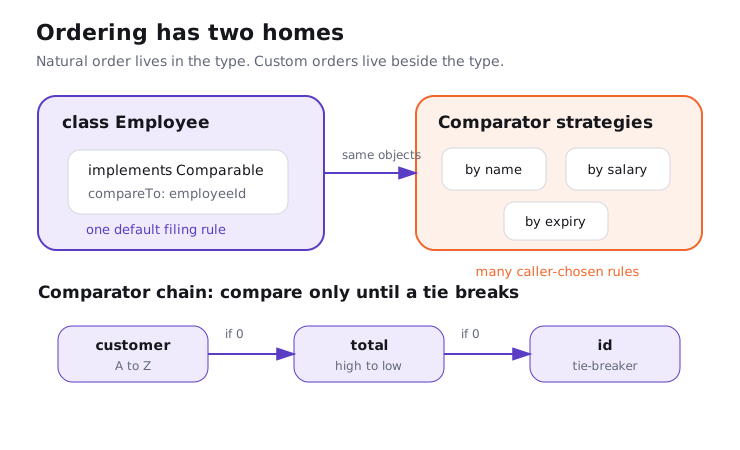
Notice the shape. Comparable answers "how should this type normally be ordered?" once. Comparator answers "how should I order it here?" as many times as you need.
02Natural ordering under the hood
Comparable<T> has one method: int compareTo(T other). The exact magnitude does not matter. Java only reads the sign: negative means this comes before other, zero means they occupy the same ordering slot, and positive means this comes after.
Try it yourself first
Before reading the comments, decide why the id tie-breaker is not optional if this record may go into a TreeSet.
import java.time.LocalDate;

public record Shipment(String id, LocalDate promisedDate, int priority)
        implements Comparable<Shipment> {

    @Override
    public int compareTo(Shipment other) {
        int byDate = promisedDate.compareTo(other.promisedDate);
        if (byDate != 0) return byDate;

        int byPriority = Integer.compare(other.priority, priority); // higher first
        if (byPriority != 0) return byPriority;

        return id.compareTo(other.id); // tie-breaker keeps compareTo aligned with equals
    }
}
Notice three things:
- The method returns by sign, not by distance.
-1,-17andInteger.MIN_VALUEall mean "before". Integer.compareavoids arithmetic overflow and makes the descending priority explicit by swapping the operands.- The final
idcomparison means two different shipments do not compare as0unless all record components are equal.
The Comparable contract is short, but it is not optional. For any x, y and z, antisymmetry means sgn(x.compareTo(y)) == -sgn(y.compareTo(x)); transitivity means x > y and y > z implies x > z; and consistent ties mean if x.compareTo(y) == 0, then x and y compare the same way against every z. The javadoc also strongly recommends consistency with equals: x.compareTo(y) == 0 should mean x.equals(y).
That last rule is where interviews get interesting. It is not required by the compiler, but collections that use ordering treat 0 as "same key" or "same element". If equals says two objects differ but comparison says 0, a sorted collection follows comparison.
The BigDecimal trap, briefly
BigDecimal is the classic exception, and the Core Java lesson covers it in more depth: Comparing objects in Java. Its equals includes scale, so new BigDecimal("1.0") and new BigDecimal("1.00") are not equal. Its compareTo ignores scale for numeric comparison, so they compare as 0.
Try it yourself first
Predict the two sizes. The same two values go through two different definitions of "duplicate".
import java.math.BigDecimal;
import java.util.HashSet;
import java.util.List;
import java.util.Set;
import java.util.TreeSet;

BigDecimal onePointZero = new BigDecimal("1.0");
BigDecimal onePointZeroZero = new BigDecimal("1.00");

Set<BigDecimal> hashSet = new HashSet<>(List.of(onePointZero, onePointZeroZero));
Set<BigDecimal> treeSet = new TreeSet<>(List.of(onePointZero, onePointZeroZero));

System.out.println(hashSet.size()); // 2: hashCode + equals include scale
System.out.println(treeSet.size()); // 1: compareTo says same numeric value
HashSet uses hashCode and equals. TreeSet uses compareTo or the supplied Comparator, and a comparison result of 0 means "already present". That is why I usually normalize BigDecimal values at boundaries if they are keys or set elements, for example with a fixed money scale.
03Comparator as an external strategy
Comparator<T> is a functional interface: int compare(T a, T b). It is what you use when the class has no natural order, when you do not own the class, or when the screen has a different order from the domain default. In real code, you should almost never write the comparison branches yourself.
Try it yourself first
Sort these orders by customer name, then by biggest total first, then put orders with no coupon before coupon orders. Where should reversed() go?
import java.util.ArrayList;
import java.util.Comparator;
import java.util.List;

record Order(String id, String customer, int totalCents, String coupon) {}

List<Order> orders = new ArrayList<>(List.of(
        new Order("o-3", "Ravi", 1200, "FESTIVE"),
        new Order("o-1", "Asha", 1200, null),
        new Order("o-2", "Asha", 900, "WELCOME")));

Comparator<Order> bySupportQueue = Comparator
        .comparing(Order::customer, Comparator.naturalOrder())
        .thenComparing(Comparator.comparingInt(Order::totalCents).reversed())
        .thenComparing(Order::coupon, Comparator.nullsFirst(Comparator.naturalOrder()))
        .thenComparing(Order::id);

orders.sort(bySupportQueue);
System.out.println(orders);
Notice four details:
Comparator.comparing(Order::customer)extracts a key and compares the key with its natural order. The two-argument form lets you pass a key comparator explicitly.thenComparingruns only when the previous step returns0, so the chain reads like a sequence of tie-breakers.comparingIntavoids boxingintkeys intoIntegerobjects during comparison. The same idea exists forlonganddouble.nullsFirstwraps a comparator and says what to do withnullkeys or elements. Without it,naturalOrder()throwsNullPointerExceptionwhen it seesnull.
Here is the catch with reversed(): it reverses the comparator object it is called on. If you write Comparator.comparing(Order::customer).thenComparingInt(Order::totalCents).reversed(), you reverse both customer and total. If only the total should go high to low, reverse only that step, as shown above.
Many candidates write (a, b) -> a.score() - b.score() because it is short. It is also wrong for the full int range. Integer.MIN_VALUE - 1 overflows to a positive number, so the comparator claims the smallest possible int is larger than 1. Use Integer.compare(a.score(), b.score()) or Comparator.comparingInt(Score::value).
import java.util.ArrayList;
import java.util.Comparator;
import java.util.List;

List<Integer> values = new ArrayList<>(List.of(5, Integer.MIN_VALUE, 3));
values.sort((a, b) -> a - b);
System.out.println(values); // [3, 5, -2147483648], wrong

values.sort(Integer::compare);
System.out.println(values); // [-2147483648, 3, 5]
04Sorting in Java: which API does what
Sorting is where Comparable and Comparator meet the library. The simple rule is: pass null or no comparator to use natural order, pass a comparator for caller-chosen order. The more complete answer includes stability and primitive arrays.
| API | Ordering source | Algorithm in Java 21 | Stable? | Notes |
|---|---|---|---|---|
list.sort(comparator) |
comparator or natural order if null |
TimSort via object array | yes | default method on List since Java 8 |
Collections.sort(list) |
natural order or comparator overload | delegates to List.sort |
yes | older wrapper API, still common in interviews |
Arrays.sort(Object[]) |
natural order or comparator overload | TimSort | yes | good for object arrays |
Arrays.sort(int[]) and other primitives |
primitive natural order | Dual-Pivot Quicksort | no | equal primitive values are indistinguishable, so stability usually does not matter |
Arrays.parallelSort(...) |
natural order or comparator overload | parallel sort, object overload stable | object arrays yes | useful for large arrays when fork-join overhead pays off |
Stream.sorted(...) |
natural order or comparator | sorting stage | stable for ordered streams | unordered streams do not promise encounter-order stability |
Stability means equal elements keep their original relative order. If you sort orders by amount and then stably sort by customer, the orders inside each customer group stay amount-sorted. I still prefer one comparator chain over multi-pass sorting in production because it states the intent in one place.
Sorting is O(n log n), so 1,000,000 elements take about 20,000,000 comparisons. If your key extractor boxes an int into an Integer on each comparison, you are creating pressure exactly where the sort is hottest. Prefer comparingInt, comparingLong and comparingDouble for primitive keys.
For maps, remember that a HashMap itself is not sorted by value. The usual pattern is to sort its entrySet() into a list or stream result, which we cover in Everyday Map operations. Use TreeMap when you need keys kept sorted as the map is updated.
I once reviewed a retry scheduler that used (a, b) -> (int) (a.nextRunMillis() - b.nextRunMillis()) for a PriorityQueue. Two jobs more than about 24.8 days apart could compare in the wrong direction because 2^31 milliseconds no longer fits in an int. The queue did not crash; it quietly delayed urgent work behind future work. Comparator.comparingLong(Job::nextRunMillis) fixed the bug and made the intent readable.
05Advanced: sorted collections, heaps and broken contracts
TreeMap and TreeSet are red-black tree structures. They use the natural order of keys/elements unless you pass a comparator at construction time. Every lookup, insertion and removal walks the tree with comparison, so a result of 0 means "same key" in TreeMap and "same element" in TreeSet.
import java.util.Comparator;
import java.util.NavigableSet;
import java.util.TreeSet;

record Task(String id, int priority) {}

NavigableSet<Task> tasks = new TreeSet<>(
        Comparator.comparingInt(Task::priority).reversed()
                  .thenComparing(Task::id));

tasks.add(new Task("index", 10));
tasks.add(new Task("email", 10));
System.out.println(tasks.first()); // Task[id=email, priority=10]
The id tie-breaker matters. If the comparator used only priority, those two tasks would compare as 0, and the second insert would be treated as a duplicate. That is not a TreeSet bug. It is the comparator saying the two tasks occupy the same sorted slot.
PriorityQueue also uses natural order or a comparator, but it is a heap, not a sorted list. peek() and poll() give you the least element according to the comparator, or the greatest if your comparator reverses the order. Iterating the queue does not produce sorted output; it walks the heap array.
import java.util.Comparator;
import java.util.PriorityQueue;

record Incident(String id, int severity) {}

PriorityQueue<Incident> queue = new PriorityQueue<>(
        Comparator.comparingInt(Incident::severity).reversed()
                  .thenComparing(Incident::id));

queue.add(new Incident("db", 3));
queue.add(new Incident("cache", 1));
queue.add(new Incident("api", 3));

while (!queue.isEmpty()) {
    System.out.println(queue.poll()); // api severity 3, db severity 3, cache severity 1
}
The TimSort exception
List.sort and object Arrays.sort use TimSort, a stable merge sort optimized for already partially ordered data. During merging it checks assumptions that rely on comparator transitivity. If a comparator says a < b, b < c and then c < a, TimSort can throw IllegalArgumentException: Comparison method violates its general contract!.
That exception often appears only with enough data and the right shape of runs. A unit test with five elements can pass for months. Then production sorts 50,000 rows where a comparator reads mutable state or uses a non-transitive rule, and the sort fails.
Many candidates describe this as a TimSort bug. It is usually a comparator bug. A comparator must be deterministic for the duration of the sort, must be antisymmetric and transitive, and must treat 0 as a real tie. Random ordering, mutable fields changing during sort, or special cases that do not compose are the usual causes.
Nulls, natural order and default choices
Natural ordering generally does not accept null. TreeSet with natural ordering and List.sort(null) will throw when they need to compare a null element. If nulls are legitimate data, say how they should order.
Comparator<String> names = Comparator.nullsLast(String.CASE_INSENSITIVE_ORDER);
The simple option is natural order: list.sort(null) or new TreeSet<>(). It stops being enough when the domain has more than one useful order, when nulls are allowed, or when equality and order would disagree. My default is to keep Comparable for obvious value types and put business-screen ordering in named comparators.
06How to say it in the interview
When I ask this, I'm listening for five things: you know the sign-based contract, you separate natural order from caller-provided order, you avoid subtraction, you know sorted collections use comparison instead of equals, and you can name which Java sorts are stable. The strong answer also mentions BigDecimal and TimSort's contract exception without turning the answer into a lecture on equals.
In the interview
"Comparable is the natural order built into a type, so I use it only when there is one obvious order. Comparator is an external strategy, so I use it for screen-specific or query-specific ordering, and I build it with comparing, thenComparing and primitive helpers like comparingInt. compareTo and compare return a sign, not a distance, and they must be antisymmetric, transitive and consistent about ties. I try to make ordering consistent with equals because TreeSet and TreeMap treat compare result zero as duplicate, which is why BigDecimal 1.0 and 1.00 behave differently in HashSet and TreeSet. I never subtract in a comparator because it can overflow; I use Integer.compare. For sorting, List.sort, Collections.sort and object Arrays.sort are stable TimSort-based sorts, primitives use an unstable dual-pivot quicksort, and a broken comparator can make TimSort throw a general-contract exception."
On the whiteboard
Comparable<T>
- inside the class: one natural order
- compareTo sign: <0, 0, >0
- contract: antisymmetry, transitivity, consistent ties
- prefer: compareTo == 0 iff equals == true

Comparator<T>
- outside strategy: many orders per type
- comparing / thenComparing / reversed / nullsFirst
- comparingInt/Long/Double avoid boxing
- never a - b, use Integer.compare(a, b)

Collections that compare
- TreeMap/TreeSet: compare == 0 means same key/element
- PriorityQueue: heap order for poll, iterator not sorted
- HashSet: hashCode + equals, so BigDecimal 1.0/1.00 size differs

Sorting
- List.sort, Collections.sort, Arrays.sort(Object[]): stable TimSort
- Arrays.sort(primitives): dual-pivot quicksort, not stable
- parallelSort: large arrays, fork-join overhead
- bad comparator -> "violates its general contract"
Further reading (10)
- Comparable (Java SE 21 API)
- Comparator (Java SE 21 API)
- Collections.sort (Java SE 21 API)
- List.sort (Java SE 21 API)
- Arrays.sort (Java SE 21 API)
- TreeMap (Java SE 21 API)
- PriorityQueue (Java SE 21 API)
- BigDecimal (Java SE 21 API)
- OpenJDK TimSort source
- Effective Java, 3rd ed., Item 14: Consider implementing Comparable